Apple Watch series 8 cellular microphone not working
I am not able to use my microphone for phone calls, texts and Siri.
this is the second series 8 with the same issue.
is this a more widespread issue?
I am not able to use my microphone for phone calls, texts and Siri.
this is the second series 8 with the same issue.
is this a more widespread issue?
Hi AKAdam80,
Have you tried to restart your Apple Watch? Restarting is a simple step, and can sometimes resolve unexpected issues.
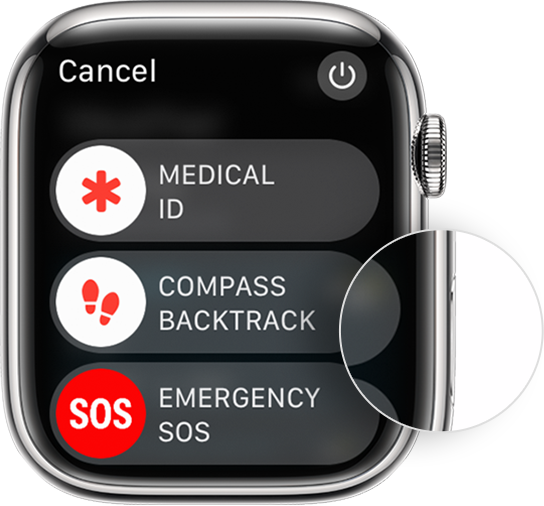
How to restart your Apple Watch if you have watchOS 9
1. If your Apple Watch is charging, take it off the charger.
2. Press and hold the side button until you see the power buttonin the upper-right corner of the display.
3. Tap the power button.
4. Drag the Power Off slider.
5. After your watch turns off, press and hold the side button again until you see the Apple logo.
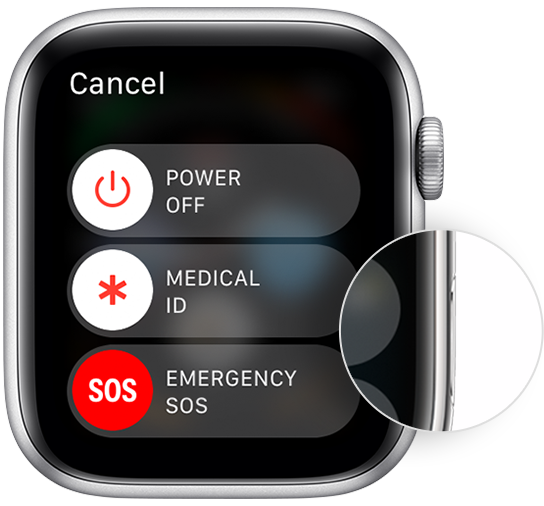
How to restart your Apple Watch if you have watchOS 8 or earlier
1. If your Apple Watch is charging, take it off the charger.
2. Press and hold the side button until you see the Power Off slider.
3. Drag the Power Off slider.
4. After your watch turns off, press and hold the side button again until you see the Apple logo.
Restart your Apple Watch - Apple Support
If you've already done this step, and you're still having the same issue, or it has returned, we'd advise to contact Apple Support.
Have a good day.
Apple Watch series 8 cellular microphone not working