Timer no longer vibrates
Since the last update my timer (where I can set it for 45 sec, etc) no longer vibrates letting me know the time is up. How can I fix this?
Apple Watch SE, watchOS 8
Since the last update my timer (where I can set it for 45 sec, etc) no longer vibrates letting me know the time is up. How can I fix this?
Apple Watch SE, watchOS 8
Hi Swtgracey,
It seems you're trying to make sure your Apple Watch is vibrating when you have a Timer complete and we can help.
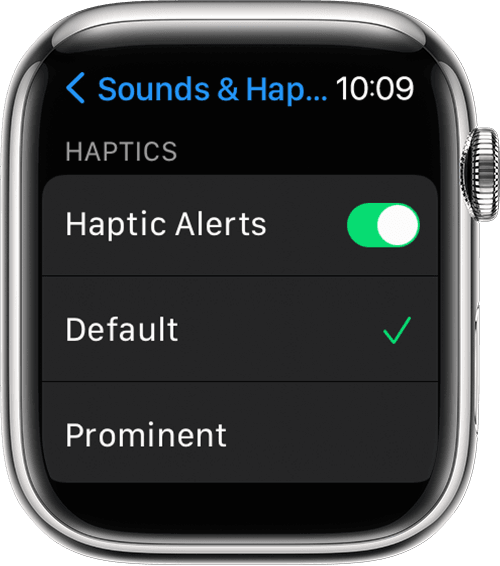
Check out these steps to make sure you have Haptic Alerts enabled:
1. Open the Settings app.
2. Scroll down and tap Sounds & Haptics.
3. Turn Haptic Alerts on or off.
4. To add extra emphasis to haptic alerts, tap Prominent. This feature adds an additional haptic tap that pre-announces some of your other haptic alerts.
Change the audio and notification settings on your Apple Watch
Thanks for using the Apple Support Communities.
Hi Swtgracey,
It seems you're trying to make sure your Apple Watch is vibrating when you have a Timer complete and we can help.
Check out these steps to make sure you have Haptic Alerts enabled:
1. Open the Settings app.
2. Scroll down and tap Sounds & Haptics.
3. Turn Haptic Alerts on or off.
4. To add extra emphasis to haptic alerts, tap Prominent. This feature adds an additional haptic tap that pre-announces some of your other haptic alerts.
Change the audio and notification settings on your Apple Watch
Thanks for using the Apple Support Communities.
Timer no longer vibrates