Howdy Boilerup83,
Thanks for posting in the Apple Support Communities, and congratulations on your new Apple Watch Ultra!
We understand how exciting new features can be, so let's check into this with you. You mentioned the shortcut option isn't appearing, is this when you're setting up the Action Button or is the shortcut not running when you press the Action Button?
If the shortcut isn't running, try setting a different shortcut to test or different action to be sure the Action Button responds correct. For assistance with that, take a look at the following steps found here: Use the Action button on Apple Watch Ultra - Apple Support
How to set up the Action button on your Apple Watch Ultra
1. Open the Settings app on your Apple Watch. You can also do this in the Apple Watch app on your iPhone.
2. Tap Action Button.
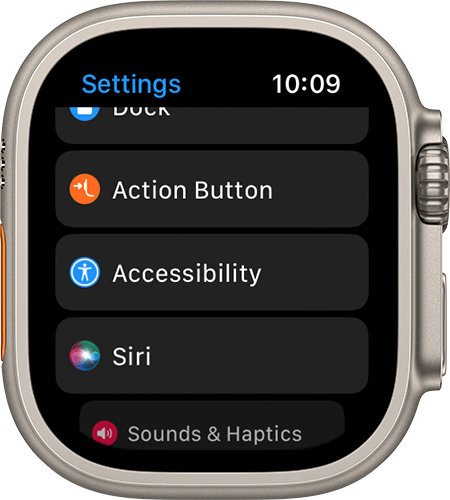
3. Tap the menu under Action, then select what you want the button to launch.

4. Tap the arrow in the top-left corner  to go back to Action Button settings.
5. Tap the menu under App if it appears, then select an app to perform the action. Some actions, such as Flashlight, don't show the App option.
6. Tap the arrow to go back.
7. Tap the menu under First Press if it appears, then select an action. Some features allow different actions to happen on the first and second press of the button.
If you see that other shortcuts or actions work as expected, contact Apple Support directly to check into this with you in more detail.
If we misunderstood, and shortcuts aren't working from your Apple Watch at all, be sure they're set to sync with your iPhone to display the same shortcuts. Take a look at the final section of the following resource to check out those steps: Use shortcuts on Apple Watch Ultra - Apple Support
We hope that's able to help.
Have a great day!



