Beats Studio Buds
How do I turn on ANC for my Beats Studio Buds without music. I thought it was automatic, but ANC does not activate when I put the buds in my ear.
How do I turn on ANC for my Beats Studio Buds without music. I thought it was automatic, but ANC does not activate when I put the buds in my ear.
Hi Rolfei,
It looks like you've had a chance to review: About Beats noise cancellation and noise isolation. If Active noise cancellation isn't working as expected, resetting your Beats may help. Give the steps from this article a try: Reset your Beats Studio Buds.
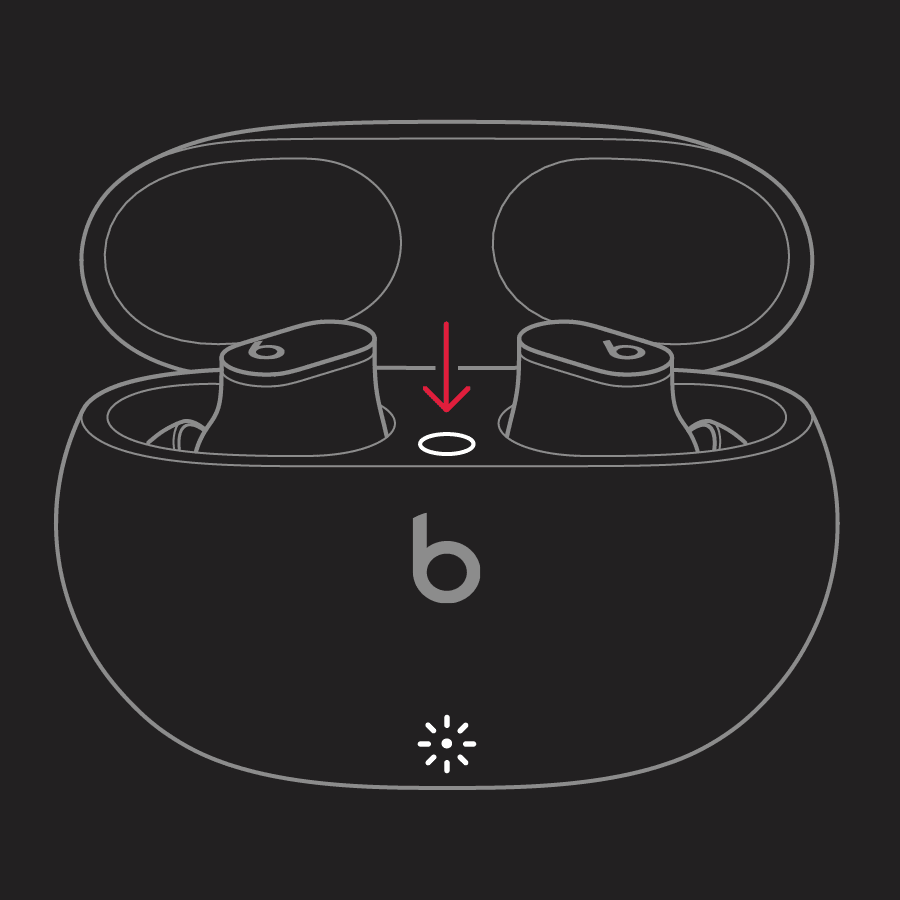
1. Place both earbuds in the charging case. Leave the case open.
2. Press and hold the system button on the case for 15 seconds or until the LED indicator light flashes red and white.
3. Release the system button.
The LED indicator light will continue to flash white, which means that you can pair your Beats Studio Buds with your iPhone, Mac, Android device, or other device again.
If you need more help, reach out to Apple Support directly so they can look into this with you further. They can be contacted here: Get Support, or by calling the most applicable phone number from this list: Contact Apple for support and service.
Best regards.
Beats Studio Buds