Combining the SUBTOTAL function with COUNTIF is not possible?

Hi guys,


I have a filtered set of rows in which I want to count an if statement with the function COUNTIF.

But I can't combine the function SUBTOTAL with the COUNTIF function.


Any ideas on this?

Thanks!

Posted on Oct 23, 2022 12:34 AM

Reply
6 replies

Oct 23, 2022 2:04 AM in response to RubenVDV

It is difficult to give you a good answer without knowing the details.


Will you filter based on the content of the row?

If yes you could try COUNTIFS, this will allow you to count only rows that meet multiple criteria.

Content of this row in column A and content of this row in column B, only if both are met this row will count.


Would be helpful if you could post a screenshot of your table, please remember to remove confidential information.


Ralf

Oct 23, 2022 2:54 PM in response to RubenVDV

Hi RubenVDV,

Hope I got it right.

I created only a small section of your large table to show how it can work.


Please try this

A2=COUNTIFS(Table 4::A,"Bags 5",Table 4::B,">0") or COUNTIFS(Table 4::A;"Bags 5";Table 4::B;">0")

COUNTIFS will only count rows that meet both tests

A: Text in column A = Bags 5

B: Value in column B is >0
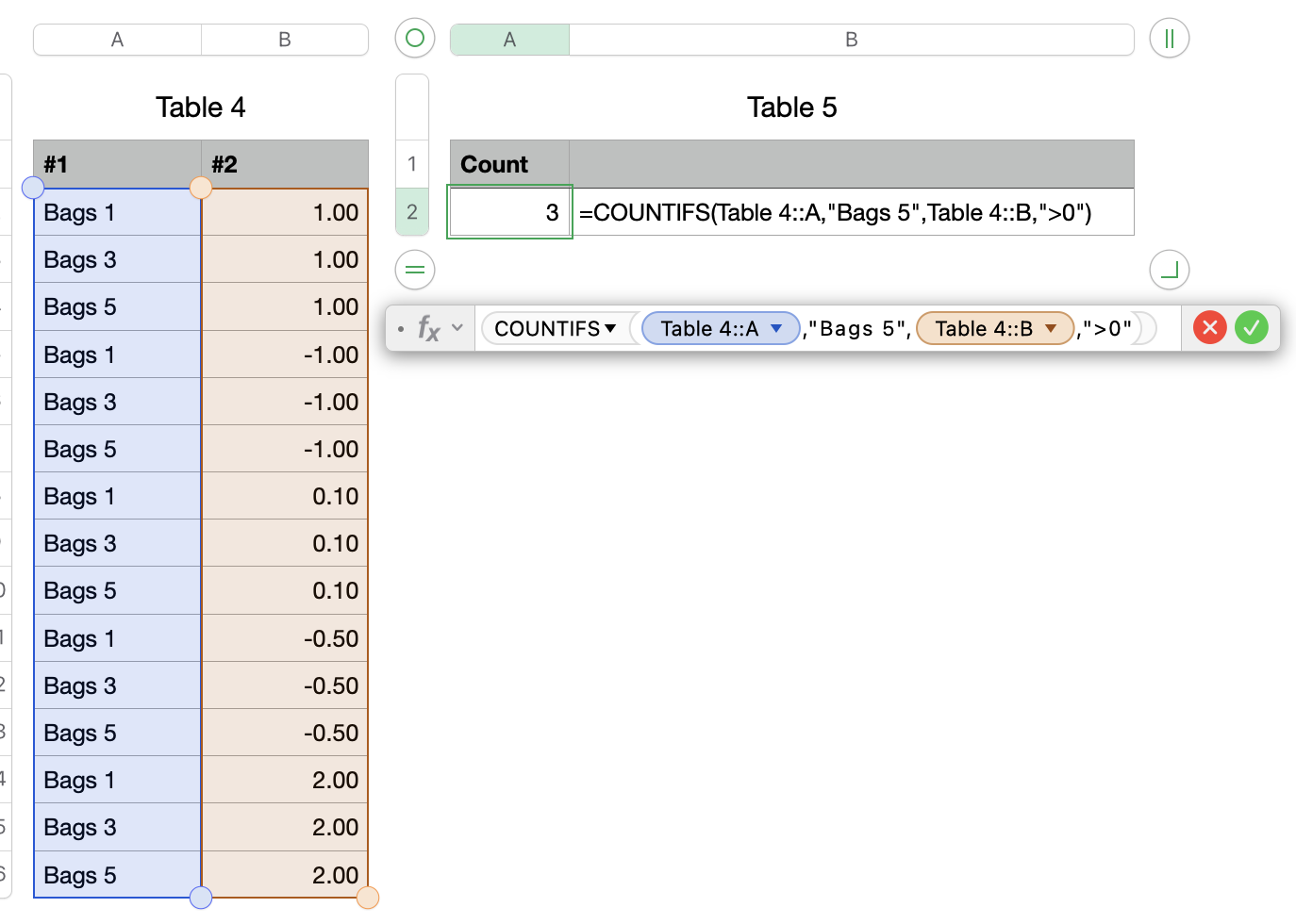

Based on your region the , or the ; will be used to separate the different sections of a formula. If you write one thousand as 1,000.00 then the , is used as your formula separator. If you write one thousand as 1.000,00 then the ; is used as your formula separator.


Hope this will solve your question, please let me know if this worked for you or if something in unclear.


Regards Ralf

Oct 23, 2022 12:20 PM in response to RubenVDV

Hi Ralf,


Thanks for your reply. I attached some screenshots from my spreadsheet.


Screenshot 1:

I filtered the 609 lines so that only the 'Bags 5' Continuation' is visible.


Screenshot 2:

In cell '1J' I managed to show the total '# trades' from my selection, which is 22 from the 609 in lines in total.


Screenshot 3:

In cell '2J' I only want to show the number of winning trades. So I need to combine the 'SUBTOTAL' function with the 'COUNTIF' function to only show the winning trades from this '22' filtered rows and not from the total 609 lines.


Hopefully my problem is more clearly explained now?


This thread has been closed by the system or the community team. You may vote for any posts you find helpful, or search the Community for additional answers.

Combining the SUBTOTAL function with COUNTIF is not possible?

Welcome to Apple Support Community
A forum where Apple customers help each other with their products. Get started with your Apple Account.