The Apple ID is an email address. Does it have to be a current email address

I have an Apple ID - which is an email address. But Apple also has my current email address which is the email address I use. Today the email address that I use for my Apple ID is being cancelled. Do I need to change my ID or not? (I am currently using only one email address)

Posted on Oct 26, 2022 4:54 AM

Reply
Question marked as Top-ranking reply

Posted on Oct 28, 2022 12:25 PM

Hi Bedouin1,


While your actual email address being cancelled or closed won't impact your Apple services, it can cause problems down the line if you ever need to reset your Apple ID password or forget your account info. One of the options Apple offers to regain access to your account involves verification through a trusted email address.


That said, if you have a new email address, you can change the email address tied to your Apple ID without having to create a new account. See more info here:


"How to change your Apple ID to a different email address

  1. Go to appleid.apple.com and sign in.
  2. In the Sign-In and Security section, choose Apple ID.
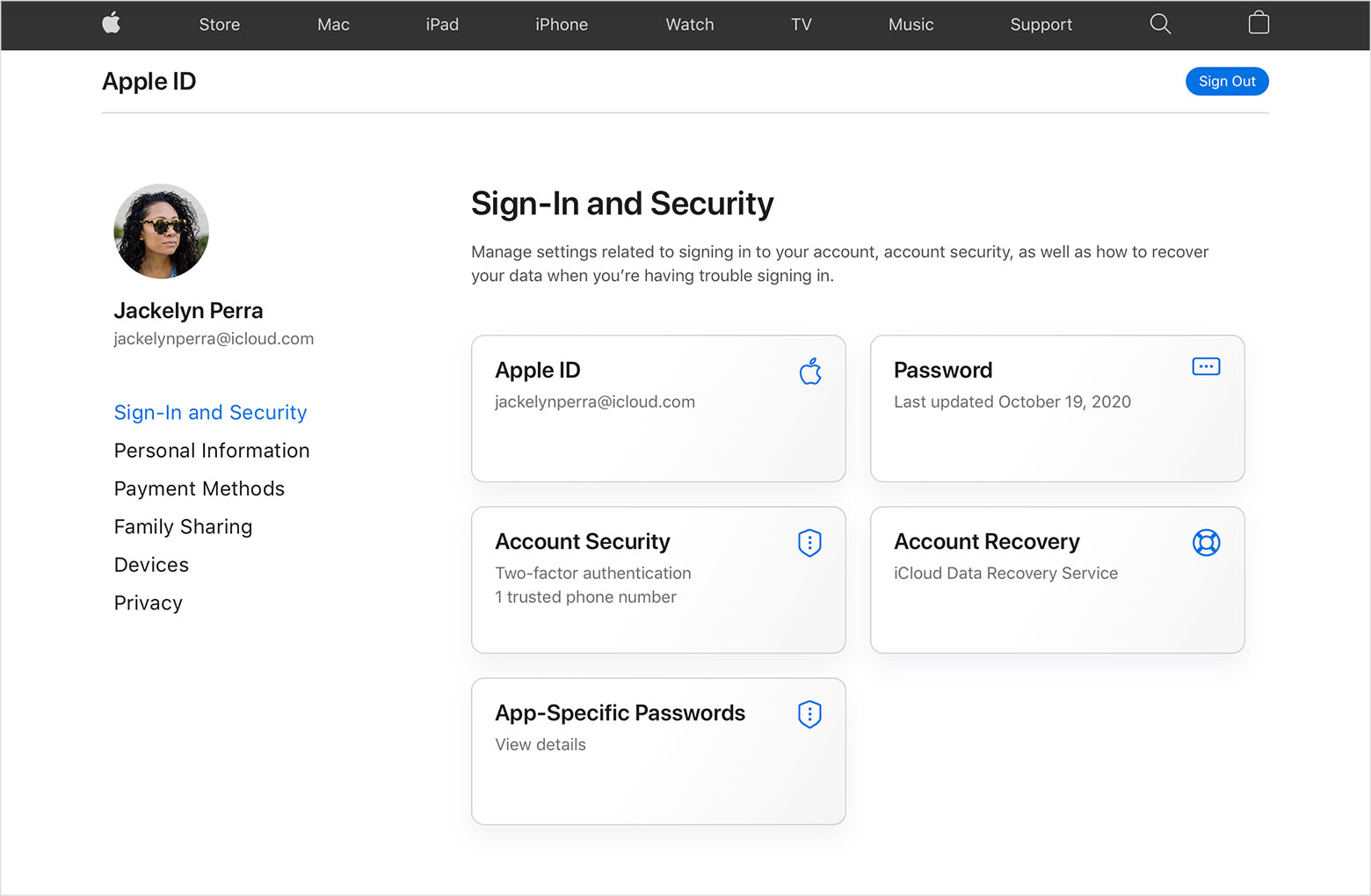
  3. Enter the email address that you want to use as your Apple ID.
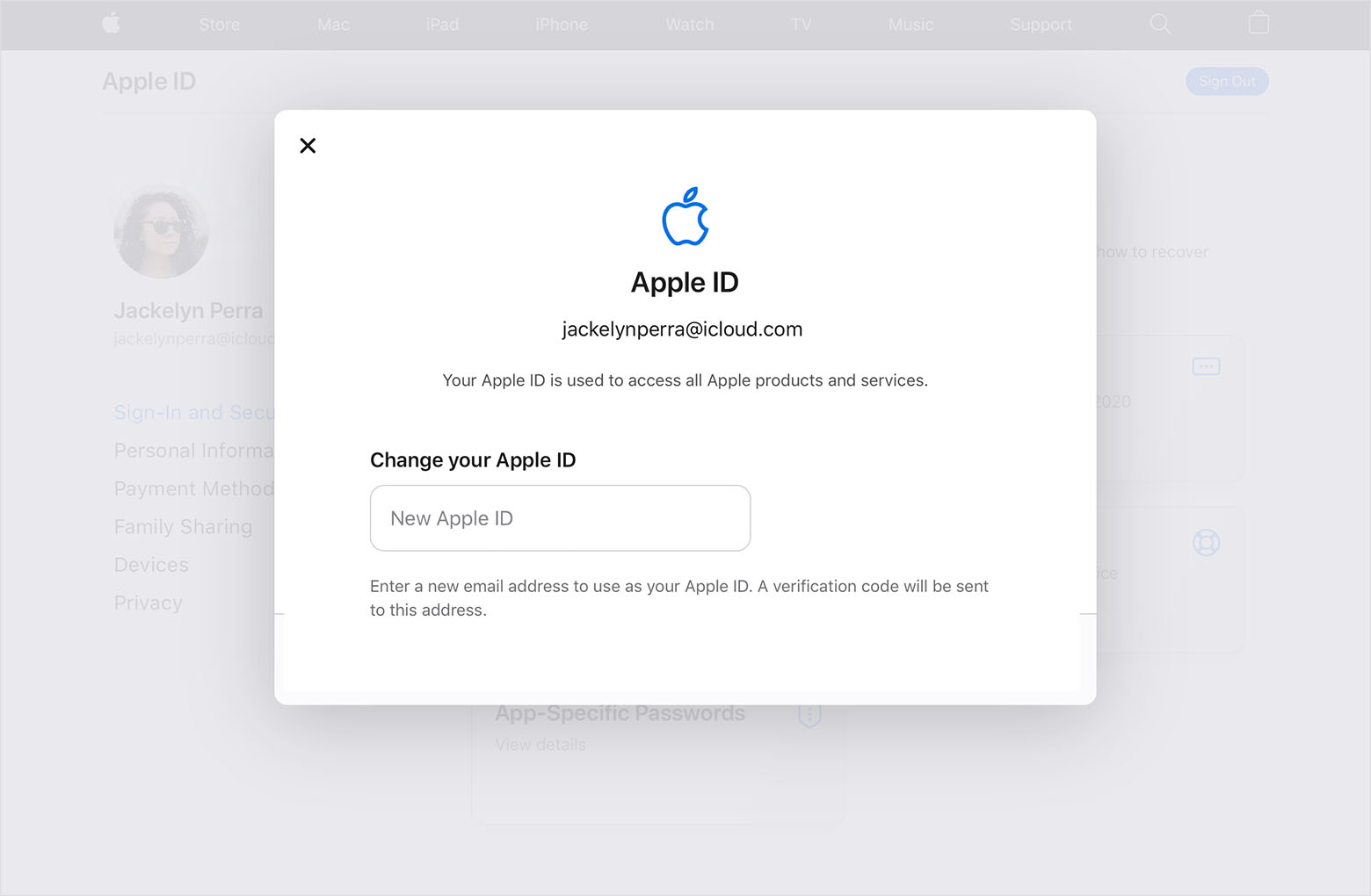
  4. Choose Change Apple ID.
  5. If you changed your Apple ID to a third-party email address, check your email for a verification code, then enter the code. Learn what to do if you didn't get the email.
  6. If you use services like iCloud or Messages to share with friends and colleagues, sign in to those services with your updated Apple ID."


Cheers!

Similar questions

2 replies
Question marked as Top-ranking reply

Oct 28, 2022 12:25 PM in response to Bedouin1

Hi Bedouin1,


While your actual email address being cancelled or closed won't impact your Apple services, it can cause problems down the line if you ever need to reset your Apple ID password or forget your account info. One of the options Apple offers to regain access to your account involves verification through a trusted email address.


That said, if you have a new email address, you can change the email address tied to your Apple ID without having to create a new account. See more info here:


"How to change your Apple ID to a different email address

  1. Go to appleid.apple.com and sign in.
  2. In the Sign-In and Security section, choose Apple ID.
  3. Enter the email address that you want to use as your Apple ID.
  4. Choose Change Apple ID.
  5. If you changed your Apple ID to a third-party email address, check your email for a verification code, then enter the code. Learn what to do if you didn't get the email.
  6. If you use services like iCloud or Messages to share with friends and colleagues, sign in to those services with your updated Apple ID."


Cheers!

Oct 28, 2022 12:20 PM in response to Bedouin1

Hey Bedouin1,


It's not required that the email used for your Apple ID to be an active account, but it is definitely a best practice and is recommended. Change your Apple ID has some good information that will help you out, as there is a section all about changing your Apple ID to a different email address and what to do if you try to make the change and are unable to.


" How to change your Apple ID to a different email address


  1. Go to appleid.apple.com and sign in.
  2. In the Sign-In and Security section, choose Apple ID.

  3. Enter the email address that you want to use as your Apple ID.

  4. Choose Change Apple ID.
  5. If you changed your Apple ID to a third-party email address, check your email for a verification code, then enter the code. Learn what to do if you didn't get the email.
  6. If you use services like iCloud or Messages to share with friends and colleagues, sign in to those services with your updated Apple ID. "


Should you have any other issues with this topic, please reply back in this thread.


Take care.

This thread has been closed by the system or the community team. You may vote for any posts you find helpful, or search the Community for additional answers.

The Apple ID is an email address. Does it have to be a current email address

Welcome to Apple Support Community
A forum where Apple customers help each other with their products. Get started with your Apple Account.