Hi, Maveric666.
One possibility that comes to mind is it may be attempting to open a pop up window for you to verify in. If you're using Safari and have pop-ups blocked; it could be causing this behavior.
Allow or block pop-ups in Safari on Mac - Apple Support
"Allow or block pop-ups on all websites
- In the Safari app
 on your Mac, choose , then click Websites.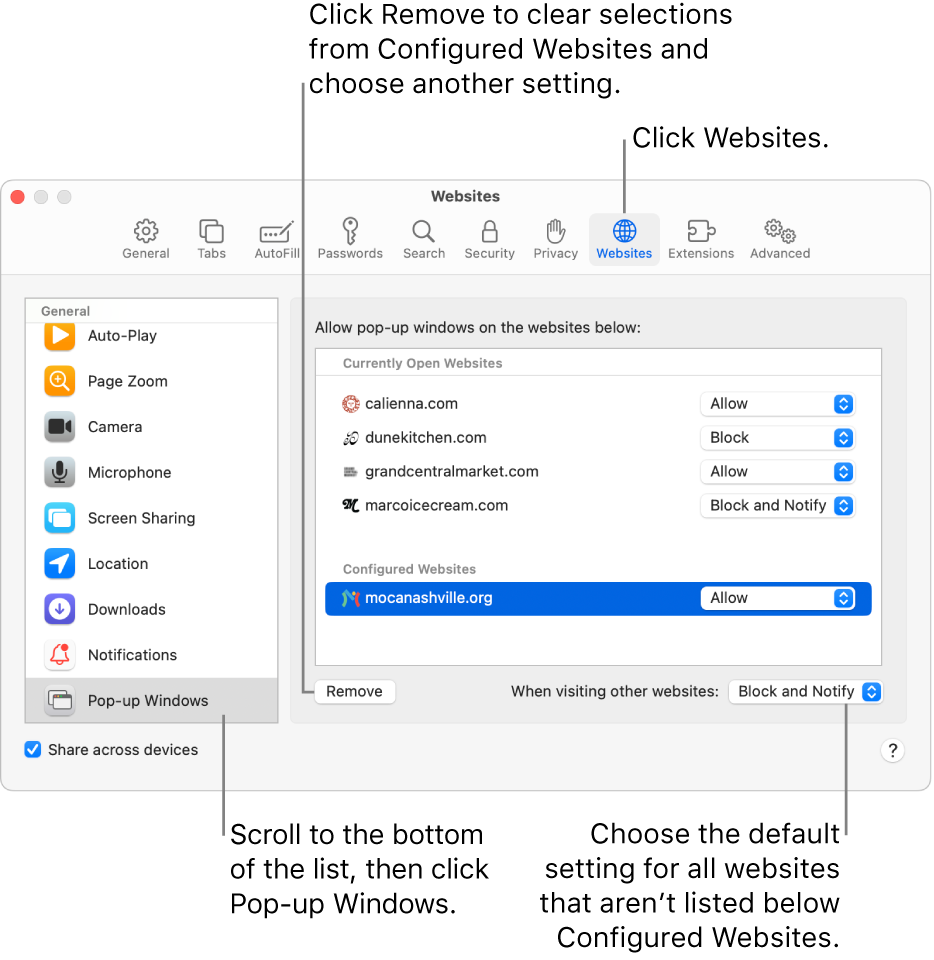
- Click Pop-up Windows on the left.
- If you don’t see Pop-up Windows, be sure to scroll to the bottom of the list.
- If there are websites listed below Configured Websites, and you want to change the settings for these sites (for example, they’re set to Allow, but you want to change them to Block), select each website, then click Remove.
- If you don’t see Configured Websites, either you haven’t set pop-up blocking for any sites yet, or you’ve cleared the list.
- Click the “When visiting other websites” pop-up menu, then choose one of the following:
- Allow: Pop-ups for the websites appear.
- Block and Notify: Pop-ups for the website don’t appear, but when you visit a website with blocked pop-ups, you can choose to show them by clicking the Show button
 in the Smart Search field.
 - Block: Pop-ups for the websites don’t appear.
If you block pop-ups on a website, but you continue to see pop-ups on the website, you might have unwanted software on your Mac. See the Apple Support article About pop-up ads and windows in Safari."
Cheers.



