Stand Reminders on Apple Watch

Is there any way that I can turn off stand reminder at night without setting watch to “do not disturb”? It would be really nice to be able to set stand reminders between certain wake hours like from 6 AM to 10 PM but still allow other notifications at night if desired.

Apple Watch SE

Posted on Oct 28, 2022 3:41 PM

Reply
Question marked as Top-ranking reply

Posted on Oct 31, 2022 10:32 AM

Hi mk6,


For help with silencing Apple Watch stand notifications while allowing other notifications you may want to set a custom focus. The article here has more information to assist. Use Focus on your iPhone or iPad - Apple Support


Without Focus and Do Not Disturb stand notifications will continue to be delivered. If you'd like you can turn the feature completly off with the steps foudn below and in the article here: Use the Activity app on your Apple Watch


"Set activity reminders


  1. On your iPhone, open the Watch app. 
  2. Tap the My Watch tab, then tap Activity.
  3. Choose your notifications and reminders. For example, coaching notifications are based on your previous progress. 
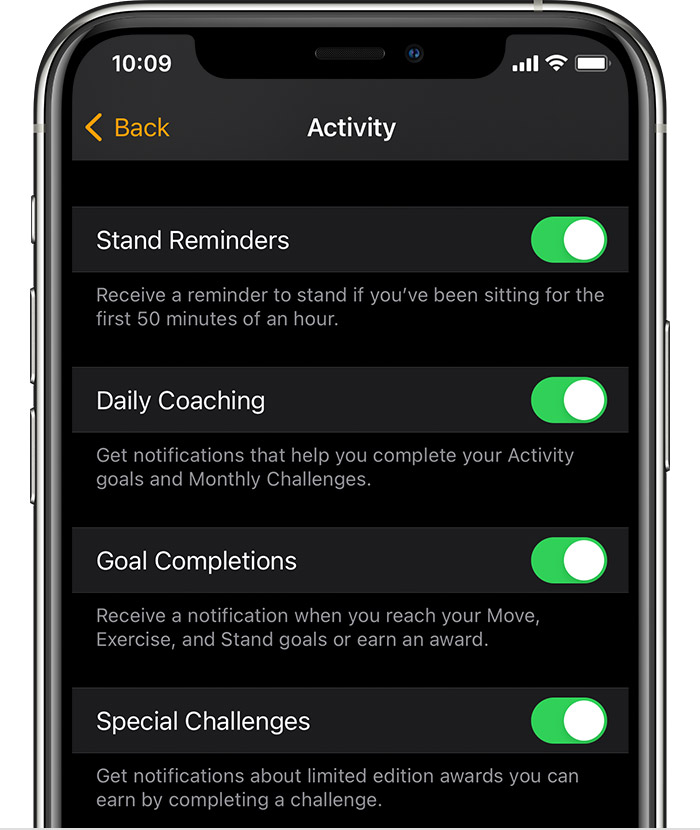
  4. An iPhone screen showing the options for Activity notifications and reminders"


While there's no way to set a schedule for the reminders to turn off, you can submit additional feature feedback here: Product Feedback - Apple


Cheers.

1 reply
Question marked as Top-ranking reply

Oct 31, 2022 10:32 AM in response to mk6

Hi mk6,


For help with silencing Apple Watch stand notifications while allowing other notifications you may want to set a custom focus. The article here has more information to assist. Use Focus on your iPhone or iPad - Apple Support


Without Focus and Do Not Disturb stand notifications will continue to be delivered. If you'd like you can turn the feature completly off with the steps foudn below and in the article here: Use the Activity app on your Apple Watch


"Set activity reminders


  1. On your iPhone, open the Watch app. 
  2. Tap the My Watch tab, then tap Activity.
  3. Choose your notifications and reminders. For example, coaching notifications are based on your previous progress. 
  4. An iPhone screen showing the options for Activity notifications and reminders"


While there's no way to set a schedule for the reminders to turn off, you can submit additional feature feedback here: Product Feedback - Apple


Cheers.

This thread has been closed by the system or the community team. You may vote for any posts you find helpful, or search the Community for additional answers.

Stand Reminders on Apple Watch

Welcome to Apple Support Community
A forum where Apple customers help each other with their products. Get started with your Apple Account.