I created a document in Pages but can"t save it.
I created a document in Pages but don't know how to save it.
iMac 21.5″, macOS 10.13
I created a document in Pages but don't know how to save it.
iMac 21.5″, macOS 10.13
Hey fall22warm,
To save a document in Pages on a Mac, follow these steps:
Save and name a new document
1. Click anywhere in the document window to make it active, then choose File > Save (from the File menu at the top of your screen).
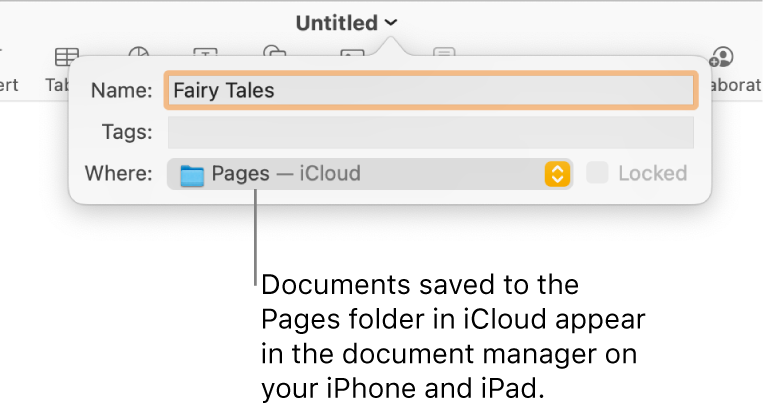
2. Enter a name in the Save As field, then enter one or more tags (optional).
3. Click the Where pop-up menu and choose a location.
• If you want the document to appear on all your devices set up with iCloud Drive, save the document in the Pages folder in iCloud Drive. (To see this option, iCloud Drive must be set up on your Mac.)
• To create a new folder for the document, click the Where pop-up menu and choose Other, then click New Folder at the bottom of the dialog. Enter a name for the folder, then click Create.
4. Click Save.
Those steps and more can be found in the Pages User Guide for Mac, here: Save and name a document in Pages on Mac - Apple Support
Thanks for participating in Apple Support Communities.
Take care!
Hey fall22warm,
To save a document in Pages on a Mac, follow these steps:
Save and name a new document
1. Click anywhere in the document window to make it active, then choose File > Save (from the File menu at the top of your screen).
2. Enter a name in the Save As field, then enter one or more tags (optional).
3. Click the Where pop-up menu and choose a location.
• If you want the document to appear on all your devices set up with iCloud Drive, save the document in the Pages folder in iCloud Drive. (To see this option, iCloud Drive must be set up on your Mac.)
• To create a new folder for the document, click the Where pop-up menu and choose Other, then click New Folder at the bottom of the dialog. Enter a name for the folder, then click Create.
4. Click Save.
Those steps and more can be found in the Pages User Guide for Mac, here: Save and name a document in Pages on Mac - Apple Support
Thanks for participating in Apple Support Communities.
Take care!
I created a document in Pages but can"t save it.