trying to disconnect headphones so I can give them to someone else

HIII plz help! So I had lost my AirPods awhile back and recently got new ones along with a new phone.. just found the old ones but in order to faculty reset them so I can give them to my dad it says you need to remove them from my Apple ID in my devices. PROBLEM IS its not in my devices?? not even the headphones I have now are.. weird right?? AND since I got the new phone I can't remove the device from Bluetooth either and call it good because they were never connected to this phone only the old one. So my question is how the heckkk do I remove a device to reset it that isn't there???

Posted on Nov 2, 2022 8:08 PM

Reply
Question marked as Top-ranking reply

Posted on Nov 4, 2022 3:06 PM

Hi,


If they're not showing up, it may be that they're already removed. If you follow the steps here, and they still don't show up; just try pairing them with your dad's device, since they may have been removed in the past:If an item or device is connected to another Apple ID - Apple Support


"How to remove AirPods, AirTag, or another Find My network item or device from an Apple ID on iPhone, iPad, or iPod touch

  1. Make sure that the device or item is connected via Bluetooth to your iPhone, iPad, or iPod touch, and is within Bluetooth range.
  2. Open the Find My app, then tap the Items tab or Devices tab.
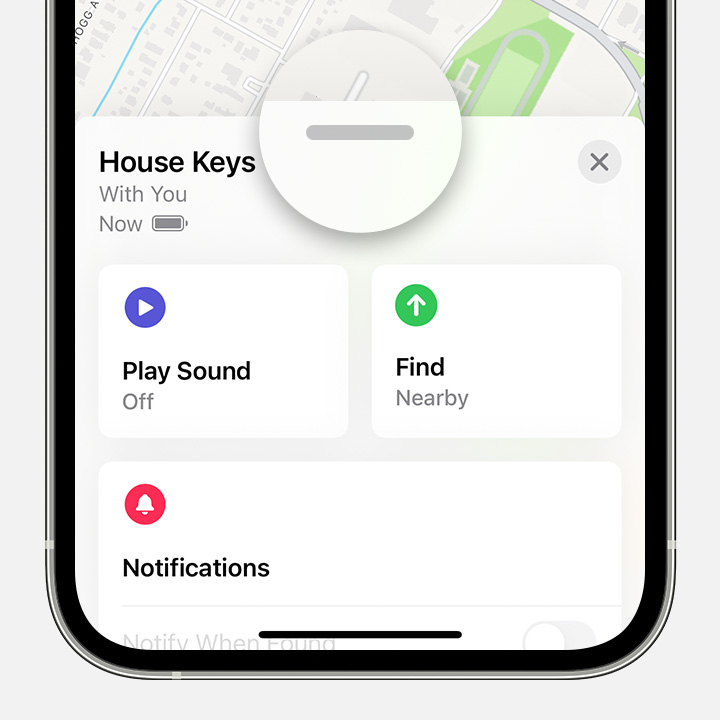
  3. Tap the item or device you want to remove, then swipe up on the handle.
  4. After you tap an item or device in the Find My app, swipe up to see more options.

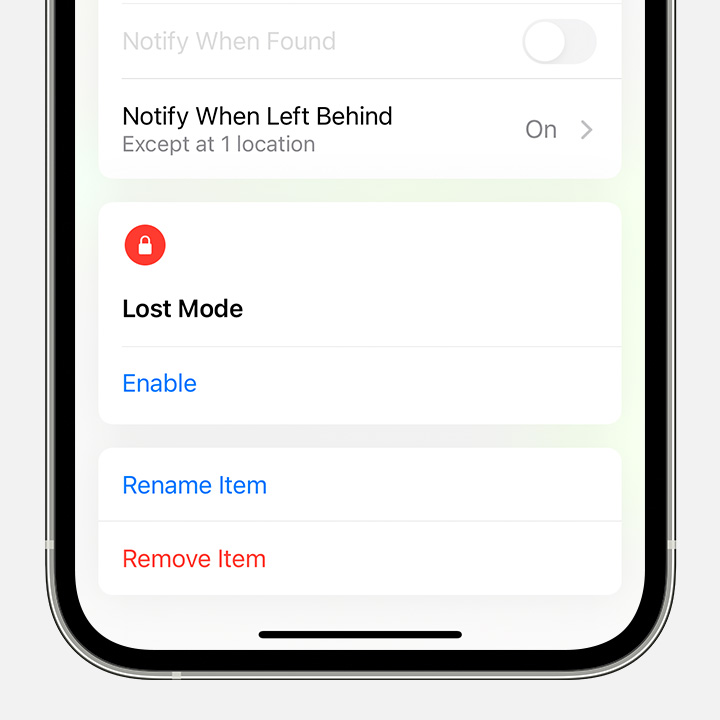
  5. Tap Remove Item or Remove This Device, then tap Remove to confirm.
  6. Tap Remove Item to remove an time from Find My and remove Find My Lock.

How to remove AirPods or another Find My network device from an Apple ID on Mac

  1. Make sure that the device is connected via Bluetooth to your Mac, and is within Bluetooth range.
  2. Open the Find My app.
  3. Select the Devices tab.
  4. Select the device that you want to remove.
  5. On the map, click the More Info button .
  6. Click Remove This Device.

AirTag and Find My network items can be removed from an Apple ID only on iPhone, iPad, or iPod touch."


Cheers.


1 reply
Question marked as Top-ranking reply

Nov 4, 2022 3:06 PM in response to plzhalpmeimjustababy

Hi,


If they're not showing up, it may be that they're already removed. If you follow the steps here, and they still don't show up; just try pairing them with your dad's device, since they may have been removed in the past:If an item or device is connected to another Apple ID - Apple Support


"How to remove AirPods, AirTag, or another Find My network item or device from an Apple ID on iPhone, iPad, or iPod touch

  1. Make sure that the device or item is connected via Bluetooth to your iPhone, iPad, or iPod touch, and is within Bluetooth range.
  2. Open the Find My app, then tap the Items tab or Devices tab.
  3. Tap the item or device you want to remove, then swipe up on the handle.
  4. After you tap an item or device in the Find My app, swipe up to see more options.

  5. Tap Remove Item or Remove This Device, then tap Remove to confirm.
  6. Tap Remove Item to remove an time from Find My and remove Find My Lock.

How to remove AirPods or another Find My network device from an Apple ID on Mac

  1. Make sure that the device is connected via Bluetooth to your Mac, and is within Bluetooth range.
  2. Open the Find My app.
  3. Select the Devices tab.
  4. Select the device that you want to remove.
  5. On the map, click the More Info button .
  6. Click Remove This Device.

AirTag and Find My network items can be removed from an Apple ID only on iPhone, iPad, or iPod touch."


Cheers.


This thread has been closed by the system or the community team. You may vote for any posts you find helpful, or search the Community for additional answers.

trying to disconnect headphones so I can give them to someone else

Welcome to Apple Support Community
A forum where Apple customers help each other with their products. Get started with your Apple Account.