Reminders app - issue with repeat daily

Hi

I have set up a list of tasks that I need to do each day.

But when I mark as complete, the task still shows ready for the next day. I want the tasks to stop showing when completed for the day, then refresh and reappear the next day.

Help much appreciated


iPhone XR, iOS 16

Posted on Nov 3, 2022 9:13 AM

Reply

Similar questions

1 reply

Nov 5, 2022 11:23 AM in response to andrya288

Hello andrya288,


Welcome to Apple Support Communities!

If we understand your post correctly, when you mark a task as completed you want it to show completed and not reset for the following day. We'd like to help!


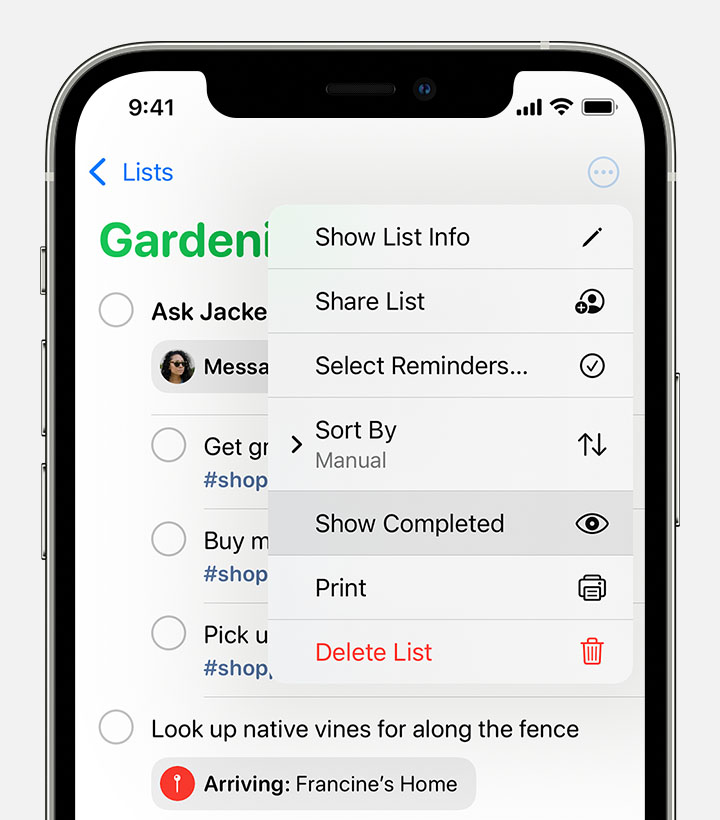
"To mark a reminder as completed, tap the empty circle next to it. To see your completed reminders, tap the More button , then tap Show Completed.

An iPhone showing a Reminders list with the menu open after selecting the More button. Show Completed is highlighted in the menu. 

To delete a reminder without marking it as completed, swipe left on it, then tap Delete.

If you get a reminder notification on your Lock Screen, swipe left over the reminder. Tap View, then tap Mark as Completed."


Use Reminders on your iPhone, iPad, or iPod touch


Let us know if you have any questions.

Thank you for using Apple Support Communities.

Take care!


This thread has been closed by the system or the community team. You may vote for any posts you find helpful, or search the Community for additional answers.

Reminders app - issue with repeat daily

Welcome to Apple Support Community
A forum where Apple customers help each other with their products. Get started with your Apple Account.