I can't get messenger to download on my apple watch
I can't get messenger to download on my apple watch
Apple Watch Series 7, watchOS 9
I can't get messenger to download on my apple watch
Apple Watch Series 7, watchOS 9
Hello Jwhitman3313,
Without knowing exactly what is happening, we would begin by restarting both the Apple Watch and the iPhone it is paired with. While simple, this can refresh the operating systems, apps and connections.
Apps for the Apple Watch can be download with the iPhone, or the Apple Watch itself. Be sure that you are following these steps from Download apps on your Apple Watch:
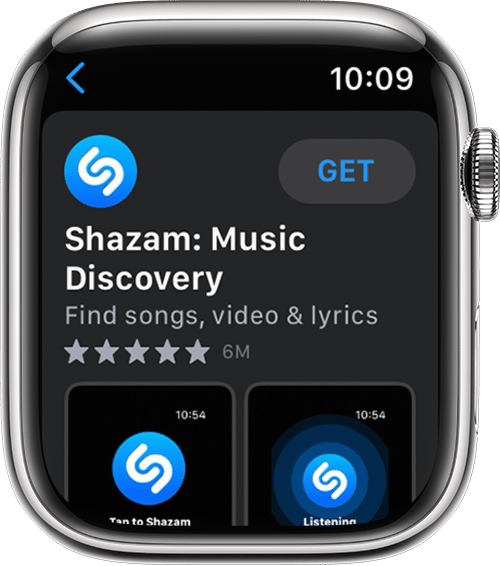
Get apps from the App Store on your Apple Watch
1. Press the Digital Crown to see the Home screen, then tap the App Store.
2. Tap Search to find apps using Scribble or Dictation or scroll down to discover featured apps and curated app collections.
3. Tap an app to see its description, ratings and reviews, screenshots, release notes, and more.
4. Tap the price or tap Get.
5. When prompted, double-click the side button under the Digital Crown to download and install the app.
In the App Store, if an app has a Get button instead of a price, the app is free. You won't be charged for downloading a free app. Some free apps offer in-app purchases and subscriptions that you can buy. Subscriptions and in-app purchases give you access to more features, content, and more. Learn more about in-app purchases and subscriptions.
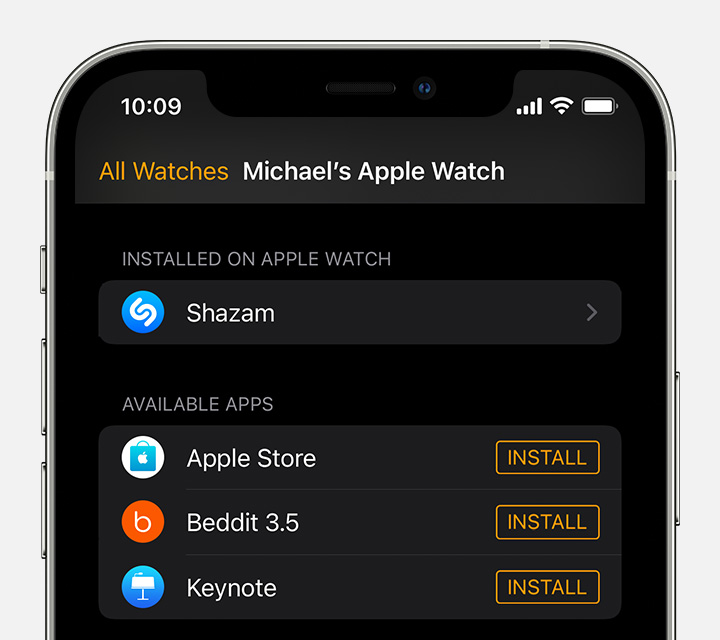
Get apps with the iPhone that's paired with the Apple Watch
On your iPhone, open the Watch app.
Tap the My Watch tab.
Scroll to the app that you want to add. Apps that you can install appear in the Available Apps section.
To add an app to your watch, tap Install.
These steps should add the app to the Apple Watch.
If they do not, if you want to post details of what happens, others here may be able to offer possible solutions.
Have a good day.
Hello Jwhitman3313,
Without knowing exactly what is happening, we would begin by restarting both the Apple Watch and the iPhone it is paired with. While simple, this can refresh the operating systems, apps and connections.
Apps for the Apple Watch can be download with the iPhone, or the Apple Watch itself. Be sure that you are following these steps from Download apps on your Apple Watch:
Get apps from the App Store on your Apple Watch
1. Press the Digital Crown to see the Home screen, then tap the App Store.
2. Tap Search to find apps using Scribble or Dictation or scroll down to discover featured apps and curated app collections.
3. Tap an app to see its description, ratings and reviews, screenshots, release notes, and more.
4. Tap the price or tap Get.
5. When prompted, double-click the side button under the Digital Crown to download and install the app.
In the App Store, if an app has a Get button instead of a price, the app is free. You won't be charged for downloading a free app. Some free apps offer in-app purchases and subscriptions that you can buy. Subscriptions and in-app purchases give you access to more features, content, and more. Learn more about in-app purchases and subscriptions.
Get apps with the iPhone that's paired with the Apple Watch
On your iPhone, open the Watch app.
Tap the My Watch tab.
Scroll to the app that you want to add. Apps that you can install appear in the Available Apps section.
To add an app to your watch, tap Install.
These steps should add the app to the Apple Watch.
If they do not, if you want to post details of what happens, others here may be able to offer possible solutions.
Have a good day.
I can't get messenger to download on my apple watch