One Contacts Messages Linking to iCloud devices

Can I choose a certain contact to not link to iCloud and be shared on my watch/MacBook ? Or is it all messages or none? Im trying to get one of my active texts threads with a person to show on my MacBook and watch but only one contacts messages don’t forward to either how do I fix this, or how do I select or deselect ONE persons messages from being shared to all my devices?

Posted on Nov 7, 2022 10:05 AM

Reply
Question marked as Top-ranking reply

Posted on Nov 9, 2022 9:16 AM

Hello CharleyM8859,


Are you using Messages in iCloud? Using Messages in iCloud would sync all of your conversations across your Apple devices. Learn how here: Use Messages in iCloud


Use Messages in iCloud

iCloud can keep your entire message history updated and available on all your devices, even when you set up a brand-new device.

Here's how it works

When you turn on Messages in iCloud, your message history is updated automatically on all of your devices. That way, you always have the same view everywhere you use iMessage. When you delete a message, photo, or conversation on one device, it’s removed from all of your devices. And since all of your attachments are stored in iCloud, you can save space on your device.

You can use Messages in iCloud on your iPhone, iPad, iPod touch, Apple Watch, and Mac. For your privacy, Messages in iCloud is end-to-end encrypted, which means you can't view or access Messages online via browser. 

Learn more about end-to-end encryption and iCloud security.

Turn on Messages in iCloud

To turn on Messages in iCloud, make sure that you've set up iCloud and are signed in with the same Apple ID on all your devices, and that you've turned on iCloud Keychain. You also need to use two-factor authentication with your Apple ID.

On your iPhone, iPad, or iPod touch

1. Go to the Settings app.
2. Tap your name.
3. Tap iCloud.
4. Turn on Messages.
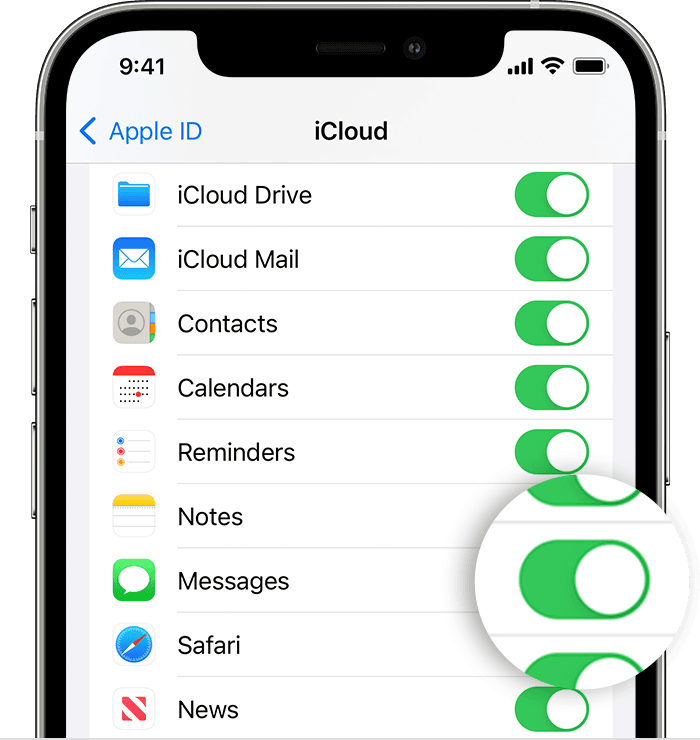
Turn on Messages in iCloud on your iPhone

On your Mac

1. Open Messages.
2. In the menu bar, choose Messages > Preferences.
3. Click iMessage.
4. Select the checkbox next to Enable Messages in iCloud.
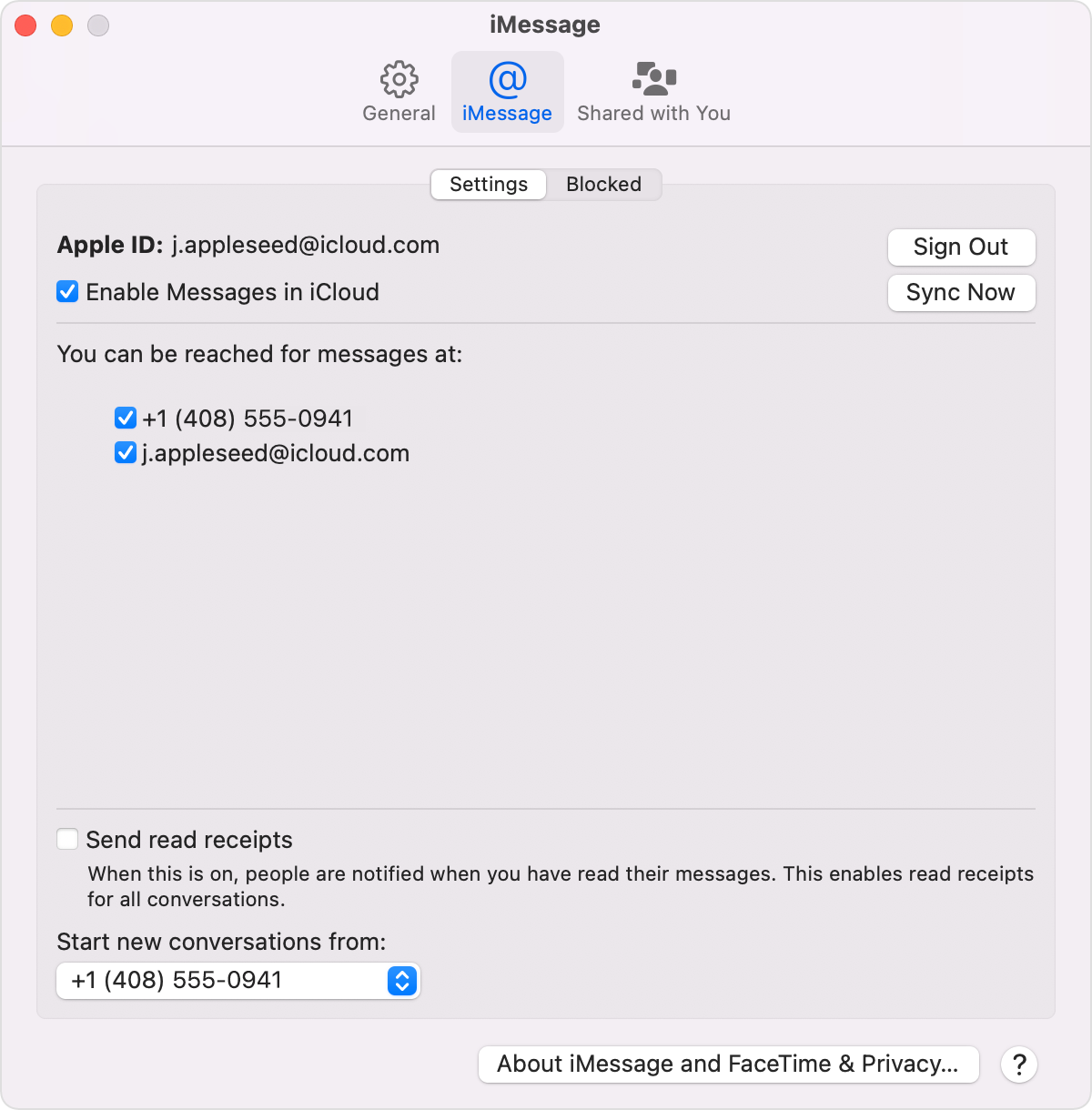
Mac iMessage settings screen with Enable Messages in iCloud selected

Turn off Messages in iCloud

When you turn off Messages in iCloud on your iPhone, iPad, iPod touch, or Mac, you can choose to turn off Messages in iCloud for just that device. Any device where Messages in iCloud is still turned on continues to store what you send and receive from that device in iCloud.

You can also turn off Messages in iCloud on all of your devices.

On your iPhone, iPad, or iPod touch

1. Go to the Settings app.
2. Tap your name > iCloud.
3. Turn off Messages.

On your Mac

1. Open Messages.
2. In the menu bar, choose Messages > Preferences.
3. Click iMessage.
4. Deselect the checkbox next to Enable Messages in iCloud.
If you turn off Messages in iCloud on an iPhone, iPad, or iPod touch, your message history will be included in iCloud Backup. If you set up an Apple Watch for a family member, Messages in iCloud is the only way to back up messages.


If you're already using Messages in iCloud, then it should be syncing across your Apple devices. This service would be an all or nothing sort of thing. You would need to sync all messages in order to use the service.


Let us know if that helps to sort this out, take care.

Similar questions

1 reply
Question marked as Top-ranking reply

Nov 9, 2022 9:16 AM in response to CharleyM8859

Hello CharleyM8859,


Are you using Messages in iCloud? Using Messages in iCloud would sync all of your conversations across your Apple devices. Learn how here: Use Messages in iCloud


Use Messages in iCloud

iCloud can keep your entire message history updated and available on all your devices, even when you set up a brand-new device.

Here's how it works

When you turn on Messages in iCloud, your message history is updated automatically on all of your devices. That way, you always have the same view everywhere you use iMessage. When you delete a message, photo, or conversation on one device, it’s removed from all of your devices. And since all of your attachments are stored in iCloud, you can save space on your device.

You can use Messages in iCloud on your iPhone, iPad, iPod touch, Apple Watch, and Mac. For your privacy, Messages in iCloud is end-to-end encrypted, which means you can't view or access Messages online via browser. 

Learn more about end-to-end encryption and iCloud security.

Turn on Messages in iCloud

To turn on Messages in iCloud, make sure that you've set up iCloud and are signed in with the same Apple ID on all your devices, and that you've turned on iCloud Keychain. You also need to use two-factor authentication with your Apple ID.

On your iPhone, iPad, or iPod touch

1. Go to the Settings app.
2. Tap your name.
3. Tap iCloud.
4. Turn on Messages.

Turn on Messages in iCloud on your iPhone

On your Mac

1. Open Messages.
2. In the menu bar, choose Messages > Preferences.
3. Click iMessage.
4. Select the checkbox next to Enable Messages in iCloud.

Mac iMessage settings screen with Enable Messages in iCloud selected

Turn off Messages in iCloud

When you turn off Messages in iCloud on your iPhone, iPad, iPod touch, or Mac, you can choose to turn off Messages in iCloud for just that device. Any device where Messages in iCloud is still turned on continues to store what you send and receive from that device in iCloud.

You can also turn off Messages in iCloud on all of your devices.

On your iPhone, iPad, or iPod touch

1. Go to the Settings app.
2. Tap your name > iCloud.
3. Turn off Messages.

On your Mac

1. Open Messages.
2. In the menu bar, choose Messages > Preferences.
3. Click iMessage.
4. Deselect the checkbox next to Enable Messages in iCloud.
If you turn off Messages in iCloud on an iPhone, iPad, or iPod touch, your message history will be included in iCloud Backup. If you set up an Apple Watch for a family member, Messages in iCloud is the only way to back up messages.


If you're already using Messages in iCloud, then it should be syncing across your Apple devices. This service would be an all or nothing sort of thing. You would need to sync all messages in order to use the service.


Let us know if that helps to sort this out, take care.

This thread has been closed by the system or the community team. You may vote for any posts you find helpful, or search the Community for additional answers.

One Contacts Messages Linking to iCloud devices

Welcome to Apple Support Community
A forum where Apple customers help each other with their products. Get started with your Apple Account.