Why does my iphone ask for my passcode every time I sync it to trust my computer.

Why does my iphone ask for my passcode every time I sync it to trust my computer. If I don't put this passcode in, I get a message in itunes that says the phone can't be backed up. Just started this w/ 16.1. I've never had to do this before. All software is up to date. Windows 10 home & iphone 13 are what I'm using. I called Apple and the guy said this was normal but not new with the software update (although my phone didn't start this until I updated it). itunes software is also the most recent version (12.12.16.1). So, is there some way around this? Thanks.

iPhone 13

Posted on Nov 7, 2022 7:42 PM

Reply
Question marked as Top-ranking reply

Posted on Nov 9, 2022 2:09 PM

Hello corellifan1,


The information provided by Apple Support is correct, and can be found in Using USB accessories with iOS and iPadOS.


Starting with iOS and iPadOS, if you use USB accessories with your iPhone, iPad, or iPod touch, or if you connect your device to a Mac or PC, you might need to unlock your device for it to recognize and use the accessory. Your accessory then remains connected, even if your device is subsequently locked.

If you don’t first unlock your password-protected iOS or iPadOS device—or you haven’t unlocked and connected it to a USB accessory within the past hour—your iOS or iPadOS device won’t communicate with the accessory or computer, and in some cases, it might not charge. You might also see an alert asking you to unlock your device to use accessories.


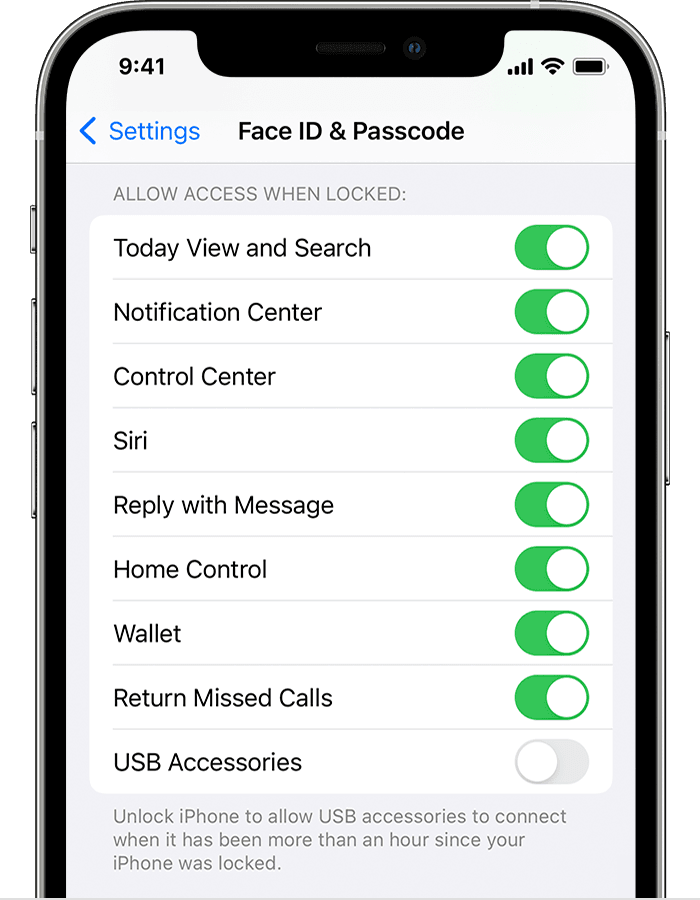
If you're wanting to allow access to your device without entering your passcode, you'll need to manually enable that setting.

  1. Open the Settings app.
  2. Go to Face ID & Passcode.
  3. Turn on USB Accessories under Allow Access When Locked.


Cheers!

Similar questions

14 replies
Question marked as Top-ranking reply

Nov 9, 2022 2:09 PM in response to corellifan1

Hello corellifan1,


The information provided by Apple Support is correct, and can be found in Using USB accessories with iOS and iPadOS.


Starting with iOS and iPadOS, if you use USB accessories with your iPhone, iPad, or iPod touch, or if you connect your device to a Mac or PC, you might need to unlock your device for it to recognize and use the accessory. Your accessory then remains connected, even if your device is subsequently locked.

If you don’t first unlock your password-protected iOS or iPadOS device—or you haven’t unlocked and connected it to a USB accessory within the past hour—your iOS or iPadOS device won’t communicate with the accessory or computer, and in some cases, it might not charge. You might also see an alert asking you to unlock your device to use accessories.


If you're wanting to allow access to your device without entering your passcode, you'll need to manually enable that setting.

  1. Open the Settings app.
  2. Go to Face ID & Passcode.
  3. Turn on USB Accessories under Allow Access When Locked.


Cheers!

Nov 10, 2022 6:33 AM in response to corellifan1

Hey there corellifan1, 


Let's take another look at Using USB accessories with iOS and iPadOS,


"Allow access to USB accessories


You can allow your iOS or iPadOS device to always access USB accessories, for example, if you use a USB assistive device to enter your passcode on your locked iPhone. Many assistive devices will automatically turn on the setting to allow USB devices the first time they’re connected.


If you don’t connect to USB accessories regularly, you might need to turn on this setting manually.


In Settings, go to Face ID & Passcode or Touch ID & Passcode, and turn on USB Accessories under Allow Access When Locked.


turn on USB accessories


When the USB Accessories setting is off, as in the image above, you might need to unlock your iOS or iPadOS device to connect USB accessories.


Administrators can control the USB Accessories setting on supervised iOS or iPadOS devices using Apple Configurator or mobile device management."


If you have followed these steps, and are still prompted for your passcode when connecting your iPhone, you may need to test using a different cable, port, or connecting directly to your computer instead of using a hub, if you currenlty are.


Have a good one!

Jan 27, 2023 4:26 AM in response to KathiLoo

We don't know. As I posted earlier it appears to be a protection measure against a newly uncovered exploit.

See https://imazing.com/blog/ios-backup-passcode-prompt. It likely won't change while unapproved backups would still present a security risk. You could do what I do, which is to backup to iCloud automatically, and take the occasional manual backup on my computer.


tt2

This thread has been closed by the system or the community team. You may vote for any posts you find helpful, or search the Community for additional answers.

Why does my iphone ask for my passcode every time I sync it to trust my computer.

Welcome to Apple Support Community
A forum where Apple customers help each other with their products. Get started with your Apple Account.