Making an emergency call is not a child's play. An adult must intentionally use it, only then it can be dialled.
Here's how it works
When you make a call with SOS, your iPhone automatically calls the local emergency number. In some countries and regions, you might need to choose the service that you need. For example, in China mainland you can choose police, fire, or ambulance.
You can also add emergency contacts. After an emergency call ends, your iPhone alerts your emergency contacts with a text message, unless you choose to cancel. Your iPhone sends your current location, and for a period of time after you enter SOS mode, your emergency contacts receive updates when your location changes.

Make the call on iPhone 8 or later:
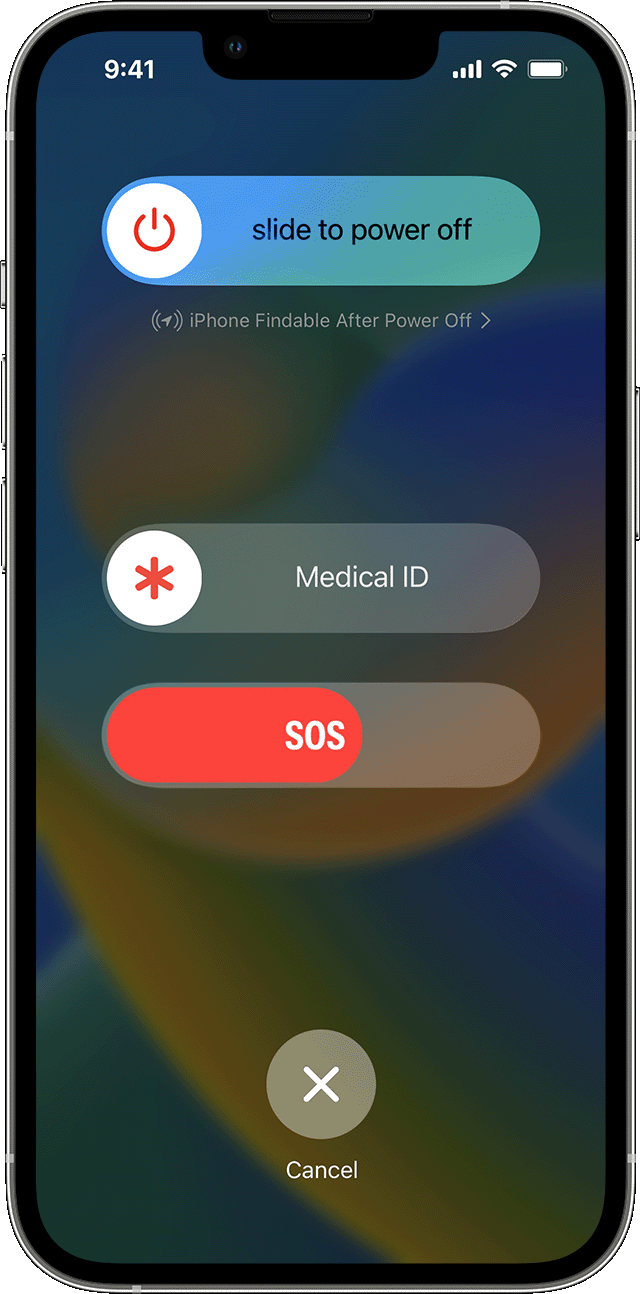
- Press and hold the side button and one of the volume buttons until the Emergency SOS slider appears.
- Drag the Emergency Call slider to call emergency services. If you continue to hold down the side button and volume button, instead of dragging the slider, a countdown begins and an alert sounds. If you hold down the buttons until the countdown ends, your iPhone automatically calls emergency services.
Make the call on iPhone 7 or earlier:
- Rapidly press the side (or top) button five times. The Emergency Call slider will appear. (In India, you only need to press the button three times, then your iPhone automatically calls emergency services.)
- Drag the Emergency SOS slider to call emergency services.
After the call ends, your iPhone sends your emergency contacts a text message with your current location, unless you choose to cancel. If Location Services is off, it will temporarily turn on. If your location changes, your contacts will get an update, and you'll get a notification about 10 minutes later.
On iPhone 14 and iPhone 14 Pro models, your phone can call emergency services and send a message to your emergency contacts when a severe car crash is detected. Learn more about Crash Detection on your iPhone or Apple Watch.
If you use the Emergency SOS shortcut, you need to enter your passcode to re-enable Touch ID or Face ID, even if you don't complete a call to emergency services.
Use Emergency SOS on your Apple Watch

