Garageband 10.4.7 track volume slider moves itself lower after monterrey 12.6.1 update.

In my Garageband 10.4.7, track volume slider began spontaneously moving itself to lower setting (from 0.0dB to -13dB) after Monterrey 12.6.1 update. Volume level won't remain where I set it no matter how many times it is reset. No changes or additions (no new plugins, etc) made to GarageBand prior to the OS update. Has anyone else had this problem?

Mac mini 2018 or later

Posted on Nov 12, 2022 1:05 PM

Reply

Similar questions

1 reply

Nov 14, 2022 11:32 AM in response to Sidney_Hobart

Hey there Sidney_Hobart,


The information and link below should help clarify the volume levels in GarageBand:


Adjust a track’s volume level
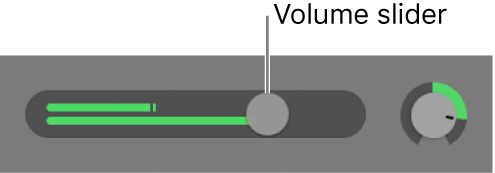
• In the GarageBand on Mac track header, drag the Volume slider left or right to lower or raise the volume level.
Track header showing Volume slider.
Note: You might have to resize the track header to see the Volume slider.
• Option-click the slider to return it to a neutral level (0 dB gain).

The level meter in a track’s Volume slider shows the output volume for the track as the project plays. You can watch the level meter as you record to the track to see if clipping occurs on the track.

Set track volume levels in GarageBand on Mac - Apple Support


Take care!


This thread has been closed by the system or the community team. You may vote for any posts you find helpful, or search the Community for additional answers.

Garageband 10.4.7 track volume slider moves itself lower after monterrey 12.6.1 update.

Welcome to Apple Support Community
A forum where Apple customers help each other with their products. Get started with your Apple Account.