Amazon Music app unavailable for Mac

Hello,


I have been using the Amazon Music app on my Mac for a few years now. This morning the application stopped working and it is no longer available for download in the App Store. Is haven't seen any notifications or messages about this issue from either Apple or Amazon. Can you please advise what is going on here and if this is an issue on the Apple side or Amazon? Thank you.

MacBook Pro

Posted on Nov 14, 2022 6:03 AM

Reply
3 replies

Nov 15, 2022 4:21 PM in response to VonTippa21

Hey VonTippa21,


The following steps can help if an app stops working on your Mac:


1. Quit and reopen the app.

2. Restart your Mac.

3. Check for updates to the app and macOS.

4. Reinstall the app. This link from Amazon mentions it is still available: Amazon.com: Amazon Music Desktop Player for PC & MAC: Digital Music


You can read more here:


If an app on your Mac stops responding, closes unexpectedly, or won’t open 


Take care.

Nov 16, 2022 6:11 AM in response to barberlives123

Hey barberlives123, thanks for the response! I am always hesitant to download an app that isn't published in the App Store, even if the developer is Amazon. I will probably just use their web interface until they sort out whatever issues they have with their app and the App Store. Here is the link to their web interface in case anyone else faces the same issue I am: music.amazon.com.


Thanks again!


Nov 16, 2022 7:46 AM in response to VonTippa21

Hi VonTippa21,


We understand wanting to only download apps from the App Store.


We did a search for Amazon Music using the Apple Services Marketing Tools. Currently it's only showing that Amazon Music is available as an App for iPhone, iPad, Apple Watch, and Apple TV. It does not show any apps that were removed from the App Store but we're not finding any reference on Amazon that it was available in the past.


We recommend that you reach out to Amazon to inquire if they have any insight on this. This resource can help:

How to contact an app developer - Apple Support


Contact the developer of an iOS, iPadOS, or watchOS app

1. Open the App Store on your iPhone or iPad.
2. Search for the app, then tap it. If you can't find it, tap the account button  or your photo at the top of the screen, tap Purchased, tap "Not on this [device]," then tap the app.

3. The app's product page appears. Scroll to the Ratings & Reviews section, then tap App Support. If you don't see App Support, make sure that you're signed in with the correct Apple ID.
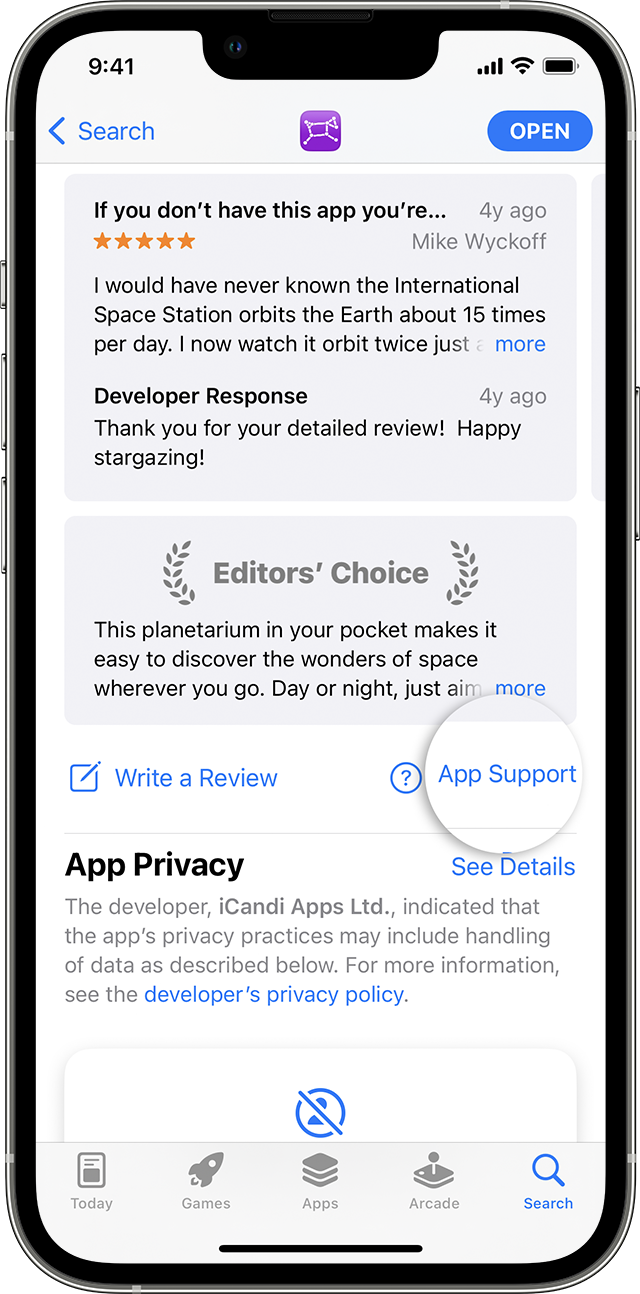
In the App Store on iPhone, you can find the App Support button below the reviews.

We've added steps to find that information on the mobile version of the app since it's not appearing in the App Store for Mac.


Hope that helps!


This thread has been closed by the system or the community team. You may vote for any posts you find helpful, or search the Community for additional answers.

Amazon Music app unavailable for Mac

Welcome to Apple Support Community
A forum where Apple customers help each other with their products. Get started with your Apple Account.
