Prepaid gift card not working
Why wont pre paid gift cards work anymore ? I have used in the past to add funds to account but now it will not work.
iPhone XR, iOS 15
Why wont pre paid gift cards work anymore ? I have used in the past to add funds to account but now it will not work.
iPhone XR, iOS 15
Hi atf16,
Thanks for contacting Apple Support Communities!
We understand that you're unable to use your Apple Gift Card, correct?
If so, this article outlines the troubleshooting steps you can take to address this behavior depending on what the alert says when you attempt to redeem your gift card: If you can't redeem your Apple Gift Card or App Store & iTunes Gift Card - Apple Support
If you can't redeem your gift card in the App Store or iTunes Store, here are some things you can try.
Card is not valid
Card has already been redeemed
Card is not activated
Code is unreadable
Code must be redeemed in a different country or region
Card is not valid
If you see a message that says that your card is not valid, here's what to do:
1. Make sure that your card is not an Apple Store Gift Card. Apple Store Gift Cards are gray, white, silver, or gold. You can’t redeem Apple Store Gift Cards in the App Store or iTunes Store. Find out what to do if you have an Apple Store Gift Card or don't know what type of gift card you have.
2. Try entering your redemption code manually. When you redeem a gift card, tap or click "You can also enter your code manually." Make sure that you enter the redemption code that begins with "X", not a different number on the card.
3. Make sure that you enter the correct characters. Some letters and numbers look alike, such as:
• B and 8
• D and O
• E and 3
• G and 6
• O and Q
• O and 0
• S and 5
• U and V
• Z and 2
Card has already been redeemed
If you see a message that says that your card has already been redeemed, you might have already redeemed it. Sign out of the App Store or iTunes Store on all of your devices, then sign back in. This refreshes your Apple Account balance. Learn how to check your Apple Account balance.
If you need more help, contact Apple Support.
Card is not activated
If you see a message that says that your card has not been properly activated, it might not have been activated by the retailer who sold the card. The best option is to go back to the retailer and try to resolve it with them.
If you need more help, contact Apple Support.
Code is unreadable
If you can't read the code on the back of your card because it's scratched or damaged, contact Apple Support.
Code must be redeemed in a different country or region
If you see a message that says the code must be redeemed in another storefront, the card was probably purchased in another country or region. You can't redeem Apple Gift Cards or App Store & iTunes Gift Cards outside of the country or region of purchase. For example, if you bought an App Store & iTunes Gift Card in France, you can't redeem it in the App Store in the United States.
If you need more help, contact Apple Support.
Contact Apple Support
Contact Apple Support.
You might need to provide:
An image of the full front and back of your card.
A sales receipt showing when your card was purchased.
The serial number from your card.
Find your serial number
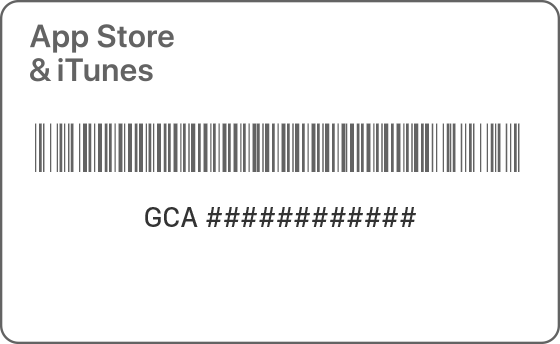
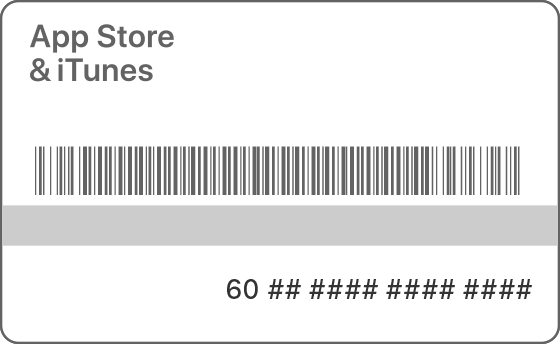
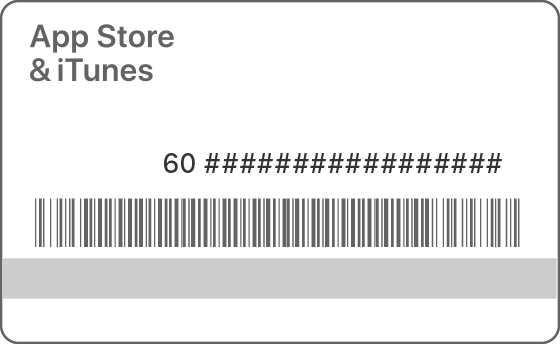
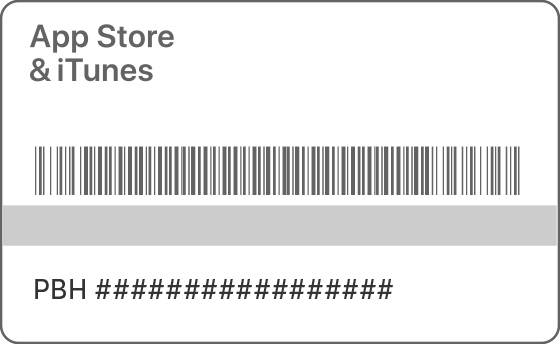
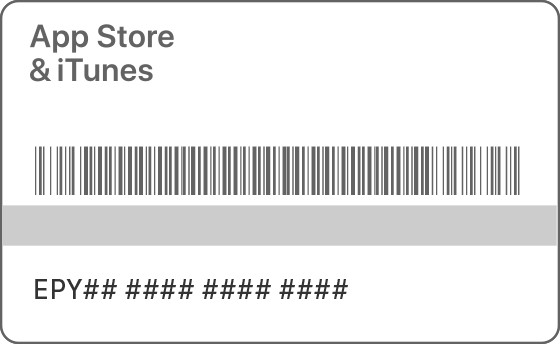
The serial number is not the same thing as the code that begins with "X" that you use to redeem the card. Serial numbers are located on the back of your card. Here are some examples of where you might see the serial number:
Serial number begins with "GCA"
Serial number begins with "60"
Serial number begins with "60" (Australia Gift Cards)
Serial number begins with "PBH"
Serial number begins with "EPY"
If you're seeing a different alert other than what is outlined here, just let us know what the specific alert says. We'll take it from there.
Cheers!
Hi atf16,
Thanks for contacting Apple Support Communities!
We understand that you're unable to use your Apple Gift Card, correct?
If so, this article outlines the troubleshooting steps you can take to address this behavior depending on what the alert says when you attempt to redeem your gift card: If you can't redeem your Apple Gift Card or App Store & iTunes Gift Card - Apple Support
If you can't redeem your gift card in the App Store or iTunes Store, here are some things you can try.
Card is not valid
Card has already been redeemed
Card is not activated
Code is unreadable
Code must be redeemed in a different country or region
Card is not valid
If you see a message that says that your card is not valid, here's what to do:
1. Make sure that your card is not an Apple Store Gift Card. Apple Store Gift Cards are gray, white, silver, or gold. You can’t redeem Apple Store Gift Cards in the App Store or iTunes Store. Find out what to do if you have an Apple Store Gift Card or don't know what type of gift card you have.
2. Try entering your redemption code manually. When you redeem a gift card, tap or click "You can also enter your code manually." Make sure that you enter the redemption code that begins with "X", not a different number on the card.
3. Make sure that you enter the correct characters. Some letters and numbers look alike, such as:
• B and 8
• D and O
• E and 3
• G and 6
• O and Q
• O and 0
• S and 5
• U and V
• Z and 2
Card has already been redeemed
If you see a message that says that your card has already been redeemed, you might have already redeemed it. Sign out of the App Store or iTunes Store on all of your devices, then sign back in. This refreshes your Apple Account balance. Learn how to check your Apple Account balance.
If you need more help, contact Apple Support.
Card is not activated
If you see a message that says that your card has not been properly activated, it might not have been activated by the retailer who sold the card. The best option is to go back to the retailer and try to resolve it with them.
If you need more help, contact Apple Support.
Code is unreadable
If you can't read the code on the back of your card because it's scratched or damaged, contact Apple Support.
Code must be redeemed in a different country or region
If you see a message that says the code must be redeemed in another storefront, the card was probably purchased in another country or region. You can't redeem Apple Gift Cards or App Store & iTunes Gift Cards outside of the country or region of purchase. For example, if you bought an App Store & iTunes Gift Card in France, you can't redeem it in the App Store in the United States.
If you need more help, contact Apple Support.
Contact Apple Support
Contact Apple Support.
You might need to provide:
An image of the full front and back of your card.
A sales receipt showing when your card was purchased.
The serial number from your card.
Find your serial number
The serial number is not the same thing as the code that begins with "X" that you use to redeem the card. Serial numbers are located on the back of your card. Here are some examples of where you might see the serial number:
Serial number begins with "GCA"
Serial number begins with "60"
Serial number begins with "60" (Australia Gift Cards)
Serial number begins with "PBH"
Serial number begins with "EPY"
If you're seeing a different alert other than what is outlined here, just let us know what the specific alert says. We'll take it from there.
Cheers!
Prepaid gift card not working