I didn't use us for 2 hours I think and then I wanted to see it it doesn’t open I put it on a charger, I changed on another one for all night and then tomorrow it still don’t even open what I think is because of the freezing weather or because I b

How can I open my iPhone even if he’s closed for all night I put it on charger by the way


iPhone 12, iOS 16

Posted on Nov 16, 2022 8:02 AM

Reply
Question marked as Top-ranking reply

Posted on Nov 18, 2022 12:22 PM

Hey Us12,


To clarify, you're trying to use your iPhone, however it won't power on, is that correct?


If so, did you try the steps from the article linked at the top of your post?


"If your screen is black or frozen

Follow the steps for your device.

On your iPhone 8 or later, including iPhone SE (2nd and 3rd generation)

  1. Press and quickly release the volume up button.
  2. Press and quickly release the volume down button.
  3. Press and hold the side button until you see the Apple logo.

  4. An animation of an iPhone with arrows pointing to the volume up button, then to the volume down button, and then to the side button.
  5. If your phone doesn't turn on, follow these steps to check your hardware and charge your phone. You might need to charge for up to an hour.
  6. If your phone still doesn't turn on, contact Apple Support."


"If your iPhone turns on but gets stuck during start up

If you see the Apple logo or a red or blue screen during startup, try these steps:

  1. Connect your iPhone to a computer. On a Mac with macOS Catalina, open the Finder. On a Mac with macOS Mojave or earlier, or on a PC, open iTunes. Find out which macOS your Mac is using.
  2. Select your iPhone on your computer.
  3. While your iPhone is connected, follow these steps:
  • On your iPhone 8 or later, including iPhone SE (2nd and 3rd generation): Press and quickly release the volume up button. Press and quickly release the volume down button. Then press and hold the side button.

    • An animation of an iPhone with arrows pointing to the volume up button, then to the volume down button, and then to the side button.
  • On your iPhone 7 or iPhone 7 Plus: Press and hold the side button and volume down button at the same time.

  • An iPhone with arrows pointing to the volume down button and the side button.

    • On your iPhone 6s or earlier, including iPhone SE (1st generation): Press and hold both the Home button and the side button or the top button at the same time.
  1. Keep holding the buttons until you see the recovery mode screen.
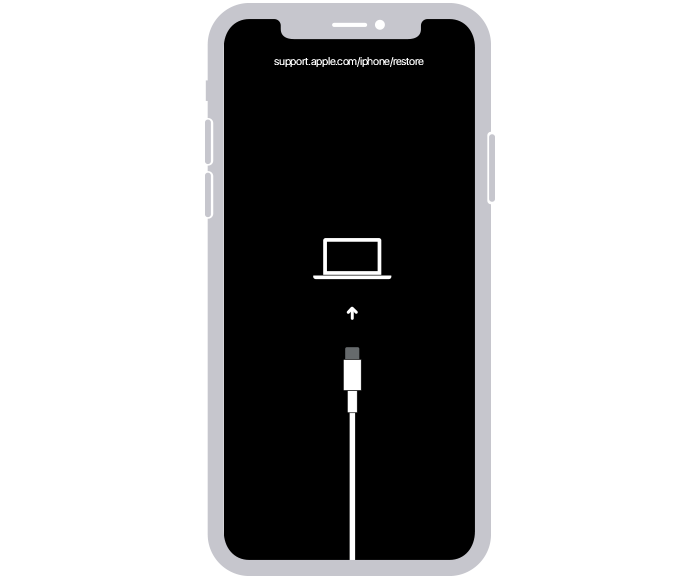
  2. An iPhone showing the recovery mode screen.

  3. When you get the option to restore or update, choose Update.

  4. A Finder window showing a prompt with the choice to update or restore your iPhone. Update is selected.

  5. Your computer will download the software for your device. If it takes more than 15 minutes, your device will exit recovery mode. Repeat steps 2-4."


If neither of those steps allow you to fully regain access to the iPhone, you'll need to contact Apple Support directly for assistance, as it may require inspection.


See contact options here if needed:


Take care.

1 reply
Question marked as Top-ranking reply

Nov 18, 2022 12:22 PM in response to Us12

Hey Us12,


To clarify, you're trying to use your iPhone, however it won't power on, is that correct?


If so, did you try the steps from the article linked at the top of your post?


"If your screen is black or frozen

Follow the steps for your device.

On your iPhone 8 or later, including iPhone SE (2nd and 3rd generation)

  1. Press and quickly release the volume up button.
  2. Press and quickly release the volume down button.
  3. Press and hold the side button until you see the Apple logo.
  4. An animation of an iPhone with arrows pointing to the volume up button, then to the volume down button, and then to the side button.
  5. If your phone doesn't turn on, follow these steps to check your hardware and charge your phone. You might need to charge for up to an hour.
  6. If your phone still doesn't turn on, contact Apple Support."


"If your iPhone turns on but gets stuck during start up

If you see the Apple logo or a red or blue screen during startup, try these steps:

  1. Connect your iPhone to a computer. On a Mac with macOS Catalina, open the Finder. On a Mac with macOS Mojave or earlier, or on a PC, open iTunes. Find out which macOS your Mac is using.
  2. Select your iPhone on your computer.
  3. While your iPhone is connected, follow these steps:
  • On your iPhone 8 or later, including iPhone SE (2nd and 3rd generation): Press and quickly release the volume up button. Press and quickly release the volume down button. Then press and hold the side button.

    • An animation of an iPhone with arrows pointing to the volume up button, then to the volume down button, and then to the side button.
  • On your iPhone 7 or iPhone 7 Plus: Press and hold the side button and volume down button at the same time.
  • An iPhone with arrows pointing to the volume down button and the side button.

    • On your iPhone 6s or earlier, including iPhone SE (1st generation): Press and hold both the Home button and the side button or the top button at the same time.
  1. Keep holding the buttons until you see the recovery mode screen.
  2. An iPhone showing the recovery mode screen.

  3. When you get the option to restore or update, choose Update.
  4. A Finder window showing a prompt with the choice to update or restore your iPhone. Update is selected.

  5. Your computer will download the software for your device. If it takes more than 15 minutes, your device will exit recovery mode. Repeat steps 2-4."


If neither of those steps allow you to fully regain access to the iPhone, you'll need to contact Apple Support directly for assistance, as it may require inspection.


See contact options here if needed:


Take care.

This thread has been closed by the system or the community team. You may vote for any posts you find helpful, or search the Community for additional answers.

I didn't use us for 2 hours I think and then I wanted to see it it doesn’t open I put it on a charger, I changed on another one for all night and then tomorrow it still don’t even open what I think is because of the freezing weather or because I b

Welcome to Apple Support Community
A forum where Apple customers help each other with their products. Get started with your Apple Account.