How do I remove the “Get Help During an Emergency” notification badge on the Settings app?

Stupid question, but how do I remove the “Get Help During an Emergency” notification badge on the Settings app? I can’t even click on it, and the glaring red notification bugs me. Any information is appreciated, thank you in advance!


[Re-Titled by Moderator]

Posted on Nov 16, 2022 8:53 PM

Reply
Question marked as Top-ranking reply

Posted on Nov 21, 2022 6:19 PM

Found my solution on Reddit. I had deleted the Health app as bloatware when I set up my phone because I was using the Fitbit app.


Reinstalled the Health app, set it up, and the notification disappeared.


20 replies

Nov 16, 2022 10:41 PM in response to Bbrandt31

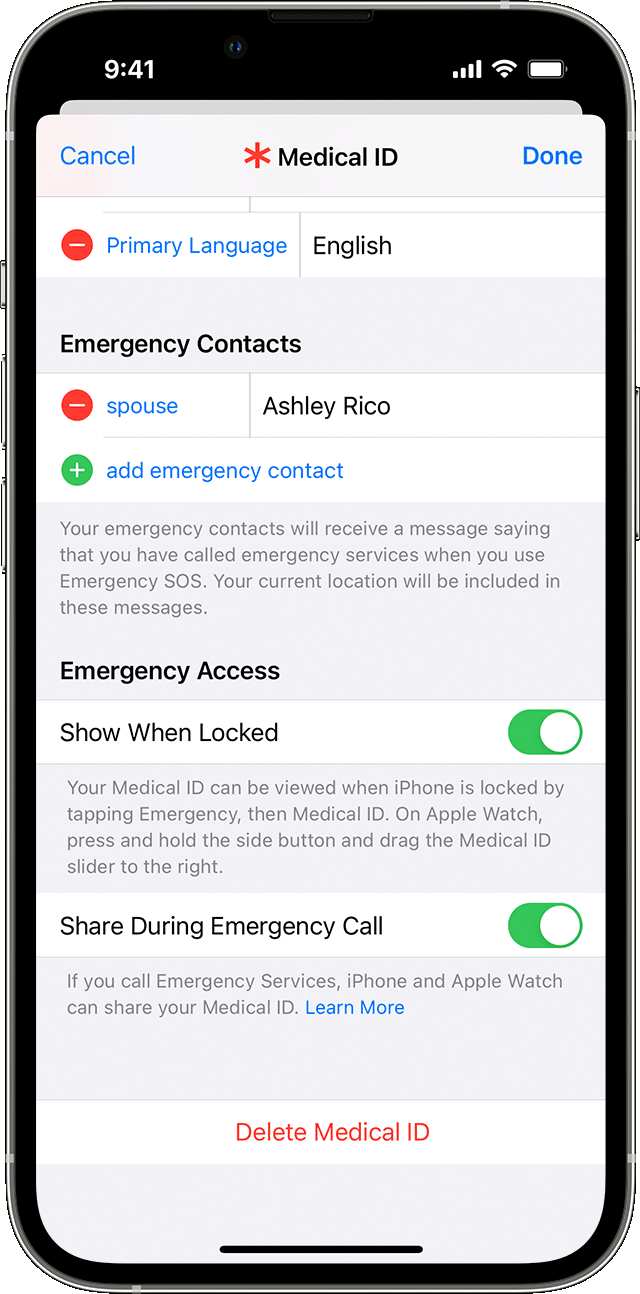
Probably you have removed all emergency Contacts from your Medical ID under the Health App


Add emergency contacts

  1. Open the Health app and tap your profile picture .
  2. Tap Medical ID.
  3. Tap Edit, then scroll to Emergency Contacts.
  4. Tap the Add button  to add an emergency contact.
  5. Tap a contact, then add their relationship.
  6. Tap Done to save your changes.

You can't set emergency services as an SOS contact.

Set up your Medical ID in the Health app


Remove emergency contacts

  1. Open the Health app and tap your profile picture .
  2. Tap Medical ID.
  3. Tap Edit, then scroll to Emergency Contacts.
  4. Tap the Delete button  next to a contact, then tap Delete.
  5. Tap Done to save your changes.

Mar 17, 2023 9:50 AM in response to Bbrandt31

i originally had the health app deleted and when i switched devices after upgrading, it was giving me the notification to apply the settings but when i would click it, it wasn’t doing anything because i didn’t have the app. so i downloaded the health app again and went through the set up and the notification finally disappeared. so i think this issue is pertaining to people who may have deleted the app in your previous device, maybe not. i hope this helps either way.

Jun 26, 2023 9:31 AM in response to Bbrandt31

Is the SOS keep popping up where my barcodes are at at the top of my phone and where their Internet is at and when it pops on I can’t make a call I can I get calls I have to turn my phone off completely and turn it back on my bars is not staying up in the sand no Sim card but this iPhone doesn’t have a Sim card so I need to know how to get rid of the SOS on my phone because I think that’s what’s affecting my whole phone

This thread has been closed by the system or the community team. You may vote for any posts you find helpful, or search the Community for additional answers.

How do I remove the “Get Help During an Emergency” notification badge on the Settings app?

Welcome to Apple Support Community
A forum where Apple customers help each other with their products. Get started with your Apple Account.