How do I remove the “Get Help During an Emergency” notification badge on the Settings app?

Stupid question, but how do I remove the “Get Help During an Emergency” notification badge on the Settings app? I can’t even click on it, and the glaring red notification bugs me. Any information is appreciated, thank you in advance!


[Re-Titled by Moderator]

Posted on Nov 16, 2022 8:53 PM

Reply
Question marked as Top-ranking reply

Posted on Nov 16, 2022 10:41 PM

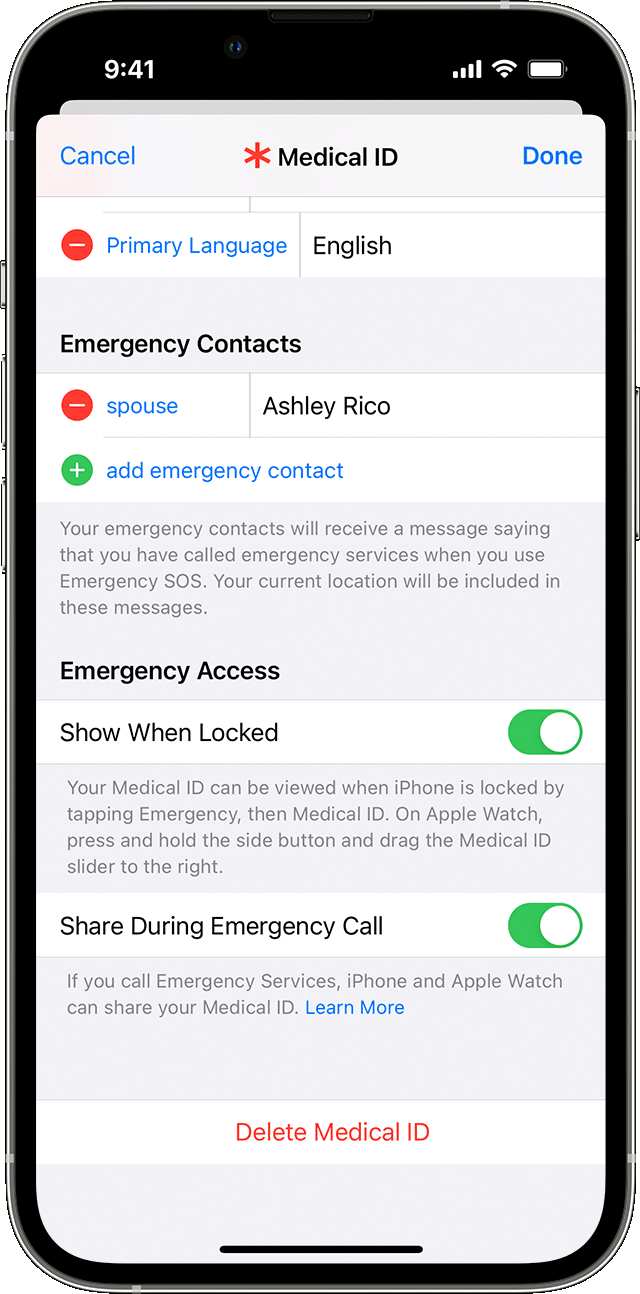
Probably you have removed all emergency Contacts from your Medical ID under the Health App


Add emergency contacts

  1. Open the Health app and tap your profile picture .
  2. Tap Medical ID.
  3. Tap Edit, then scroll to Emergency Contacts.
  4. Tap the Add button  to add an emergency contact.
  5. Tap a contact, then add their relationship.
  6. Tap Done to save your changes.

You can't set emergency services as an SOS contact.

Set up your Medical ID in the Health app


Remove emergency contacts

  1. Open the Health app and tap your profile picture .
  2. Tap Medical ID.
  3. Tap Edit, then scroll to Emergency Contacts.
  4. Tap the Delete button  next to a contact, then tap Delete.
  5. Tap Done to save your changes.

20 replies

This thread has been closed by the system or the community team. You may vote for any posts you find helpful, or search the Community for additional answers.

How do I remove the “Get Help During an Emergency” notification badge on the Settings app?

Welcome to Apple Support Community
A forum where Apple customers help each other with their products. Get started with your Apple Account.