
My iPhone has started losing contacts since I updated 16.1.1. Has anyone else seen that?
My iPhone has started losing contacts since I updated 16.1.1. Has anyone else seen that?
iPhone 13, iOS 16
My iPhone has started losing contacts since I updated 16.1.1. Has anyone else seen that?
iPhone 13, iOS 16
Hello vanita247,
Thank you for reaching out to Apple Support Communities, and we'll be happy to help in any way we can. We understand you're having issues with contacts since updating your iPhone. Do you sync your contacts with iCloud? If so, try the steps listed here: If your iCloud Contacts, Calendars, or Reminders won’t sync - Apple Support
"Things to check first
Try the steps for your device
If you still need help, try the steps for your device below.

iOS 13 and iPadOS or later
After each step, check your contacts, calendars, or reminders.
Restart the Contacts, Calendar, or Reminders app
Refresh your contacts and calendars
To refresh your contacts, open the Contacts app and swipe down on the list. To refresh your contact groups, tap Groups in the upper-left corner, then swipe down on the list.
To refresh your calendars:
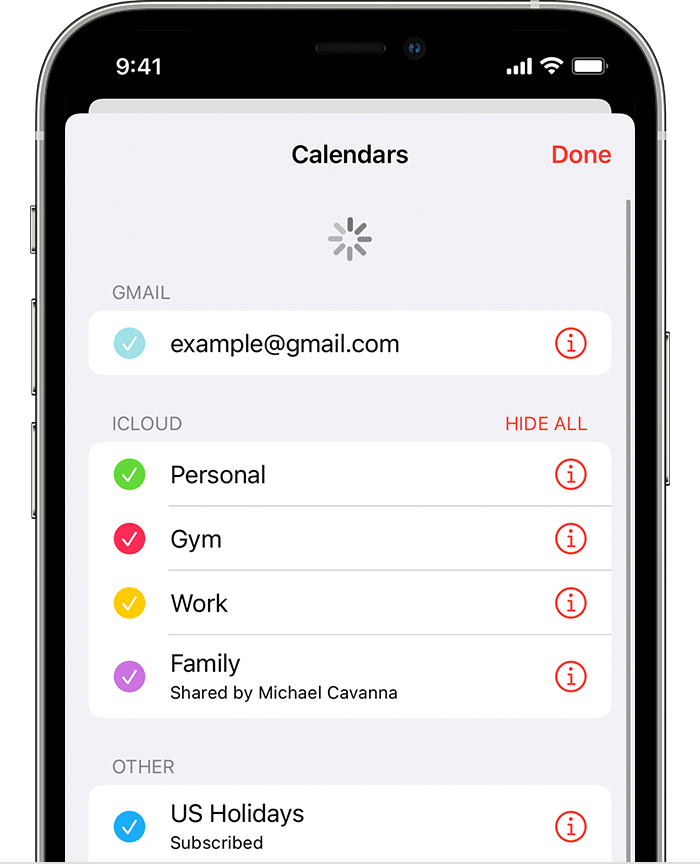
Check your app settings
If you use multiple groups or accounts in the Contacts or Calendars app, make sure that your iCloud Contacts and Calendars are set to appear:
Change how often your calendars update:
Since the iCloud Birthdays calendar updates daily, changes to birthdays might not appear in the Calendars app until the next day.
Set iCloud Contacts, Calendars, or Reminders as your default
If your contacts, calendars, and reminders are in iCloud, then iCloud automatically updates your information. If your information is in a third-party account, like Google or Yahoo, you can change your default account to iCloud. Changing your default account to iCloud won't move your existing information from a third-party service to iCloud.
Contacts
To see which account your contacts are in:
Set iCloud as the default account for your contacts:
If you still need help
If you still need help, contact Apple Support. "
We hope this helps.
Cheers!
Hello vanita247,
Thank you for reaching out to Apple Support Communities, and we'll be happy to help in any way we can. We understand you're having issues with contacts since updating your iPhone. Do you sync your contacts with iCloud? If so, try the steps listed here: If your iCloud Contacts, Calendars, or Reminders won’t sync - Apple Support
"Things to check first
Try the steps for your device
If you still need help, try the steps for your device below.
iOS 13 and iPadOS or later
After each step, check your contacts, calendars, or reminders.
Restart the Contacts, Calendar, or Reminders app
Refresh your contacts and calendars
To refresh your contacts, open the Contacts app and swipe down on the list. To refresh your contact groups, tap Groups in the upper-left corner, then swipe down on the list.
To refresh your calendars:
Check your app settings
If you use multiple groups or accounts in the Contacts or Calendars app, make sure that your iCloud Contacts and Calendars are set to appear:
Change how often your calendars update:
Since the iCloud Birthdays calendar updates daily, changes to birthdays might not appear in the Calendars app until the next day.
Set iCloud Contacts, Calendars, or Reminders as your default
If your contacts, calendars, and reminders are in iCloud, then iCloud automatically updates your information. If your information is in a third-party account, like Google or Yahoo, you can change your default account to iCloud. Changing your default account to iCloud won't move your existing information from a third-party service to iCloud.
Contacts
To see which account your contacts are in:
Set iCloud as the default account for your contacts:
If you still need help
If you still need help, contact Apple Support. "
We hope this helps.
Cheers!
Yes I’m experiencing the same issue… including my own details - very frustrating to say the least
My iPhone has started losing contacts since I updated 16.1.1. Has anyone else seen that?


