Move I tunes media folder location

Hello all, please excuse my ignorance.


  1. I am a PC user
  2. I have i tunes on my PC
  3. I also have an extensive Classical CD collection that I ripped and organized using i tunes ( I play through a Sonos system that I love)
  4. I still buy CD's (sue me )
  5. My Goals:
    1. I want to copy over my entire itunes library to my NAS (success)
    2. I want to move the media folder location permanently to the NAS, but it keeps reverting back to the original C drive path
    3. I want to free up my space on my PC and with each new modification of my i tunes library, I want to rip and modify the i tunes library on my NAS only

Is this possible? Thanks for any and all help


Warren

Posted on Nov 20, 2022 5:49 AM

Reply
Question marked as Top-ranking reply

Posted on Nov 23, 2022 5:08 AM

Hi Warren,


There is a bug in recent builds of iTunes (make that 3 years now) that, at least for some users, seems to stop the media folder preference from being saved properly. See Make a split library portable - Apple Community and put your library in a shape that isn't affected by the issue, and is easier to backup and move around in future.


iTunes isn't guaranteed to play nicely with NAS, and iTunes performance will drop if the active .itl file is stored on the NAS. I'd recommend putting the library on a locally connected external drive in the portable layout, which you then clone to your NAS for backup/and or for use as a shared network copy of your library.


tt2

Similar questions

3 replies
Question marked as Top-ranking reply

Nov 23, 2022 5:08 AM in response to WarrenRN

Hi Warren,


There is a bug in recent builds of iTunes (make that 3 years now) that, at least for some users, seems to stop the media folder preference from being saved properly. See Make a split library portable - Apple Community and put your library in a shape that isn't affected by the issue, and is easier to backup and move around in future.


iTunes isn't guaranteed to play nicely with NAS, and iTunes performance will drop if the active .itl file is stored on the NAS. I'd recommend putting the library on a locally connected external drive in the portable layout, which you then clone to your NAS for backup/and or for use as a shared network copy of your library.


tt2

Nov 22, 2022 10:18 AM in response to WarrenRN

Hello WarrenRN,


Thank you for reaching out to Apple Support Communities.


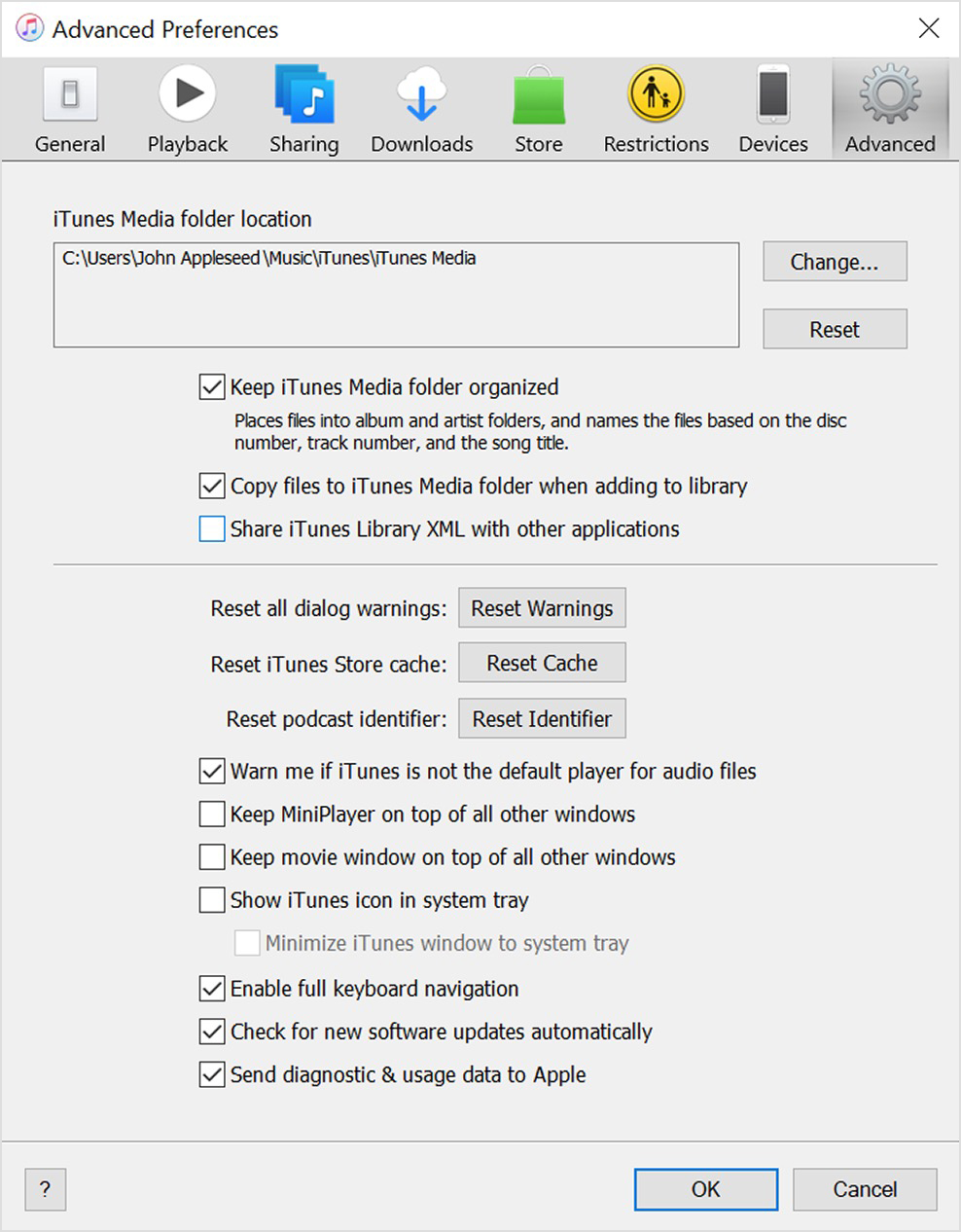
You can move your iTunes Media folder to your external hard drive and then change the location using  Edit > Preferences > Advanced preferences > Change.


These steps may help you locate it:


"Find the iTunes Media folder

By default, your iTunes Media folder is in your iTunes folder. To find it, go to User > Music > iTunes > iTunes Media.

If you don't see your iTunes Media folder in the above location, here's how to find it:

  1. Open iTunes.
  2. From the menu bar at the top of the iTunes window, choose Edit > Preferences.
  3. Click the Advanced tab.Advanced Preferences screen showing iTunes Media folder location
  4. Look in the box under "iTunes Media folder location" for the location of your iTunes Media folder."


More details can be found here: Back up and restore your iTunes library on your PC


Hopefully this helps. Let us know if you run into any issues.


Cheers!


This thread has been closed by the system or the community team. You may vote for any posts you find helpful, or search the Community for additional answers.

Move I tunes media folder location

Welcome to Apple Support Community
A forum where Apple customers help each other with their products. Get started with your Apple Account.