Memory leak on new (2021) iMac 24 with 16gb of memory , 2tb ssd.

I also have memory leak on a new Mac running Ventura. I have been trying to sync a large library of pictures to Lightroom Classic and it keeps generating the message that all system memory has been used and it presents a list of apps to force quit. I have to quit Lightroom, come back and sync for another 1/2 hour or so until I again get the same message. Lightroom usage gets up to over 6 gob.


Regarding the response to the other similar post:


1) the i24 can’t be upgraded to more than 16gb of memory,

2) My start up disk is 2tb and approximately 1.8 gob are available so it is not a lack of space,

3) There are numerous other posts regarding this same issue with the M1 chip.


Is Apple doing anything about this known issue and are there any workarounds?


Had I done my due diligence before buying the iMac 24, I wouldn’t have bought it.


iMac (24-inch, M1, 2021, 2 ports)

Posted on Nov 20, 2022 9:59 PM

Reply
3 replies

Nov 23, 2022 8:38 AM in response to Jim Lord

Hi Jim Lord,


It sounds like you've isolated this behavior to the Adobe Lightroom application on your iMac. Syncing a large library or amount of 50,000 photos into Lightroom would result in more memory being used on the Mac. Selecting a smaller amount of photos would achieve your goal, as you've determined.


We'd recommend partnering with Adobe Support to work through this issue with their app. You can do this by following the steps outlined here: How to contact an app developer - Apple Support


Contact the developer of a macOS app

1. Open the App Store on your Mac.

2. Click the sign-in button  or your photo.
 
3. A list of apps appears. Click the app that you want. If you can't find the app, use the search bar.

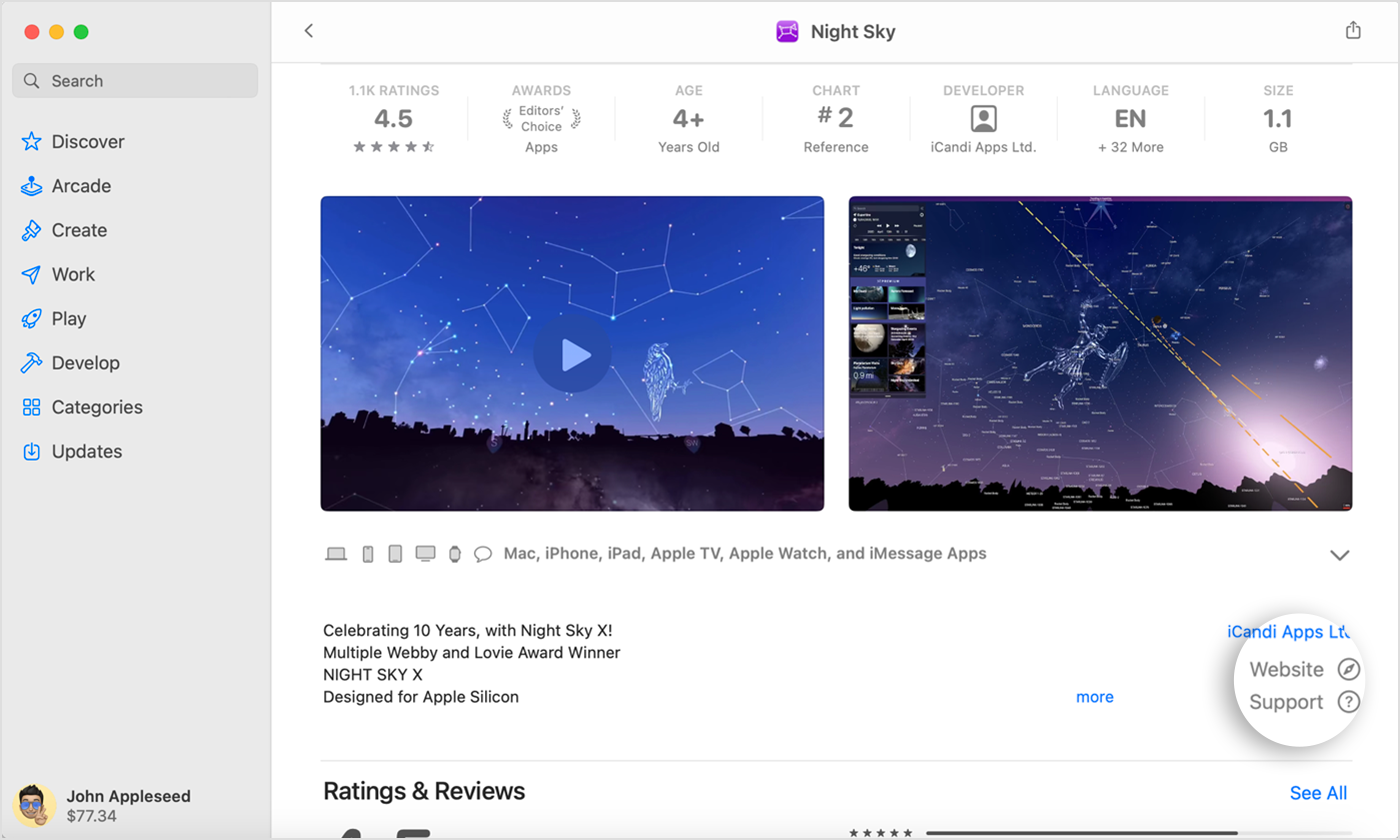
4. The app's product page appears. Click Support or App Support. If you don't see Support or App Support, make sure that you're signed in with the correct Apple ID.

In the App Store on Mac, find the Support or App Support button near the ratings and reviews.


Wishing you well, take care.

Nov 22, 2022 4:20 PM in response to Jim Lord

Hey there Jim,


We wanted to confirm our understanding of what's happening, along with ruling out some basics:


  1. You mentioned that this occurs in Adobe Lightroom Classic when trying to load a large library into the app, but how large is this library, and have you tried loading the library in sections instead of the whole thing at once?
  2. Sometimes unexpected behavior can be resolved with a restart. Check out the section 'Restart' here: Log out, sleep, wake, restart, or shut down your Mac
  3. We recommend making sure that all apps are up to date: How to manually update apps on your Apple device
  4. You also mentioned running macOS Ventura, but the latest version for it would be macOS Ventura 13.0.1. You can verify this by clicking on the Apple logo at the top left corner of the screen, then on ‘About This Mac’. In case you needed it, this link shows how to first back up, then Update macOS on Mac.


Cheers!

Nov 22, 2022 9:03 PM in response to bruno75

Bruno75,

In answer to your questions:


  1. I am trying to sync a library of approximately 50,000 pictures from Adobe Creative Cloud to Lightroom Classic. I have been forced to to break it into many chunks by the constant "running out of memory" alerts I get.
  2. Yes, I have logged out, slept and restarted. I feel better but the problem is still there.
  3. All apps are up to date. In fact, based on an Adobe rep's advice I have uninstalled Lightroom Classic and then done a fresh, clean install, to no avail.
  4. I confirmed that I am on macOS Venture 13.0.01


For the last few days I have had the activity monitor running constantly, tracking the memory usage. I have come to the conclusion that Lightroom Classic is the offending app. Even when I pause the syncing, the memory leakage problem continues, albeit at a slower pace.


There are a LOT of Adobe users who have had similar issues with the M1 chip. It looks like the problem may be with Adobe, and not Apple. Although Adobe certifies that Lightroom runs on the M1, I think they left out the fact that it doesn't run well.


Other than Lightroom Classic, my 24" iMac runs great and I'm very happy with it. However, had I know that I would have memory issues such as I am having, I would not have purchased a machine which limits the memory to 16gb. That was a big mistake on my part.


Thank you,


This thread has been closed by the system or the community team. You may vote for any posts you find helpful, or search the Community for additional answers.

Memory leak on new (2021) iMac 24 with 16gb of memory , 2tb ssd.

Welcome to Apple Support Community
A forum where Apple customers help each other with their products. Get started with your Apple Account.