
yahoo comments show no submit button in OSX 10.13.6 using a web browser

while logged into Yahoo account, about 4 weeks ago I lost the send/submit button that use to be below the lower right of the comment box once something is typed into the box. I am using Mac OSX 10.13.6 and Safari 13.1.2 but even stranger in FIrefox 107.0 It shows a button even if signed in with your name at the top of the yahoo window and says "sign up to post" but it does not work either. The account works on my newer laptop running Mojave OS. Everything else seems ok on yahoo mail and other web pages. I have popup blocker off, and javascript enabled with no content blockers on.

Mac mini, macOS 10.13

Posted on Nov 21, 2022 11:06 AM

Reply

Similar questions

3 replies

Nov 23, 2022 11:11 AM in response to Ralph DeMartino

Hello Ralph DeMartino,


We understand that when signed in your Yahoo account in Safari, you do not have the option to submit comments. We'd like to provide you with a few steps that can help when Safari is not working as expected:


1. Check Safari extensions
If you installed any Safari extensions, make sure that they are up to date.
You can also try turning extensions off. From the menu bar in Safari, choose Safari > Settings (or Preferences). Click Extensions, then deselect the checkbox for each extension to turn it off. Learn more about Safari extensions

2. Check Safari settings
The webpage might not be compatible with one or more browser settings, which you can turn on or off as needed. From the menu bar in Safari, choose Safari > Settings (or Preferences). Then click Websites, Privacy, or Security to access these settings:
Websites settings. These settings can be configured for specific websites.
Privacy settings. These settings apply to all websites.
Security settings. These settings apply to all websites. 

3. Test with a private window 
A website can store cookies, caches, and other data on your Mac, and issues with that data can affect your use of the website. To prevent the website from using that data, view it in a private window. From the menu bar in Safari, choose File > New Private Window, or press Shift-Command-N.
If that works, use the following steps to remove the website's data, including its caches and cookies. The website can then create new data as needed. If it's a website that you sign in to, make sure that you know your sign-in information before continuing.
1. Choose Safari > Settings (or Preferences), then click Privacy.
2. Click Manage Website Data.
3. Select the affected website from the list shown.
4. Click Remove.
5. Click Done.
6. Open the website again in a non-private browser window.

More details here: If Safari on Mac doesn't open a webpage or isn’t working as expected


4. Clear cookies in Safari on Mac

1. In the Safari app  on your Mac, choose Safari > Settings, then click Privacy.
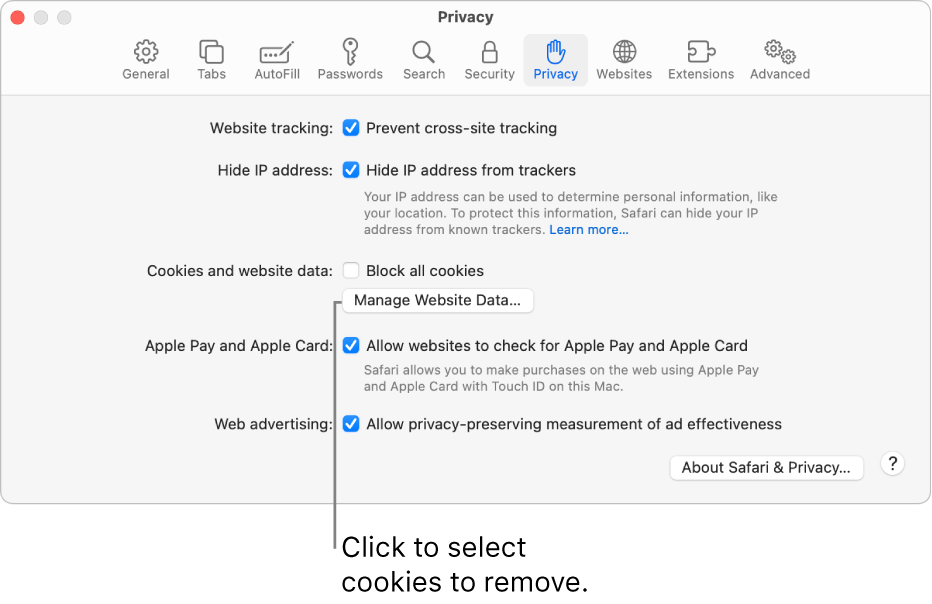
The Privacy pane of Safari settings.
2. Click Manage Website Data.
3. Select one or more websites, then click Remove or Remove All.
Removing the data may reduce tracking, but may also log you out of websites or change website behavior.


Let us know if this helps.

All the best!

Nov 23, 2022 12:50 PM in response to Grace2211

the first thing I did was empty the cache, I rather not dump all my cookies as I would have to re-enter all my login stuff and everything else seems to work. no go in private window anyway, same look, no reply button. something changed in yahoo. it use to show a reply button even before you put some text comments in the box, but now no reply button in Safari or FireFox and SeaMonkey is even worse no comments at all. In Mavrick once you put text in the comment box the reply button shows.

This thread has been closed by the system or the community team. You may vote for any posts you find helpful, or search the Community for additional answers.

yahoo comments show no submit button in OSX 10.13.6 using a web browser

Welcome to Apple Support Community
A forum where Apple customers help each other with their products. Get started with your Apple Account.