Inconsistent battery charging

Apparently, my charger been acting weird lately! The battery would go backwards instead of Forward, and a few minutes ago it went from 7 to 10 , and 10 to 14. Should I get a new battery or something?


[Re-Titled by Moderator]

iPhone 12 Pro, iOS 16

Posted on Nov 21, 2022 3:14 PM

Reply
Question marked as Top-ranking reply

Posted on Nov 23, 2022 1:18 PM

Hello Mxkiyah,


For difficulties with charging your iPhone consistently you'll want to take the steps below:


1. Check your charging cable and USB adapter for signs of damage, like breakage or bent prongs. Don't use damaged accessories.
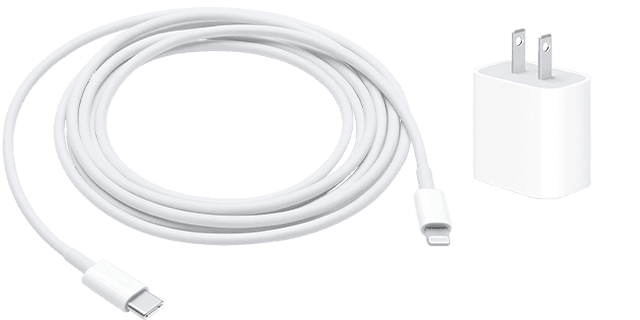
Lightning to USB and a USB-C wall adapter

2. Use a wall power outlet and check for firm connections between your charging cable, USB wall adapter, and wall outlet or AC power cable, or try a different outlet. 
3. Remove any debris from the charging port on the bottom of your device, then firmly plug your charging cable into your device. If the charging port is damaged, your device probably needs service.
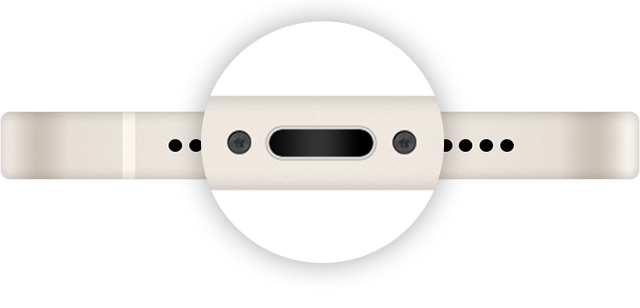
Image of the charging port.
4. Let your device charge for a half hour.


You can also find those steps in this resource: If your iPhone or iPod touch won't charge - Apple Support


Should that still persist, are you able to try charging your iPhone with another cable, USB power adapter or wall outlet? That should help to further isolate this behavior.


Let us know your results, and we'll keep moving forward from there.

1 reply
Question marked as Top-ranking reply

Nov 23, 2022 1:18 PM in response to Mxkiyah

Hello Mxkiyah,


For difficulties with charging your iPhone consistently you'll want to take the steps below:


1. Check your charging cable and USB adapter for signs of damage, like breakage or bent prongs. Don't use damaged accessories.
Lightning to USB and a USB-C wall adapter

2. Use a wall power outlet and check for firm connections between your charging cable, USB wall adapter, and wall outlet or AC power cable, or try a different outlet. 
3. Remove any debris from the charging port on the bottom of your device, then firmly plug your charging cable into your device. If the charging port is damaged, your device probably needs service.

Image of the charging port.
4. Let your device charge for a half hour.


You can also find those steps in this resource: If your iPhone or iPod touch won't charge - Apple Support


Should that still persist, are you able to try charging your iPhone with another cable, USB power adapter or wall outlet? That should help to further isolate this behavior.


Let us know your results, and we'll keep moving forward from there.

This thread has been closed by the system or the community team. You may vote for any posts you find helpful, or search the Community for additional answers.

Inconsistent battery charging

Welcome to Apple Support Community
A forum where Apple customers help each other with their products. Get started with your Apple Account.