iPad Pro 12.9 (6th Gen) iOS 16.1.1 Constant Random App Freezing leading to hard restart

I’ve got a new iPad Pro, it runs great but occasionally some of the apps stop to load past its splash screen & then the experience declines from there. After trying to start a few apps like Instagram, formula one, steam, Files, they don’t go past the splash screen (in case of Files, the app froze on the last folder I opened) and a few minutes later the app freezes completely, not allowing me to get back to the homepage. I can only pull the notifications shade at this point. Pressing the current notifications doesn’t do anything either. Nothing in the control Center works too. The only option is a hard restart I.e. quickly tapping volume up, then volume down and holding the power button until it restarts. This is 4th time it’s happened in a weeks use. I’ve tried resetting the settings to no avail and I don’t stress the iPad, have hardly 3 apps in memory. This is a very serious issue. Any pointers to get this permanently fixed or an Apple dev that can make sure a fix for this is out? There’s nothing on the internet regarding this strange issue or help. There are a lot of analytic/bug reports that seem to be made not sure if that’s a good thing or if it could help.

iPad Pro, 16

Posted on Nov 22, 2022 9:41 PM

Reply
Question marked as Top-ranking reply

Posted on Dec 3, 2022 7:59 AM

Thanks Sean_B1 for the suggestion but all that does is remove it from a freeze & not fix the root cause (as it kept happening again). One thing that did work however was flashing (updating) iPadOS using iTunes on my laptop.


I recommend anyone having the same issue to try an “update” through iTunes. You will need to put your device in recovery mode. Here are the steps for the same: If you can't update or restore your iPad - Apple Support


I have a feeling the update to iOS 16.1 wasn’t clean & must’ve broken something. I’ve come across a lot of other hitches during my use but nothing as severe as the hard freezes. Since the fix above, I’ve not had this issue come up again, thankfully.


If an Apple employee is watching, I do hope a fix for this is in the works. Thanks for all the help!


Cheers,


Similar questions

3 replies
Question marked as Top-ranking reply

Dec 3, 2022 7:59 AM in response to Sean_B1

Thanks Sean_B1 for the suggestion but all that does is remove it from a freeze & not fix the root cause (as it kept happening again). One thing that did work however was flashing (updating) iPadOS using iTunes on my laptop.


I recommend anyone having the same issue to try an “update” through iTunes. You will need to put your device in recovery mode. Here are the steps for the same: If you can't update or restore your iPad - Apple Support


I have a feeling the update to iOS 16.1 wasn’t clean & must’ve broken something. I’ve come across a lot of other hitches during my use but nothing as severe as the hard freezes. Since the fix above, I’ve not had this issue come up again, thankfully.


If an Apple employee is watching, I do hope a fix for this is in the works. Thanks for all the help!


Cheers,


Nov 24, 2022 1:08 PM in response to Apple_Potato

Hello Apple_Potato,


We would like to see how we can help you with your new iPad. Did you set the iPad up as a brand new device or restore from a backup? Let's check the storage available for the device currently. Go to Settings > General > iPad Storage. For future reference, if this happens again, just follow the steps in this link: If your iPad won't turn on or is frozen - Apple Support


"On your iPad without a Home button

  1. Press and quickly release the volume button closest to the top button.
  2. Press and quickly release the volume button farthest from the top button.
  3. Press and hold the top button until the device begins to restart.
  4. If your iPad doesn't turn on, follow these steps to check your hardware and charge your device. You might need to charge for up to an hour.
  5. If your iPad still doesn't turn on, contact Apple Support.

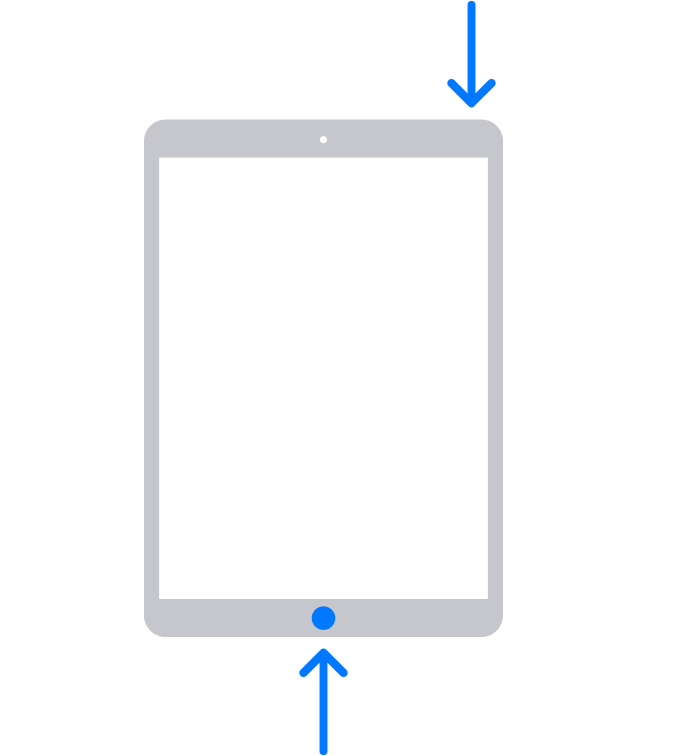
On your iPad with a Home button

  1. Press and hold both the Home button and the top button until you see the Apple logo.
  2. An iPad with arrows pointing to the Home button and the top button.
  3. If your iPad doesn't turn on, follow these steps to check your hardware and charge your device. You might need to charge for up to an hour.
  4. If your iPad still doesn't turn on, contact Apple Support."


Cheers!


Jan 12, 2023 6:47 AM in response to Apple_Potato

Okay so what I thought was the “Best answer” didn’t work out long term. I still ended up getting constant freezes for no reason! I waited for the iOS 16.2 stable update and updated to that version… still random freezes!!


This is how it goes down not much different from before:

-When I start using the iPad, things appear normal, especially the apps still in memory/task manager

-As soon as I start either a first or third party app… the app hangs on the splash screen or works for a brief while before freezing.

-The iPad experience degrades from there in a couple of seconds, soon everything freezes, cannot open the control panel or go back home. I can however still open the notification shade but cannot click on any notifications everything is busted.

-I have to hard restart/reset my iPad to get it back to normal.


What is causing this issue? There must be something more than just hard resetting it. Clearly this bug wasn’t fixed in the update. Is there a way I can reach Apple’s Dev’s or any other methods to fix this?

This thread has been closed by the system or the community team. You may vote for any posts you find helpful, or search the Community for additional answers.

iPad Pro 12.9 (6th Gen) iOS 16.1.1 Constant Random App Freezing leading to hard restart

Welcome to Apple Support Community
A forum where Apple customers help each other with their products. Get started with your Apple Account.