Pill Reminder needs some update

I use pill reminder to remind me take medication, and it is so useful because I need to take my pill on time. However, I just realized that the app doesn't adjust for summer time and winter time. Can anyone tell me how to set or it doesn't have this options?

Posted on Nov 24, 2022 6:01 PM

Reply
Question marked as Top-ranking reply

Posted on Nov 26, 2022 2:41 PM

Hi RealAlan,


Thanks for contacting Apple Support Communities!


We understand that you're unable to adjust the time in your Pill Reminder app.


Since this app isn't developed by Apple, we'd suggest that you contact the app developer directly to help you to adjust the time within their app. If you need help to locate their contact details, you can reference this article for instructions: How to contact an app developer - Apple Support


You can also use the Reminders app which is part of the iOS as well if you'd like. This is a handy resource which will show you how to set up reminders and keep them updated across your devices: Use Reminders on your iPhone, iPad, or iPod touch - Apple Support


Create a reminder
1. Open the Reminders app.
2. Tap + New Reminder, then type your reminder.
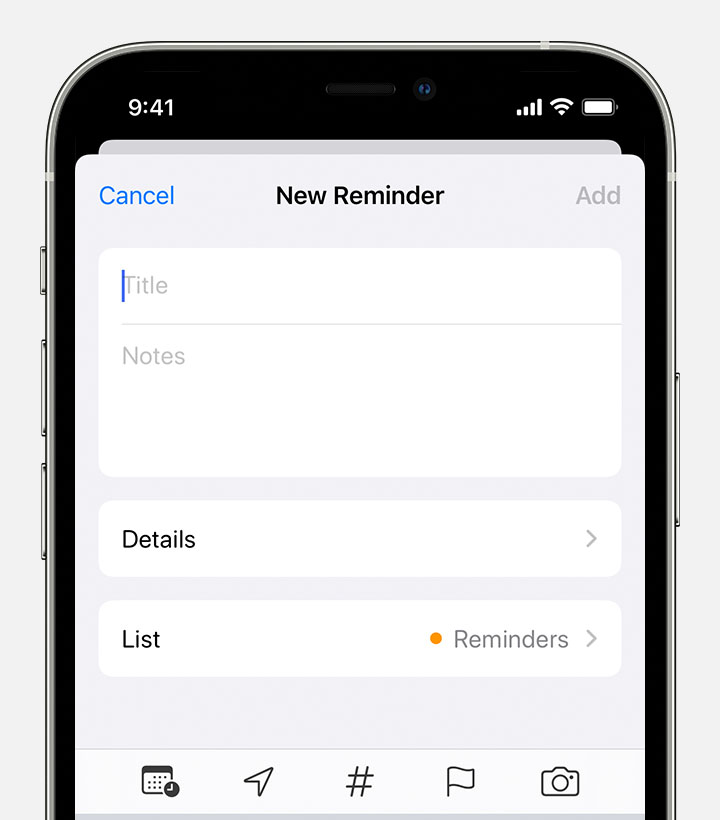
An iPhone showing the New Reminder screen, where you can add a title, notes, and other details to create a reminder.
You can also add reminders to your most important to-do lists from the Reminders widget on your Home Screen.


We hope this helps.


Cheers!

3 replies
Question marked as Top-ranking reply

Nov 26, 2022 2:41 PM in response to RealAlan

Hi RealAlan,


Thanks for contacting Apple Support Communities!


We understand that you're unable to adjust the time in your Pill Reminder app.


Since this app isn't developed by Apple, we'd suggest that you contact the app developer directly to help you to adjust the time within their app. If you need help to locate their contact details, you can reference this article for instructions: How to contact an app developer - Apple Support


You can also use the Reminders app which is part of the iOS as well if you'd like. This is a handy resource which will show you how to set up reminders and keep them updated across your devices: Use Reminders on your iPhone, iPad, or iPod touch - Apple Support


Create a reminder
1. Open the Reminders app.
2. Tap + New Reminder, then type your reminder.
An iPhone showing the New Reminder screen, where you can add a title, notes, and other details to create a reminder.
You can also add reminders to your most important to-do lists from the Reminders widget on your Home Screen.


We hope this helps.


Cheers!

This thread has been closed by the system or the community team. You may vote for any posts you find helpful, or search the Community for additional answers.

Pill Reminder needs some update

Welcome to Apple Support Community
A forum where Apple customers help each other with their products. Get started with your Apple Account.
