Change font size on Lock Screen

How do I change the font size on my Lock Screen


iPhone 6, iOS 12

Posted on Nov 25, 2022 5:20 AM

Reply
Question marked as Top-ranking reply

Posted on Nov 26, 2022 1:50 PM

Hey cdwi,


If you'd like to customize your Lock Screen you'll need iOS 16 which if you have an iPhone 6 is not supported.


If you do have a device capable of running iOS 16, see the tips here on customizing your Lock Screen:


"Create a custom Lock Screen

  1. Touch and hold the Lock Screen until the Customize button appears at the bottom of the screen.
  2. If the Customize button doesn’t appear, touch and hold the Lock Screen again, then enter your passcode.
  3. Tap the Add New button at the bottom of the screen.
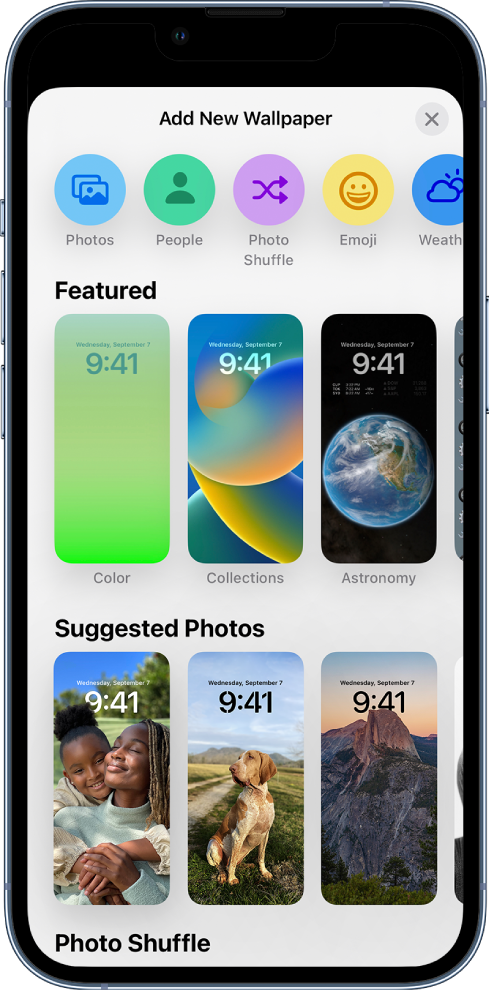
  4. The Lock Screen wallpaper gallery appears.
  5. The Add New Wallpaper screen showing a gallery of wallpaper choices for customizing the iPhone Lock Screen, in categories such as Featured, Suggested Photos, and Photo Shuffle. At the top are buttons for adding photos, people, a photo shuffle, emoji, and a weather screen background to the Lock Screen.
  6. Tap one of the wallpaper options to select it as your Lock Screen.
  7. For some wallpaper choices, you can swipe left or right to try different color filters, patterns, and fonts that complement each other.
  8. Tap Add, then do one of the following:
    • Choose whether to use the wallpaper on both the Lock Screen and Home Screen: Tap Set as Wallpaper Pair.
    • Make further changes to the Home Screen: Tap Customize Home Screen. Tap a color to change the wallpaper color, tap the Photo On Rectangle button to use a custom photo, or select Blur to blur the wallpaper so the apps stand out."


Cheers!

1 reply
Question marked as Top-ranking reply

Nov 26, 2022 1:50 PM in response to cdwi

Hey cdwi,


If you'd like to customize your Lock Screen you'll need iOS 16 which if you have an iPhone 6 is not supported.


If you do have a device capable of running iOS 16, see the tips here on customizing your Lock Screen:


"Create a custom Lock Screen

  1. Touch and hold the Lock Screen until the Customize button appears at the bottom of the screen.
  2. If the Customize button doesn’t appear, touch and hold the Lock Screen again, then enter your passcode.
  3. Tap the Add New button at the bottom of the screen.
  4. The Lock Screen wallpaper gallery appears.
  5. The Add New Wallpaper screen showing a gallery of wallpaper choices for customizing the iPhone Lock Screen, in categories such as Featured, Suggested Photos, and Photo Shuffle. At the top are buttons for adding photos, people, a photo shuffle, emoji, and a weather screen background to the Lock Screen.
  6. Tap one of the wallpaper options to select it as your Lock Screen.
  7. For some wallpaper choices, you can swipe left or right to try different color filters, patterns, and fonts that complement each other.
  8. Tap Add, then do one of the following:
    • Choose whether to use the wallpaper on both the Lock Screen and Home Screen: Tap Set as Wallpaper Pair.
    • Make further changes to the Home Screen: Tap Customize Home Screen. Tap a color to change the wallpaper color, tap the Photo On Rectangle button to use a custom photo, or select Blur to blur the wallpaper so the apps stand out."


Cheers!

This thread has been closed by the system or the community team. You may vote for any posts you find helpful, or search the Community for additional answers.

Change font size on Lock Screen

Welcome to Apple Support Community
A forum where Apple customers help each other with their products. Get started with your Apple Account.