
email settings
I cannot successfully dd an email account to mail with the correct settings.I need answers why this continues to happen
iPhone 12 Pro, iOS 16
I cannot successfully dd an email account to mail with the correct settings.I need answers why this continues to happen
iPhone 12 Pro, iOS 16
Hey there, and welcome to Apple Support Communities agreen22,
We can certainly understand your concern and see you came to us from the article Find the serial number of your Apple product.
We recommend checking out these steps for more information on how to add an email to the mail app and see if it matches up with your procedures.
" How to set up your email account manually
If you need to set up your email account manually, make sure that you know the email settings for your account. If you don’t know them, you can look them up or contact your email provider. Then follow these steps:
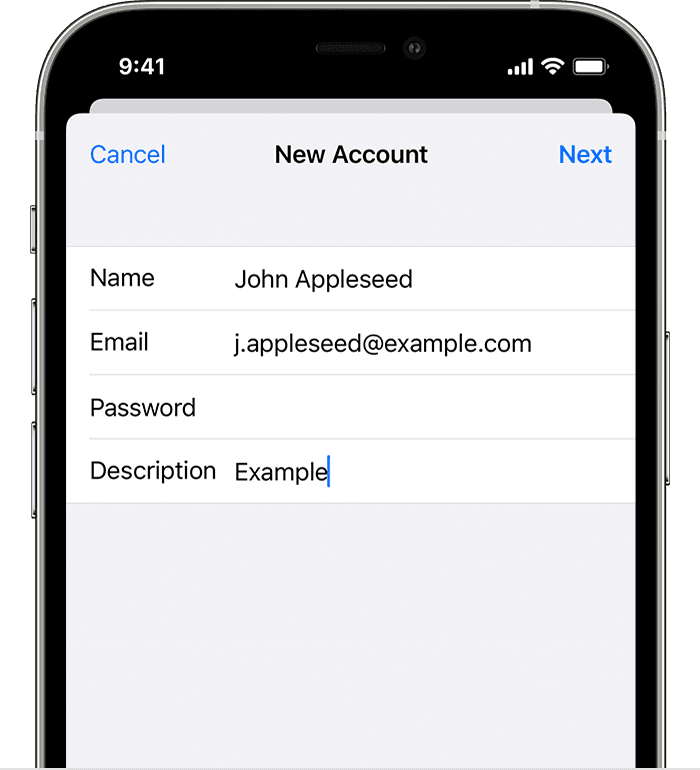
4. Tap Next. Mail will try to find the email settings and finish your account setup. If Mail finds your email settings, tap Done to complete your account setup.

Enter account settings manually
If Mail can't find your email settings, then you need to enter them manually. Tap Next, then follow these steps:

3. If your email settings are correct, tap Save to finish. If the email settings are incorrect, you'll be asked to edit them.
If you still can't set up your email account or save your email settings, contact your email provider. "
For additional information, check out this link: Add an email account to your iPhone, iPad, or iPod touch - Apple Support
These steps will help ensure your device is working with ease and can fix common issues like the ones you’re experiencing.
Kindest regards!
Hey there, and welcome to Apple Support Communities agreen22,
We can certainly understand your concern and see you came to us from the article Find the serial number of your Apple product.
We recommend checking out these steps for more information on how to add an email to the mail app and see if it matches up with your procedures.
" How to set up your email account manually
If you need to set up your email account manually, make sure that you know the email settings for your account. If you don’t know them, you can look them up or contact your email provider. Then follow these steps:
4. Tap Next. Mail will try to find the email settings and finish your account setup. If Mail finds your email settings, tap Done to complete your account setup.
Enter account settings manually
If Mail can't find your email settings, then you need to enter them manually. Tap Next, then follow these steps:
3. If your email settings are correct, tap Save to finish. If the email settings are incorrect, you'll be asked to edit them.
If you still can't set up your email account or save your email settings, contact your email provider. "
For additional information, check out this link: Add an email account to your iPhone, iPad, or iPod touch - Apple Support
These steps will help ensure your device is working with ease and can fix common issues like the ones you’re experiencing.
Kindest regards!
email settings

