
Can I change the length, and what symbols it uses for my password as it is stored in keychain access?
I have stored my passwords in Keychain Access. Can I change the length, and what symbols it uses for my password?
iMac 24″, macOS 13.0
I have stored my passwords in Keychain Access. Can I change the length, and what symbols it uses for my password?
iMac 24″, macOS 13.0
Hello Rudy18,
Thank you for reaching out to Apple Support Communities, and we'll be happy to help in any way we can. We understand you'd like to manage your passwords on Mac in iCloud Keychain. Follow the steps listed here to manage your passwords: Manage passwords using keychains on Mac - Apple Support
"Keychain Access
You use the Keychain Access app on your Mac to view and manage your login and other keychains, and also the items securely stored in the keychains—for example, keys, certificates, passwords, account information, and notes. If you forget a password, you can find it in Keychain Access. Learn more about Keychain Access.
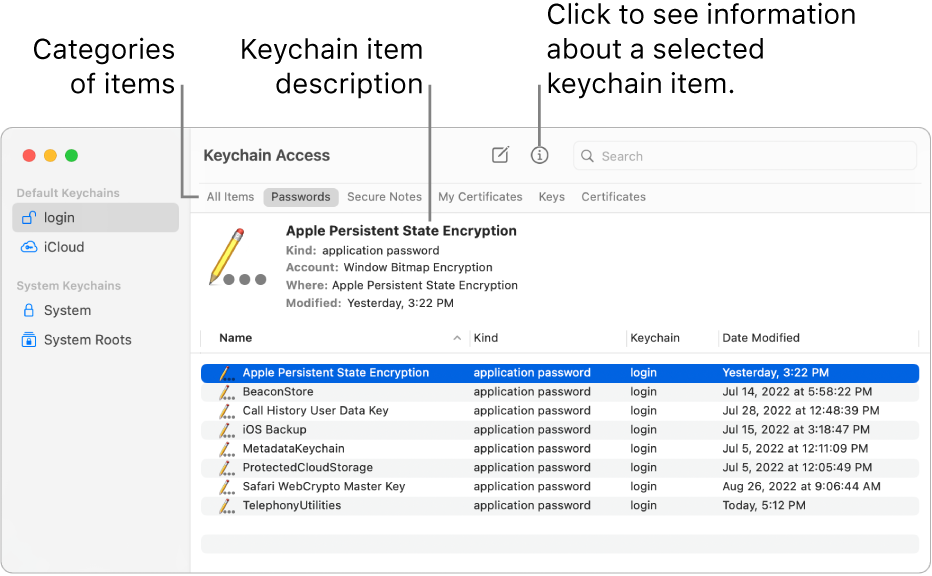
iCloud Keychain
If you use iCloud, you can have iCloud Keychain securely store the website login information and credit card information you use with AutoFill in Safari, and your Wi-Fi network information. iCloud Keychain automatically keeps that information up to date across all your Mac computers and iOS and iPadOS devices. iCloud Keychain also stores login information for the accounts you use in Mail, Contacts, Calendar, and Messages so it’s available on all your devices. Learn more about iCloud Keychain.
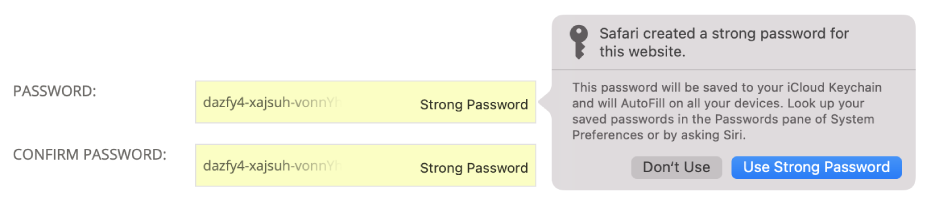
Tip: When you use passwords and credit cards online, you can let Safari store them in your keychain and automatically fill them in for you. If you also use iCloud Keychain on your Mac and iOS and iPadOS devices, Safari can fill in the stored information on any of your devices. See AutoFill credit card info.
See also
Learn how passwords are used on Mac
If you forget your login password on Mac
If you need to update your keychain password on Mac
Apple Support article: Set up iCloud Keychain"
We hope this helps.
Cheers!
You can't change the parameters of what the system recommends.
If you mean to change your iMac login you should go to Users & Groups in System Settings (Preferences)
It has NOTHING to do with it?? All I wanted is "Can I change the length, and what symbols it uses for my password?"
I'm not making myself clear. In the above example, can I change the length of the password, and/or the symbols it uses to make my password?
Can I change the length, and what symbols it uses for my password as it is stored in keychain access?



