Brand new iPad 9th. generation stuck on "Install Now" after setting up for the first time

Greetings Everyone,


I just removed my brand new 9th generation iPad and started the setup process. I chose the option to allow me to transfer everything from my older iPad 4th generation to the new iPad. After connecting the two iPads together I made sure they were on top of each other to make sure it satisfied the "near" requirement stated on the screen. It also had me connect to our WIFI network which it did successfully. It prompted me to update IOS which I started. It downloaded the software and prompted me to start the installation which I did. After an hour it told me the update required a network even though I have a fast network and the connection was strong so I pressed the Home button and reconnected to the network just to make sure everything was ok which is was. It now displayed a blue "Install Now" prompt with the progress icon showing action. After a while I thought maybe the icon was just a bug where they needed to refresh the icon display. I even tried tapping the "Install Now" and nothing happens. I went through this process at least 4 times now. I hade to reset the iPad to factory settings each time.


Please tell me why this is happening and how to get past the stuck "Install Now" prompt.


Thanks in advance.


iPad

Posted on Nov 27, 2022 10:34 AM

Reply
3 replies

Nov 27, 2022 10:47 AM in response to rleiman

As described, something has seemingly stalled.


If the iPad is unresponsive, connect your iPad to its Power Adapter and allow the iPad to charge. While still connected to external power, try a forced-restart:


Force restart iPad (models with Face ID or with Touch ID in the top button)

If your iPad doesn’t have the Home button, do the following:

  1. Press and quickly release the volume button nearest to the top button.
  2. Press and quickly release the volume button farthest from the top button.
  3. Press and hold the top button.
  4. When the Apple logo appears, release the top button.


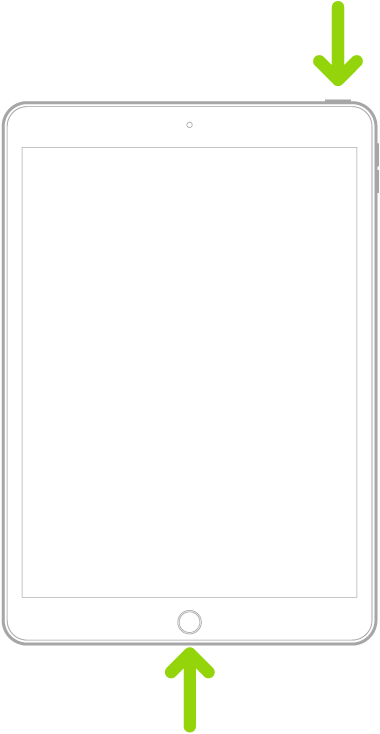
Force restart iPad (models with the Home button)

Press and hold the top button and the Home button at the same time. When the Apple logo appears, release both buttons.


If iPad still doesn’t turn on, or if it gets stuck during start up, see the Apple Support article If your iPhone, iPad, or iPod touch won’t turn on or is frozen. Or if your iPad isn’t working correctly after you restart it, see the iPad Support website.


If you continue to experience difficulties, you will need to seek assistance directly from from Apple Support. You can contact the Support Team using the Get Support link at top-right of this page. Alternatively, using another Apple device, you can initiate and manage your support cases using the excellent Apple Support App. If not already installed, the App can be downloaded from the App Store:

https://apps.apple.com/gb/app/apple-support/id1130498044


You might also visit the Genius Bar at your local Apple Store or Apple Authorised Service Provider (AASP) - where the technicians will be able to test and assess your iPad:

Genius Bar Reservation and Apple Support Options - Apple

Nov 29, 2022 4:25 AM in response to rleiman

I have bad and good news. First the bad. Using the default software on the new iPad, I had no success in automatically transferring my data and updating IOS on the device no matter how many times I tried. I can only guess the software to update the iPad was buggy.


Here's the good news. This is how I did it so I hope it will help anyone who got stuck like I did.


Update your iPhone, iPad or iPod touch with the Finder – Apple Support (UK)


Nov 27, 2022 11:52 AM in response to LotusPilot

Thanks for the reply.


The iPad is responsive because I can press the "Home" button and a dialog will be shown with several choices which are starting over, selecting a WIFI network, accessibility options, and to continue.


I chose to select the WIFI network several times and also to start over many times. It always gets stuck at the same place and the animated progress icon keep going.


I will also try doing a force start like in your reply later tonight and will let you know if it works.


Thanks again.

This thread has been closed by the system or the community team. You may vote for any posts you find helpful, or search the Community for additional answers.

Brand new iPad 9th. generation stuck on "Install Now" after setting up for the first time

Welcome to Apple Support Community
A forum where Apple customers help each other with their products. Get started with your Apple Account.