
red X when trying to run icloud on win 10
what is the problem and fix. used to work just fine now i cannot get around red x when trying to start win 10 Icloud.??
what is the problem and fix. used to work just fine now i cannot get around red x when trying to start win 10 Icloud.??
Hi jerrymed,
Is there a specific error message displayed when you see the "red x"?
The following might help:
"If you turned off Windows Media Features, or if your PC didn't come with Windows Media Player, iCloud for Windows won't install.
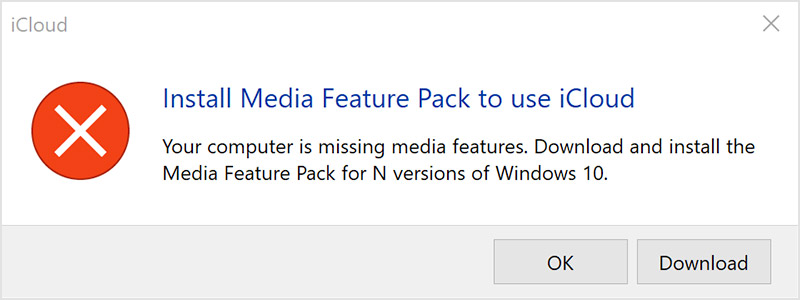
Turn on Windows Media Player
"
If you can't download or install iCloud for Windows - Apple Support
Cheers.
Hi jerrymed,
Is there a specific error message displayed when you see the "red x"?
The following might help:
"If you turned off Windows Media Features, or if your PC didn't come with Windows Media Player, iCloud for Windows won't install.
Turn on Windows Media Player
"
If you can't download or install iCloud for Windows - Apple Support
Cheers.
I had the same issue. It turned out to be that I had DNS filtering and outbound firewall rules in place. I turned off the dns filters and allowed all traffic outbound and it worked instantly. I was even able to turn both back on after the initial sign in and it continues to work.
I have been troubleshooting this for a few days now, since I had to revert windows versions (device mismatch with Win 11) and have found a work around. Not ideal, but if you reinstall an older version of iCloud it appears to be working for me now.
Read this thread can't log in to icloud for windows 11 - no error message - only an - Microsoft Community
Good luck
[Link Edited By Moderator]
I logged into my machine as a different user and iCloud for windows works perfectly. Sign out of that user and log back in as the original user and it fails miserably with the red X dialog.
This was working fine (except for passwords) prior to the last update on the MS Store. now it just fails.
I have deleted everything that has anything to do with apple and reinstalled it to no avail.
There has to be something somewhere causing the failure that is a remnant or corruption in a file.... something
same issue here. see the error in this thread. icloud for windows non descript error - Apple Community
I just used the app permission repair button. Got check mark beside. Tried to run Reset function. Got check mark. Tried to sign in same Red Box of Death.
Icloud will run if started on the net but will not run as application directly from windows.
jm
I did call Apple Support but they were of no assistance.
I have:
removed all apple products from my PC and deleted all associated directories
Obviously I have rebooted Many times.
Downloaded the software as directed on the Apple Page from the MS Store.
Installed said iCloud software
When I login I still get the Red X and cannot login.
I have not been able to find a solution.
Are there any other services that may be interfering here?
No message. Small box Red X. That is all. I have tried redownloading multiple times. I have even reset pc. I have win 10. It used to work. I added it as extension to edge though i try to avoid edge. No go.
as i say it used to work and i used the keychain to sign in. I did install win 11 buf immediately reversed it and went back to 10.
i am at a total loss.
i did look up authorities.
i run the exe as admin. Get long rectangular box saying cannot access. May not have appropriate permissions to access item.
i cannot change this authority.
so for now i have left this alone.
thanks. Jm
since i found this executable i believe authority may be an issue. The rex X lists the executable name but is is long and not fully displayed. Here goes.
cannot copy paste.
im typing on 4.7 iphone.
C:\Program Files\WindowsApps\AppleInciCloud_14.0162.0_x64_nzyj5cx40ttqa\iCloud\We……….
is the pointer to the exe but can go no farther in investigations.
i got iTunes to break also. had to reload it also... used an older version. new version would not sync.
looked around for old iCloud versions also. downloaded also multiple times...
No joy.
It is clear Apple has stopped supporting and developing Icloud. they removed it from iPhone some time ago.
they must have a large customer base for Itunes. only reason it still works..
gonna have to get away from APPLE.
i like Elon Musk. he is one of the good guys.
take care.
jman
I have media player. Like others i have tried everything available to me. Debugging these snippets of code among all these interlocking levels of coding is beyond my skills.
red X when trying to run icloud on win 10


