Hello Bigmind,
To make sure we're on the same page, are you taking the screenshot, cropping, then using Markup? Or are you cropping these screenshots in the Photos app? Are you taking these specific steps: Edit photos and videos on iPhone
Crop, rotate, or flip a photo or video
1. In Photos, tap a photo or video thumbnail to view it in full screen.
2. Tap Edit, tap  , then do any of the following:
- Crop manually: Drag the rectangle corners to enclose the area you want to keep in the photo, or you can pinch the photo open or closed.
- Crop to a standard preset ratio: Tap  , then choose an option such as square, 16:9, or 5:4.
- Rotate: Tap  to rotate the photo 90 degrees.
- Flip: Tap  to flip the image horizontally.
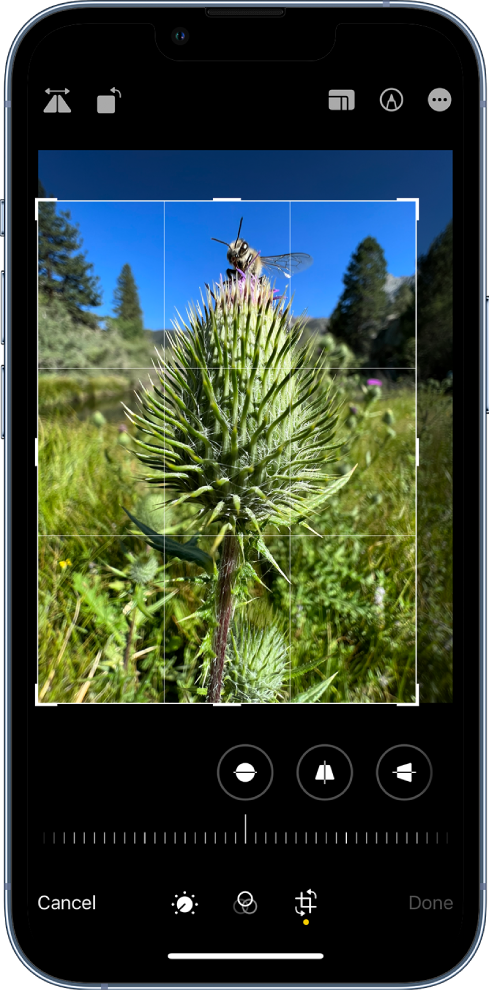
3. Tap Done to save your edits, or if you don’t like your changes, tap Cancel, then tap Discard Changes.
If you're following these steps and the cropping isn't saving or being shared, then it would be best to contact Apple directly: Apple Support
They'll need to take it from here.
Wishing you well, take care.


