Problem Report for Bridge OS

Hi,


I have a 2019 MacBook Pro running macOS Ventura v 13.0.1, and two things are happening:


1 - when in sleep mode it's having to reboot because of a problem - the report starts with: panic(cpu 0 caller 0xfffffff01e6bf578)


2 - the Touch Bar is flashing a bright light when I open the Mac after putting it into sleep mode


I haven't a clue what to do, and keep sending the reports to Apple, and in the meantime would like to know if anyone else has either of these issues, whether they are related, and / or what I can do about it ... ?


Thanks

MacBook Pro 13″, macOS 13.0

Posted on Nov 30, 2022 10:15 AM

Reply
Question marked as Top-ranking reply

Posted on Nov 30, 2022 10:39 AM

First give this a try: boot into Safe Mode according to How to use safe mode on your Mac and test to see if the problem persists. Reboot normally and test again.


NOTE 1: Safe Mode boot can take up to 3 - 5 minutes as it's doing the following; 

• Verifies your startup disk and attempts to repair directory issues, if needed

• Loads only required kernel extensions (prevents 3rd party kernel/extensions from loading)

• Prevents Startup Items and Login Items from opening automatically

• Disables user-installed fonts 

• Deletes font caches, kernel cache, and other system cache files


NOTE 2: if you have a wireless keyboard with rechargeable batteries connect it with its charging cable before booting into Safe Mode. This makes it act as a wired keyboard as will insure a successful boot into Safe Mode.


If that doesn't help download and run Etrecheck.  Copy and paste the results into your reply. Etrecheck is a diagnostic tool that was developed by one of the most respected users here in the ASC and recommended by Apple Support  to provide a snapshot of the system and help identify the more obvious culprits that can adversely affect a Mac's performance.


Copy the report
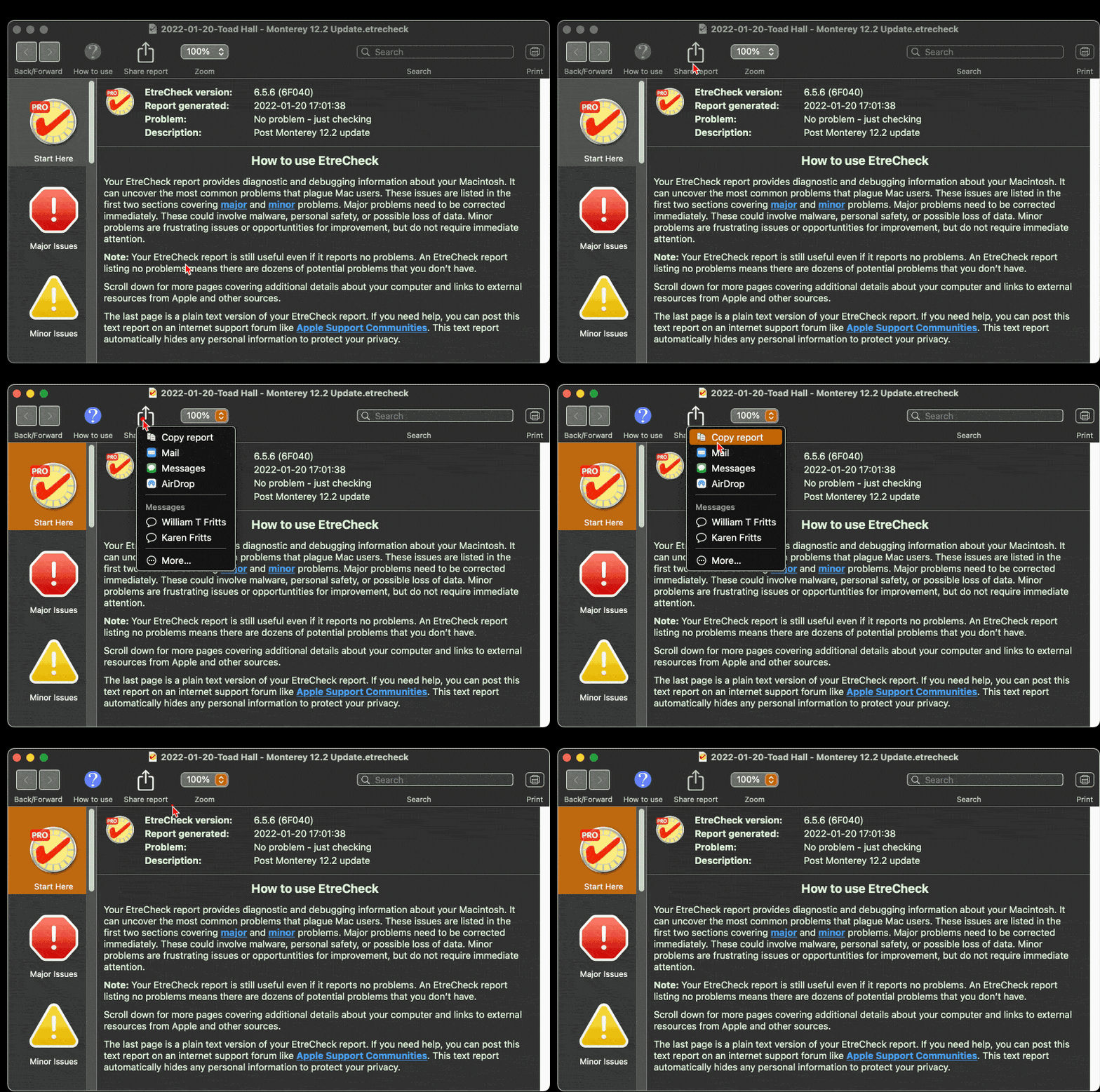


and use the Additional Text button to paste the report in your reply.



Then we can evaluate the report to see if we can determine the cause of the problem.


Similar questions

5 replies
Question marked as Top-ranking reply

Nov 30, 2022 10:39 AM in response to 675V

First give this a try: boot into Safe Mode according to How to use safe mode on your Mac and test to see if the problem persists. Reboot normally and test again.


NOTE 1: Safe Mode boot can take up to 3 - 5 minutes as it's doing the following; 

• Verifies your startup disk and attempts to repair directory issues, if needed

• Loads only required kernel extensions (prevents 3rd party kernel/extensions from loading)

• Prevents Startup Items and Login Items from opening automatically

• Disables user-installed fonts 

• Deletes font caches, kernel cache, and other system cache files


NOTE 2: if you have a wireless keyboard with rechargeable batteries connect it with its charging cable before booting into Safe Mode. This makes it act as a wired keyboard as will insure a successful boot into Safe Mode.


If that doesn't help download and run Etrecheck.  Copy and paste the results into your reply. Etrecheck is a diagnostic tool that was developed by one of the most respected users here in the ASC and recommended by Apple Support  to provide a snapshot of the system and help identify the more obvious culprits that can adversely affect a Mac's performance.


Copy the report


and use the Additional Text button to paste the report in your reply.


Then we can evaluate the report to see if we can determine the cause of the problem.


Dec 1, 2022 10:57 AM in response to 675V

The report will tell you where the various Dropbox supporting files are located. Or you can download and run the shareware app Find Any File to search for any files with the application's or the developer's name in the file name.  For Dropbox software you'd do the following search(es): 


1 - Name contains dropbox


Any files that are found can be dragged from the search results window to the Desktop or Trash bin in the Dock for deletion.


FAF can search areas that Spotlight can't like invisible folders, system folders and packages.  


If you get "file is in use" when you try to move it to the Trash you'll have to boot into Safe Mode according to How to use safe mode on your Mac and delete from there.


Note:  if you have a wireless keyboard with rechargeable batteries connect it with its charging cable before booting into Safe Mode.  This makes it act as a wired keyboard as will assure a successful boot into Safe Mode.


This thread has been closed by the system or the community team. You may vote for any posts you find helpful, or search the Community for additional answers.

Problem Report for Bridge OS

Welcome to Apple Support Community
A forum where Apple customers help each other with their products. Get started with your Apple Account.
