Good Day , Please assist me Ive been trying to pair my apple watch with my new phone for the past two months with no luck . Its was previuosly paired with my old phone and the phone screen is damaged and i couldn't unpaired it

Im struggling to pair my iphone 12 with my watch . It was previously paired with iphone XR

iPhone 12 Pro, iOS 15

Posted on Dec 1, 2022 9:54 AM

Reply
Question marked as Top-ranking reply

Posted on Dec 1, 2022 9:59 AM

Follow these instruictions:


How to erase your Apple Watch if you don't have your iPhone (or it is bused)

On your Apple Watch, tap Settings > General > Reset > Erase All Content and Settings. 
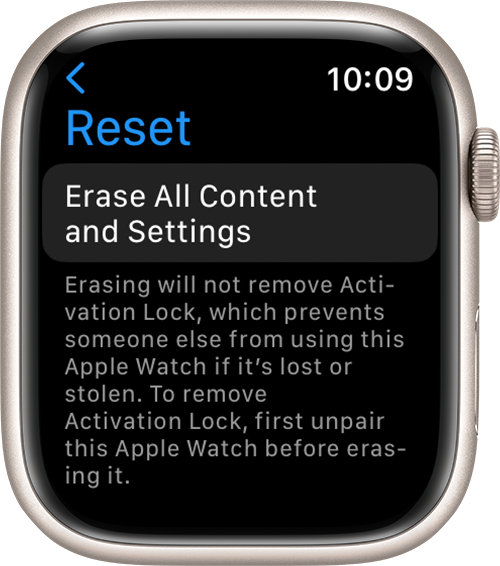
Type your password if prompted.

For GPS + Cellular models, choose to keep or remove your mobile data plan.

    • If you want to pair your Apple Watch and iPhone again, keep your plan. 
    • If you don't want to pair your Apple Watch and iPhone again, remove your plan. If you aren't going to pair with a different watch or iPhone, you may need to contact your network provider to cancel your mobile data subscription. 

Tap Erase All to confirm. This resets your Apple Watch to the factory settings.

Now you can set up your Apple Watch again. You'll need the Apple ID and password associated with the watch to turn off Activation Lock.


1 reply
Question marked as Top-ranking reply

Dec 1, 2022 9:59 AM in response to sindisiwe194

Follow these instruictions:


How to erase your Apple Watch if you don't have your iPhone (or it is bused)

On your Apple Watch, tap Settings > General > Reset > Erase All Content and Settings. 

Type your password if prompted.

For GPS + Cellular models, choose to keep or remove your mobile data plan.

    • If you want to pair your Apple Watch and iPhone again, keep your plan. 
    • If you don't want to pair your Apple Watch and iPhone again, remove your plan. If you aren't going to pair with a different watch or iPhone, you may need to contact your network provider to cancel your mobile data subscription. 

Tap Erase All to confirm. This resets your Apple Watch to the factory settings.

Now you can set up your Apple Watch again. You'll need the Apple ID and password associated with the watch to turn off Activation Lock.

This thread has been closed by the system or the community team. You may vote for any posts you find helpful, or search the Community for additional answers.

Good Day , Please assist me Ive been trying to pair my apple watch with my new phone for the past two months with no luck . Its was previuosly paired with my old phone and the phone screen is damaged and i couldn't unpaired it

Welcome to Apple Support Community
A forum where Apple customers help each other with their products. Get started with your Apple Account.