Can you tell if incoming call is Wifi or Cell?

When on a cruise ship, I can use wifi calling. I know when I initiate a call that I am on Wifi. But when you receive a call - and it rings - how can you tell if the call came in thru WiFi or cell? I will answer if the call was wifi - but ignore if the call was cell. Once the phone is ringing, the connection icon is no longer visible.


I can received SMS text for free on a cruise ship, so I don't want to go to airplane more.

iPhone XS Max

Posted on Dec 8, 2022 11:18 PM

Reply
2 replies

Dec 9, 2022 1:21 AM in response to Pjl1520

There are many 'Ifs' and 'buts' in your statement and in your question. However...


You may aware that WiFi calling is a Carrier Specific feature. If your carrier supports Wi-Fi Calling on iCloud-connected devices, you can also make and receive Wi-Fi calls on other devices.


When you receive a call, pull down the Control Center (You may have to do it twice). See the Pic below
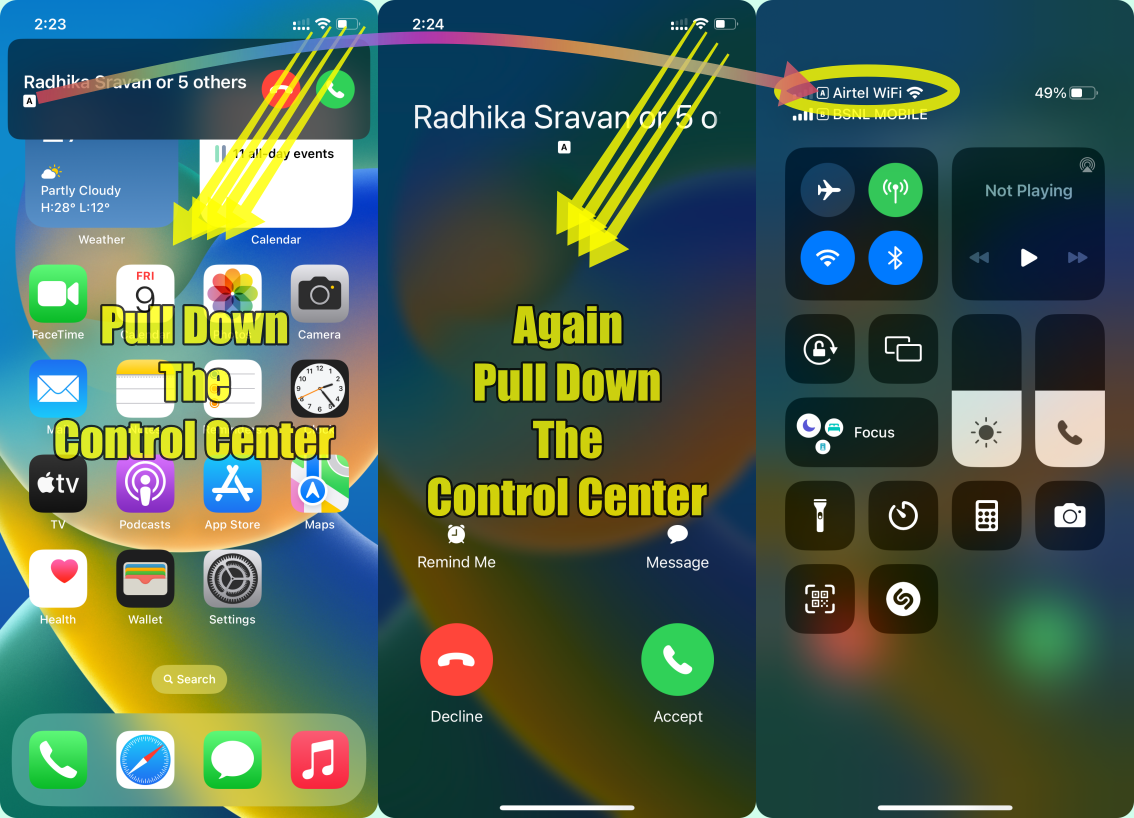

If Wi-Fi Calling is available, you’ll see Wi-Fi after your carrier name in the status bar. Then your calls may be using Wi-Fi Calling. Please see the pic below.


You need to pull down the control centre twice as explained earlier.


I have purposefully used the word "May Be" because the WiFi is provided by your ISP (Internet Service Provider) and Voice Calls are through your Carrier.


  • If they are the same Company (ISP & Carrier) then there is no issue
  • If the ISP is a different company then some Carrier providers may not support the ISP and you will be routed through a Voice Call. Talk to your Carrier to know this.
  • The same is true even while making a call and receiving it.


You will know it only at the end of a billing cycle. Then you can question your Carrier. The ISP has no role in this.


Dec 9, 2022 1:24 AM in response to SravanKrA

Thanks - very helpful. Here is a little more detail. On cruise ships they use Celluar at Sea for Cell Service. The ship also provides internet but they are not part of Celluar at Sea.


When I am connected to the internet, Celluar at Sea disappears from the control center and I see T-Mobile WiFi.


At this point I assume I am ready to make wifi calls.


My concern is that when I am walking around - sometimes the phone will disconnect from wifi and switch back to Celluar at Sea. But if the phone rings I want to make sure I am still on WiFi calling before I answer. I didn't realize I could pull down the Control Center before I answer. So if I pull it down and see T-Mobile Wifi - Then I should be OK as I will be answering a Wifi call. If I see Celluar at Sea - then I will press decline.


Is there a scenario I might see T-Mobile WIFI but the call is still routed through cellular at sea? Thanks!!!

This thread has been closed by the system or the community team. You may vote for any posts you find helpful, or search the Community for additional answers.

Can you tell if incoming call is Wifi or Cell?

Welcome to Apple Support Community
A forum where Apple customers help each other with their products. Get started with your Apple Account.