Hello kath1193,
To help us better assist you, can you let us know more about the process you used to delete the content and files from your hard drive?
If messages are missing on your Mac, let's check if they appear under the Recently Deleted folder. This link explains how to review and recover recently deleted messages or conversations, and may help: Delete messages and conversations in Messages on Mac
Recover a recently deleted message or conversation
When you delete a message or conversation, it’s moved to the Recently Deleted folder. You can view and recover items in the Recently Deleted folder for up to 30 days. After 30 days, the messages are removed from all your devices. After 40 days, the messages are permanently deleted from iCloud.
1. In the Messages app  on your Mac, choose View > Recently Deleted.
2. Select the conversation in the sidebar.
3. Do one of the following:
• Recover a recently deleted message or conversation: Click Recover.
• Permanently delete a recently deleted message or conversation: Click Delete.
As for deleted notes, please check out this link, which explains what happens when notes are deleted, and how to access recently deleted notes, which may be helpful: Delete a note on Mac
View a recently deleted note
1. In the Notes app  on your Mac, click Recently Deleted, then select the note.
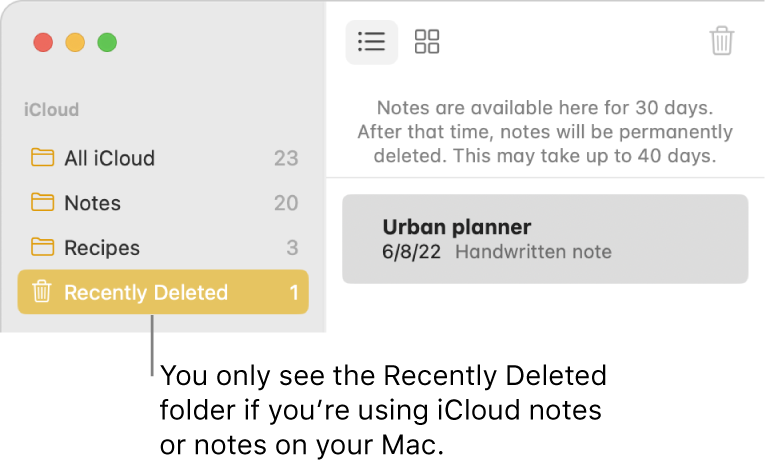
2. Do one of the following:
• Recover a recently deleted note: Drag a note from the Recently Deleted folder to another folder in the sidebar.
• Remove a recently deleted note from your device: Click the Delete button  (or press Delete).
• Permanently delete a recently deleted note: Delete or replace all of its contents. Since the note is synced to all of your devices, doing this effectively deletes the note right away.
If you are going to make changes on your Mac, we would suggest making sure you have a current backup of the content, in case something is accidentally deleted or changed. This link can help guide you through how to back up your device: Back up your files with Time Machine on Mac
Thank you.

