My iPhone can’t send a message please kindly help me
My iPhone can’t send a message please kindly help me?
iPhone 11, iOS 16
My iPhone can’t send a message please kindly help me?
iPhone 11, iOS 16
Hey Bey10,
We'd be happy to help out if you're unable to send messages on your iPhone 11. If unable to send SMS, you'll want to reach out to your wireless carrier as those messages are sent through them. If unable to send iMessages though, check out the following steps from the article that you reviewed before posting here:
If you have issues with Messages after you set up a new device
If you experience issues like conversations in Messages showing up as separate threads or sent messages appearing as green message bubbles instead of blue message bubbles when you set up a new device, update your settings using the following steps:
1. Update your device to the latest version of iOS or iPadOS if needed.
2. In the Settings app, tap Cellular. Make sure that your phone line is turned on. If you use multiple SIMs, make sure that the phone number you want to use is selected and turned on.
3. In the Settings app, tap Messages. Turn iMessage off and then back on.
4. Tap Send & Receive.
5. Tap the phone number that you want to use with Messages.
If you have issues when you try to receive a FaceTime call after you set up a new device, you can also update your FaceTime settings.
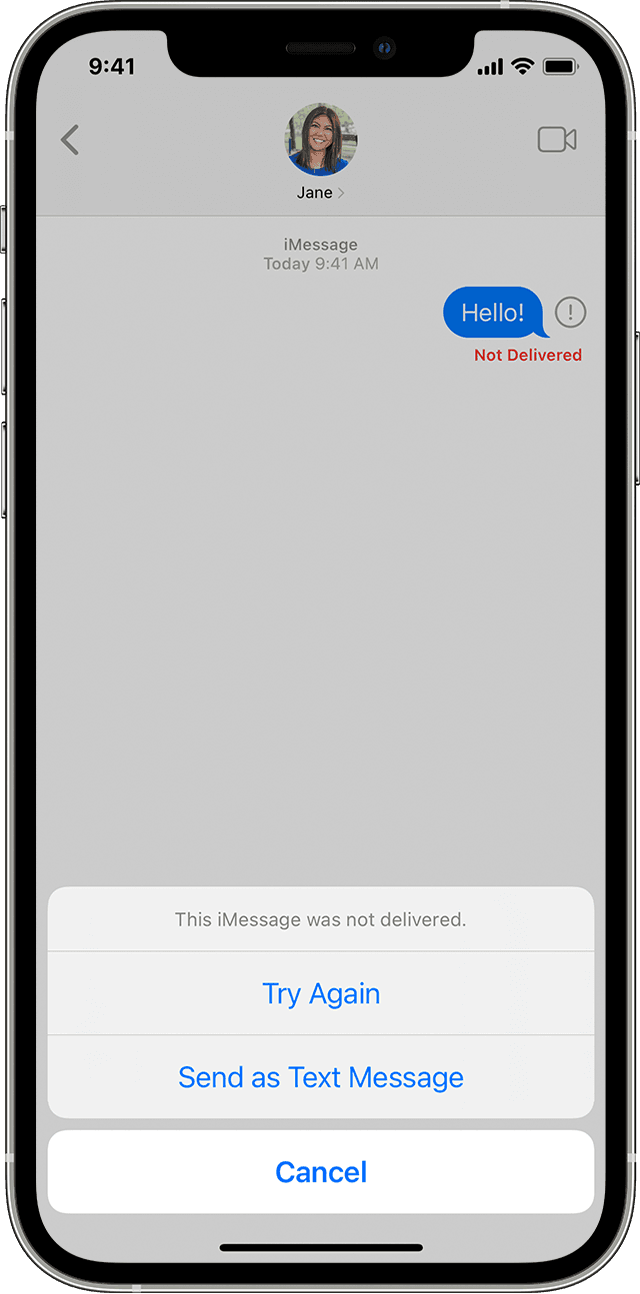
If you see a red exclamation point
If you try to send a message and you seewith an alert that says Not Delivered, follow these steps:
1. Check your network connection.
2. Tap
3. If you still can’t send the message, tap
This is outlined in more detail here: If you can't send or receive messages on your iPhone or iPad - Apple Support
We hope this helps out.
Take care!
Hey Bey10,
We'd be happy to help out if you're unable to send messages on your iPhone 11. If unable to send SMS, you'll want to reach out to your wireless carrier as those messages are sent through them. If unable to send iMessages though, check out the following steps from the article that you reviewed before posting here:
If you have issues with Messages after you set up a new device
If you experience issues like conversations in Messages showing up as separate threads or sent messages appearing as green message bubbles instead of blue message bubbles when you set up a new device, update your settings using the following steps:
1. Update your device to the latest version of iOS or iPadOS if needed.
2. In the Settings app, tap Cellular. Make sure that your phone line is turned on. If you use multiple SIMs, make sure that the phone number you want to use is selected and turned on.
3. In the Settings app, tap Messages. Turn iMessage off and then back on.
4. Tap Send & Receive.
5. Tap the phone number that you want to use with Messages.
If you have issues when you try to receive a FaceTime call after you set up a new device, you can also update your FaceTime settings.
If you see a red exclamation point
If you try to send a message and you see
1. Check your network connection.
2. Tap
3. If you still can’t send the message, tap
This is outlined in more detail here: If you can't send or receive messages on your iPhone or iPad - Apple Support
We hope this helps out.
Take care!
My iPhone can’t send a message please kindly help me