Nightstand mode off, but alarm still going off

I have 2 Apple Watches. Series 4 and just recently purchased series 8. I wear my 8 for the day and sleep in the 4 while the 8 charges.


I use the Sleep Focus function and originally, when I added the 8, both watches would wake me when my alarm went off. The 4 would vibrate on my wrist and the 8 would play the alarm on the charger.


I turned off nightstand mode on the 8 so only my 4 would wake me because I prefer just having the vibrations wake me than hearing an alarm.


This worked until about 2 weeks ago and now my 8’s alarm goes off, even with nightstand mode off.


Any ideas how to fix this?

Apple Watch Series 8

Posted on Dec 13, 2022 2:53 PM

Reply

Similar questions

1 reply

Dec 15, 2022 2:20 PM in response to Mil2phx

Hello Mil2phx,


To help us get a better understanding of the issue, we’d like to ask a few questions.


1. Just to confirm, when the issue happens, does Nightstand Mode appear to have turned back on, on its own, or does it still show as being turned off?

2. Since this behavior started, has the affected Apple Watch been restarted? If so, did restarting improve the issue at all?


The above details will help us plan how to proceed.


To help ensure that Nightstand Mode is turned off correctly, please check out the information in the following link which outlines how to manage Nightstand Mode and may help: Add an alarm on Apple Watch


Set up Apple Watch as a nightstand clock with alarm

1. Open the Settings app  on your Apple Watch.
2. Go to General > Nightstand Mode, then turn on Nightstand Mode.

When you connect your Apple Watch to its charger with nightstand mode turned on, it displays charging status, the current time and date, and the time of any alarm you’ve set. To see the time, tap the display or lightly nudge your Apple Watch. Even nudging or tapping the table might work.
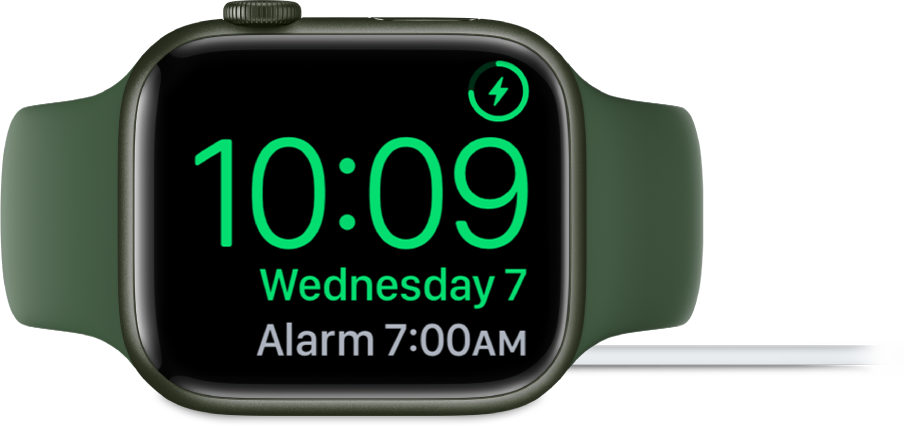
An Apple Watch placed on its side and connected to the charger, with the screen showing the charging symbol in the top-right corner, the current time below that, and the time of the next alarm.

If you set an alarm using the Alarms app, your Apple Watch in nightstand mode will gently wake you with a unique alarm sound.

When the alarm sounds, press the side button to turn it off, or press the Digital Crown to snooze for another 9 minutes.
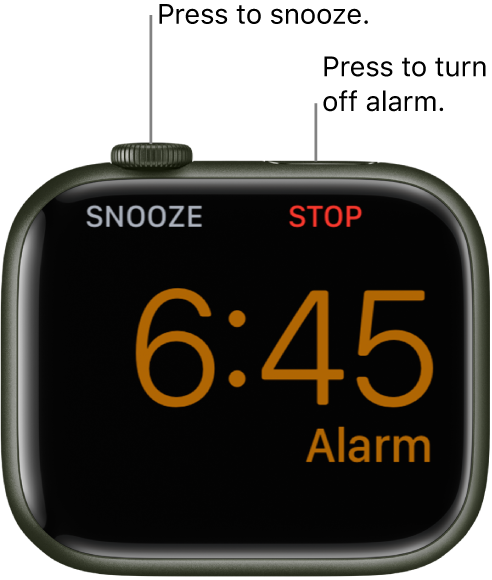
An Apple Watch placed on its side, with the screen showing an alarm that’s gone off. Below the Digital Crown is the word “Snooze.” The word “Stop" is below the side button.


Thanks!

This thread has been closed by the system or the community team. You may vote for any posts you find helpful, or search the Community for additional answers.

Nightstand mode off, but alarm still going off

Welcome to Apple Support Community
A forum where Apple customers help each other with their products. Get started with your Apple Account.
