Ring tone not coming on my iphone 12

I use iPhone 7. For last few days the ringer is not working. The silent switch is "Up" towards screen as per general guideline given in various sites. I tried removing and re-adding "vibrate on call" option but still ringer doesnt work. On pressing the up or low buttons a ringer symbol is shown and is crossed in red. And it doesnt happen consistently. But when I take the call I am able to hear clearly and speak. Also I diont hacve problem when playing music, aiduio and video files on whatsapp/ Youtube and other apps.

When I move the ringer volume symbol up or down the ring tone works. any suggestions? could it be a hardware issue of the silence switch? I tried in both positions but no difference.

iPhone 7, iOS 15

Posted on Dec 13, 2022 3:22 PM

Reply
Question marked as Top-ranking reply

Posted on Dec 15, 2022 2:27 PM

Hello Ramramjee,


It sounds like the The Ring/Silent switch is actually set to silent.


"Turn Ring/Silent mode on or off on your iPhone

In Ring mode, you hear ringtones and alerts. In Silent mode, you don't, but your iPhone can still play sounds, like when you play music or videos.

Use Ring mode

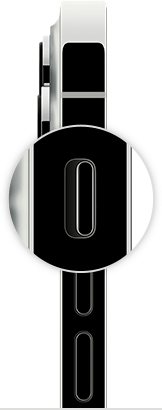
The side of an iPhone with the Ring/Silent switch magnified. Orange isn't showing on the switch. 

To put your iPhone in Ring mode, move the switch so that orange isn't showing. 

Use Silent mode

The side of an iPhone with the Ring/Silent switch magnified. Orange is showing on the switch. 

To put your iPhone in Silent mode, move the switch so that orange is showing."


 Here is a link with some additional information:


How to put your iPhone on vibrate, ring, or silent mode


We also recommend restarting your device and keeping it updated as those steps assure you have cleared out any minor software issues and are running the most current version.


Restart your iPhone - Apple Support

Update your iPhone or iPad - Apple Support


If you still have the issue, reach out to Apple Support directly here, as this may require closer guidance: Get Support


Cheers!.


Similar questions

1 reply
Question marked as Top-ranking reply

Dec 15, 2022 2:27 PM in response to Ramramjee

Hello Ramramjee,


It sounds like the The Ring/Silent switch is actually set to silent.


"Turn Ring/Silent mode on or off on your iPhone

In Ring mode, you hear ringtones and alerts. In Silent mode, you don't, but your iPhone can still play sounds, like when you play music or videos.

Use Ring mode

The side of an iPhone with the Ring/Silent switch magnified. Orange isn't showing on the switch. 

To put your iPhone in Ring mode, move the switch so that orange isn't showing. 

Use Silent mode

The side of an iPhone with the Ring/Silent switch magnified. Orange is showing on the switch. 

To put your iPhone in Silent mode, move the switch so that orange is showing."


 Here is a link with some additional information:


How to put your iPhone on vibrate, ring, or silent mode


We also recommend restarting your device and keeping it updated as those steps assure you have cleared out any minor software issues and are running the most current version.


Restart your iPhone - Apple Support

Update your iPhone or iPad - Apple Support


If you still have the issue, reach out to Apple Support directly here, as this may require closer guidance: Get Support


Cheers!.


This thread has been closed by the system or the community team. You may vote for any posts you find helpful, or search the Community for additional answers.

Ring tone not coming on my iphone 12

Welcome to Apple Support Community
A forum where Apple customers help each other with their products. Get started with your Apple Account.