Files app no longer has a Favourites section after updating iPad

Just updated to iPadOS 16.2. The Files app no longer has a Favorites section. When a try to add a Favorite the only option given is “Unfavorite”. Also the Recents section in the Numbers app is not working. It’s showing a list of spreadsheets that I haven’t worked on since last year.


[Re-Titled by Moderator]

iPad, iPadOS 16

Posted on Dec 14, 2022 6:34 AM

Reply
Question marked as Top-ranking reply

Posted on Dec 16, 2022 12:01 PM

Sorry, I should have posted this when the problem resolved. I walked away from my iPad for about 2 hours and when I logged back in the problem had fixed itself. Talking to Apple support later they said OS updates do additional background processing after the install is done and that caused then fixed the problem.

12 replies
Question marked as Top-ranking reply

Dec 16, 2022 12:01 PM in response to tzf

Sorry, I should have posted this when the problem resolved. I walked away from my iPad for about 2 hours and when I logged back in the problem had fixed itself. Talking to Apple support later they said OS updates do additional background processing after the install is done and that caused then fixed the problem.

Dec 14, 2022 6:59 AM in response to Bud in PA

If you see unexpected behaviour after performing a system software update, you should perform a forced restart - as this will often clear an isolated software issue:


Force restart iPad (models with Face ID or with Touch ID in the top button)

If your iPad doesn’t have the Home button, do the following:

  1. Press and quickly release the volume button nearest to the top button.
  2. Press and quickly release the volume button farthest from the top button.
  3. Press and hold the top button.
  4. When the Apple logo appears, release the top button.


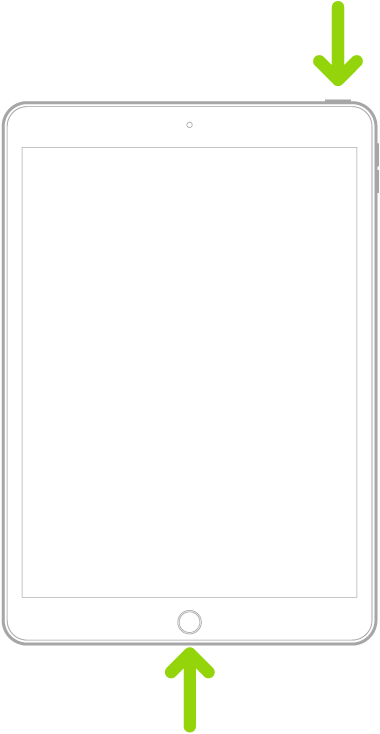
Force restart iPad (models with the Home button)

Press and hold the top button and the Home button at the same time. When the Apple logo appears, release both buttons.


Dec 14, 2022 7:22 AM in response to Bud in PA

Well, on an additional sample of one user with multiple devices running iOS/iPadOS 16.2, I cannot replicate your issue.


I suggest that you seek assistance directly from Apple Support. You can contact the Support Team using the Support link at top-right or bottom-left of this page.


Alternatively and perhaps easier, you can initiate and manage your support cases using the excellent Apple Support App. If not already installed on your iPad, the App can be downloaded from the App Store:

https://apps.apple.com/gb/app/apple-support/id1130498044


This thread has been closed by the system or the community team. You may vote for any posts you find helpful, or search the Community for additional answers.

Files app no longer has a Favourites section after updating iPad

Welcome to Apple Support Community
A forum where Apple customers help each other with their products. Get started with your Apple Account.