Unable to change my media and purchases sharing to a secondary Apple ID.

I'm trying to set up Family Sharing using two apple IDs. I have 1 Apple ID for all our shared contacts, FindMy, and iCloud. I have a 2nd Apple ID for all my purchased media and subscriptions. So I keep trying to share Media and Purchases using this secondary Apple ID. It keeps rejecting it with a popup that says I have to add a credit card on the App Store and music store? But I already have a cc on file in both, under the correct secondary ID. Same error via iPhone and Mac. Any ideas on what to try next?


Thanks for the help.

iPhone XR, iOS 16

Posted on Dec 15, 2022 11:49 AM

Reply

Similar questions

1 reply

Dec 18, 2022 11:16 AM in response to thadmatuszeski

Hello thadmatuszeski,


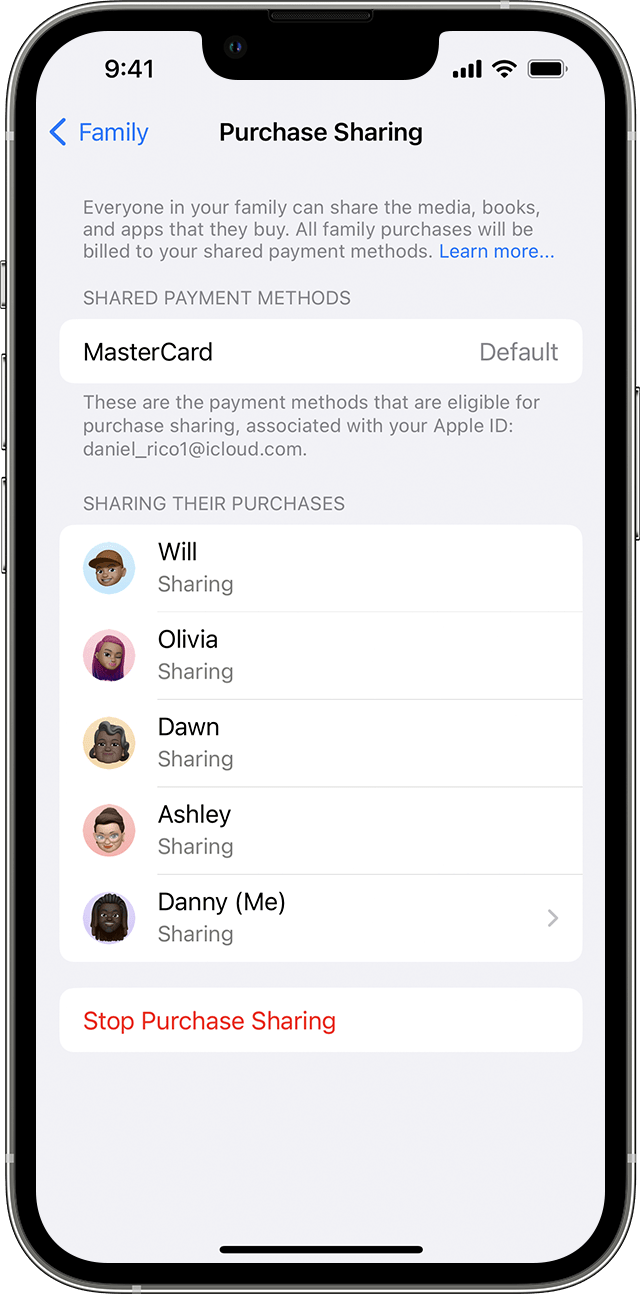
Thanks for posting in the Apple Support Communities. We're happy to look into this with you. To clarify, did you set up Family Sharing with just one of the Apple ID's and invited your second Apple ID to join? Have you confirmed that you have Purchase Sharing enabled in Family Sharing and it's showing active for all accounts in your Family Sharing group? You can read more about purchase sharing in the article below.


How to share purchases with your family


Use your iPhone, iPad, or iPod touch to turn on purchase sharing

1. If you haven't set up Family Sharing yet, set up Family Sharing.

2. Open the Settings app.

3. Tap Family. If you don't see Family, tap your name, then tap Family Sharing.

4. Tap Purchase Sharing.

5. Tap Continue and follow the onscreen instructions.

6. To see which payment method will be billed, tap Purchase Sharing again and look at the Shared Payment Method information.


Best regards.

This thread has been closed by the system or the community team. You may vote for any posts you find helpful, or search the Community for additional answers.

Unable to change my media and purchases sharing to a secondary Apple ID.

Welcome to Apple Support Community
A forum where Apple customers help each other with their products. Get started with your Apple Account.