How to make a new apple id if you forgot your password and eht email afd
Ok
iPhone 12, iOS 15
Ok
iPhone 12, iOS 15
Hello redge83,
Thank you for using Apple Support Communities.
We understand that you have forgotten the password and email address for your current Apple ID and you want to create a new Apple ID. We would encourage trying to regain access to your current Apple ID because that has access to all of your current email account info, this is the ID you have downloaded content through, data that you may have saved, synced or stored. So, it is always better to retain access to the current Apple ID if at all possible. To that end, here are some articles to help if you forgot the email address and password for your Apple ID and if necessary to use account recovery to reset your Apple ID password.
If you forgot your Apple ID email address or phone number - Apple Support
If you forgot your Apple ID password - Apple Support
How to use account recovery when you can’t reset your Apple ID password - Apple Support
If you still want to create a new Apple ID account, you can check out this link, which will guide you through that process: How to create a new Apple ID
If you aren't sure if you have already have an Apple ID, or don't know what it is, the above link also has information on what to do in that situation, and may be helpful.
How to create a new Apple ID
With an Apple ID, you can access all Apple devices and services—such as iCloud, the App Store, and more.
• Create an Apple ID on iPhone, iPad, or iPod touch
• Create an Apple ID on Mac
• Create an Apple ID on a Windows PC
• Create an Apple ID on another device
Not sure if you have an Apple ID, or forgot what it is? To find your Apple ID, enter your name and email address at iforgot.apple.com.
Learn how to create an Apple ID for your child
Create an Apple ID on your iPhone, iPad, or iPod touch
You can create a new Apple ID when you set up your device, or set it up later in the App Store.
Create an Apple ID when you set up your device
1. Tap "Forgot password or don't have an Apple ID?".
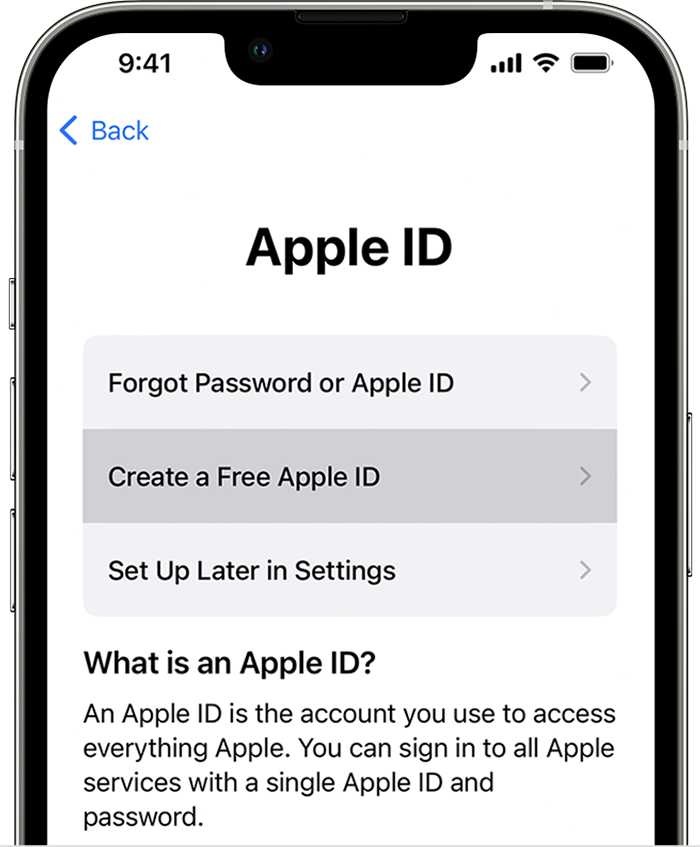
2. Tap Create a Free Apple ID.
3. Select your birthday and enter your name. Tap Next.
4. Tap "Use your current email address", or tap "Get a free iCloud email address."
5. Follow the onscreen steps to verify your email address, create a strong password, set your device region, and set up two-factor authentication. If you choose to skip this step, you'll be prompted to do this later in Settings.
Thanks!
Hello redge83,
Thank you for using Apple Support Communities.
We understand that you have forgotten the password and email address for your current Apple ID and you want to create a new Apple ID. We would encourage trying to regain access to your current Apple ID because that has access to all of your current email account info, this is the ID you have downloaded content through, data that you may have saved, synced or stored. So, it is always better to retain access to the current Apple ID if at all possible. To that end, here are some articles to help if you forgot the email address and password for your Apple ID and if necessary to use account recovery to reset your Apple ID password.
If you forgot your Apple ID email address or phone number - Apple Support
If you forgot your Apple ID password - Apple Support
How to use account recovery when you can’t reset your Apple ID password - Apple Support
If you still want to create a new Apple ID account, you can check out this link, which will guide you through that process: How to create a new Apple ID
If you aren't sure if you have already have an Apple ID, or don't know what it is, the above link also has information on what to do in that situation, and may be helpful.
How to create a new Apple ID
With an Apple ID, you can access all Apple devices and services—such as iCloud, the App Store, and more.
• Create an Apple ID on iPhone, iPad, or iPod touch
• Create an Apple ID on Mac
• Create an Apple ID on a Windows PC
• Create an Apple ID on another device
Not sure if you have an Apple ID, or forgot what it is? To find your Apple ID, enter your name and email address at iforgot.apple.com.
Learn how to create an Apple ID for your child
Create an Apple ID on your iPhone, iPad, or iPod touch
You can create a new Apple ID when you set up your device, or set it up later in the App Store.
Create an Apple ID when you set up your device
1. Tap "Forgot password or don't have an Apple ID?".
2. Tap Create a Free Apple ID.
3. Select your birthday and enter your name. Tap Next.
4. Tap "Use your current email address", or tap "Get a free iCloud email address."
5. Follow the onscreen steps to verify your email address, create a strong password, set your device region, and set up two-factor authentication. If you choose to skip this step, you'll be prompted to do this later in Settings.
Thanks!
How to make a new apple id if you forgot your password and eht email afd