How do I change my messenger account login from my email to my phone number
How to change my messenger login from my email to my phone number.
iPad Pro, 12.9-inch, 6th Gen, Wi-Fi
How to change my messenger login from my email to my phone number.
iPad Pro, 12.9-inch, 6th Gen, Wi-Fi
Hello Bosman54,
Thanks for posting in the Apple Support Communities.
It sounds like you're looking to use a phone number for iMessage instead of your Apple ID email address, right?
If we have that correct, you'll want to be sure your iPhone has your phone number enabled to be used with iMessage. In addition, you'll want to be signed in with the same Apple ID that is in use with your iPad. Check out the following resource if you need assistance with that, and the steps below will help with adding the number to your iPad: Add or remove your phone number in Messages or FaceTime - Apple Support
Turn your phone number on or off for your iPad or iPod touch
After you set up your phone number, you can turn it on or off for Messages and FaceTime on your iPad or iPod touch.
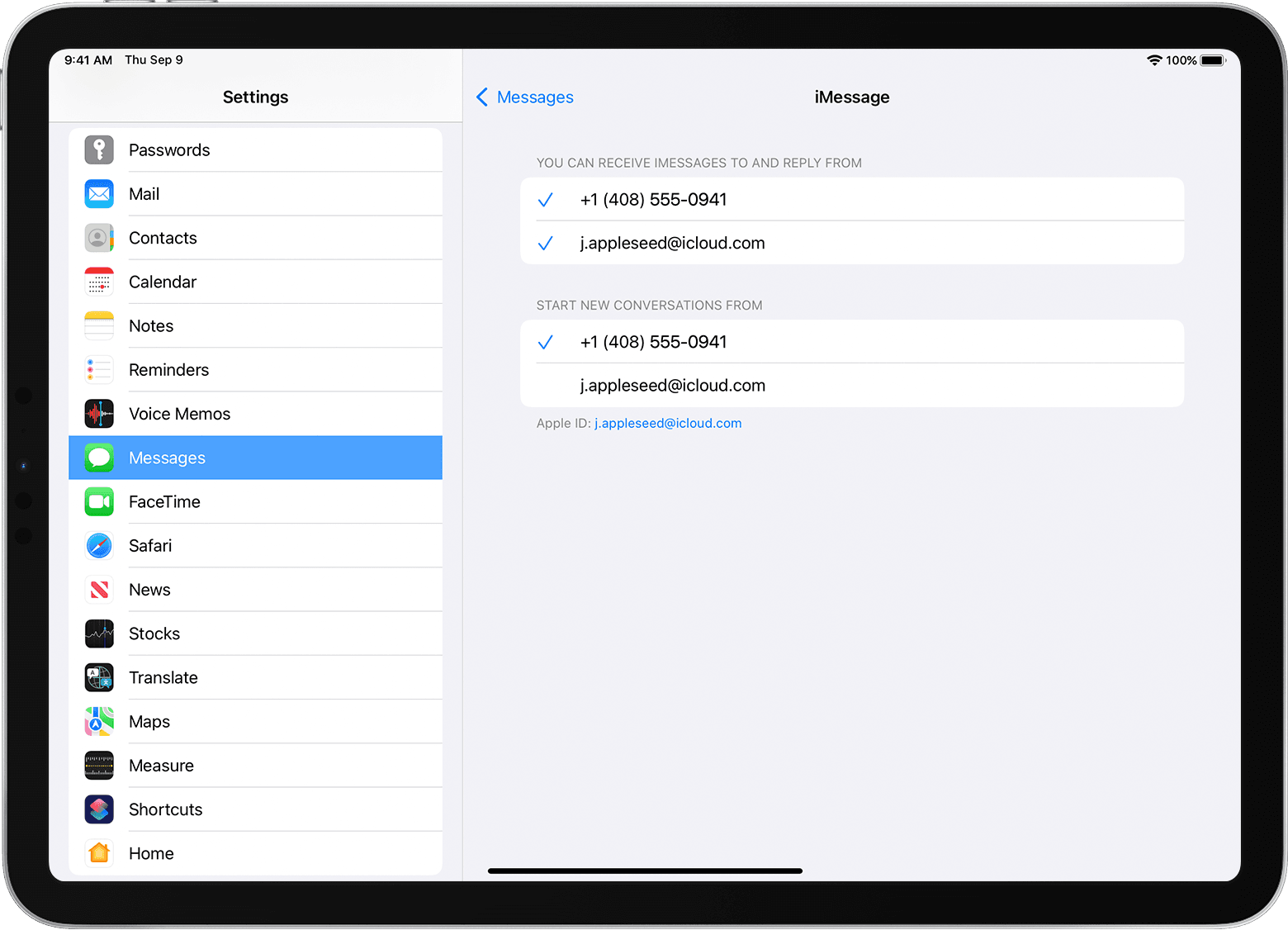
1. For Messages, go to Settings > Messages and make sure that iMessage is on. If asked, sign in with the Apple ID you're using with Messages and FaceTime on your iPhone. Then tap Send & Receive.
2. For FaceTime, go to Settings > FaceTime. If asked, sign in with the Apple ID that you're using with Messages and FaceTime on your iPhone.
3. Turn your phone number on or off:
• To turn on your phone number, select it and your Apple ID in the “You can be reached” section. If you don't see your phone number, get help with your settings or contact Apple Support. If you see a number that isn't yours, change your Apple ID password.
• To turn off your phone number, uncheck it.
Learn how to make messages that you send and receive on your iPhone also appear on your Mac, iPad, and iPod touch.
We hope that's able to help. If not, let us know what happens when you try those steps.
Have a great day!
Hello Bosman54,
Thanks for posting in the Apple Support Communities.
It sounds like you're looking to use a phone number for iMessage instead of your Apple ID email address, right?
If we have that correct, you'll want to be sure your iPhone has your phone number enabled to be used with iMessage. In addition, you'll want to be signed in with the same Apple ID that is in use with your iPad. Check out the following resource if you need assistance with that, and the steps below will help with adding the number to your iPad: Add or remove your phone number in Messages or FaceTime - Apple Support
Turn your phone number on or off for your iPad or iPod touch
After you set up your phone number, you can turn it on or off for Messages and FaceTime on your iPad or iPod touch.
1. For Messages, go to Settings > Messages and make sure that iMessage is on. If asked, sign in with the Apple ID you're using with Messages and FaceTime on your iPhone. Then tap Send & Receive.
2. For FaceTime, go to Settings > FaceTime. If asked, sign in with the Apple ID that you're using with Messages and FaceTime on your iPhone.
3. Turn your phone number on or off:
• To turn on your phone number, select it and your Apple ID in the “You can be reached” section. If you don't see your phone number, get help with your settings or contact Apple Support. If you see a number that isn't yours, change your Apple ID password.
• To turn off your phone number, uncheck it.
Learn how to make messages that you send and receive on your iPhone also appear on your Mac, iPad, and iPod touch.
We hope that's able to help. If not, let us know what happens when you try those steps.
Have a great day!
How do I change my messenger account login from my email to my phone number