Ventura internal Firewall (v13.1)

The internal Ventura firewall doesn't work at all. All applications listed in the firewall windows with incoming connections set to disabled (red flag) after a restart of the System Setting app will have incoming connections automatically enabled (green flag). All applications listed in the firewall windows with incoming connections set to disabled (red flag) allow incoming connections just as the red flag was instead green.


Posted on Dec 18, 2022 1:06 PM

Reply
Question marked as Top-ranking reply

Posted on Jan 30, 2023 6:59 AM

1 - Restart in Safe Mode. This will perform a Disk Repair, clear cache files and only load Apple Software, extensions and fonts. The boot up will be slow and can take some time - Normal.


2 - Safe Mode will also eliminate Third Party Software, extensions and drivers from loading. It will only load the Minimum amount of Core Apple Processes to allow the the computer to function at a reduced Level of Performance 


3 - Does the issue present in this mode ?


4 - Sometimes a Safe Boot followed by a Normal Boot will just put things right.


5 - If not - there could be something in the main User Account playing up. To further isolate this - Set up users, guests, and groups on Mac. Then log out of the Main User account and log into the dummy account and test again if the issue persists.


6 - If the issue is present in the dummy account - then, this appears to be a System Wide issue on the computer.


Step 7 below is optional but at the sometime will give us a more complete overview of this machine


7 - Download the Application Etrecheck directly from the Developer.


This is a Diagnostic Tool that makes no changes to the computer.


It makes a coherent and readable inventory of both the Hardware and Software used on the computer 


The application is free or paid from added features. 


The Report will Not Reveal Any Personal Information. 


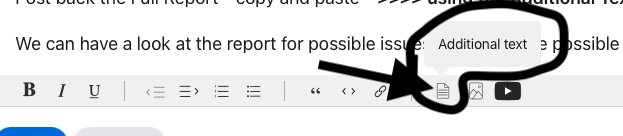
Post back the Full Report - copy and paste - >>>> using the Additional Text Icon ( 3rd Icon to last ) <<<<

Similar questions

41 replies

Dec 20, 2022 1:09 PM in response to RobbiOne

Hi RobbiOne,


Thanks for contacting Apple Support Communities!


We understand that you need help with Firewall on your Mac.


Are you saying that the settings you've configured aren't saved after you restart? We just want to be sure we're on the same page with you.


If you need assistance to use Firewall to block connections, you can follow the steps outlined here: Block connections to your Mac with a firewall


Take care!


Dec 20, 2022 6:18 PM in response to RobbiOne

Don't bother with the firewall. That's just something Apple provides so that people don't go off looking for their own and download some scam app. But it's pointless. Firefox, Black Magic, and Coconut Battery aren't going to be accepting any connections anyway. BitTorrent will, but then it wouldn't work if it didn't. Even so, it should have very fine-grained control over all network settings within the app. That's not something you want to use Apple's silly firewall with.

Dec 21, 2022 3:16 AM in response to etresoft

etresoft: the apps listed in the firewall are just for a demo of the bug, I use the much better Little Snitch.

That said Apple firewall must work correctly or must be deleted al all; until Ventura it worked fine and, yes, it is still useful for many users that do not want to spend 45€ for a better firewall. It is not pointless at all.

Dec 21, 2022 5:38 AM in response to RobbiOne

RobbiOne wrote:

etresoft: the apps listed in the firewall are just for a demo of the bug, I use the much better Little Snitch.
That said Apple firewall must work correctly or must be deleted al all; until Ventura it worked fine and, yes, it is still useful for many users that do not want to spend 45€ for a better firewall. It is not pointless at all.

Basic question then: what do you want me to do about it? This is a user-to-user technical support forum for users of Apple products. While this forum is dedicated to Apple, you have to understand that there is absolutely nothing I can do about Apple products.


The only change I can affect is with users, not the products. I simply don’t have the power to remove system components as you ask. All I can do is explain how the Application Firewall was always nothing more than Security Theatre. Its only value was to give people a reason to avoid installing some scam antivirus. Whether those buttons are green or red makes no difference. The app never worked.


If you want, you can contact Apple via Product Feedback or you can file an official bug report. But the exact same conditions apply. You will affect no change. If you do this, you do it only to make yourself feel better. My approach is to try to avoid the problem to begin with rather than giving you those links. Most people sincerely expect some change and then get upset that the fix they requested never appears. Once again, the only thing I can do is explain to you that you are just wasting your time, much as you are with the Application Firewall and Little Snitch.

Dec 21, 2022 6:04 AM in response to etresoft

You do not understand the problem or do not want understand. That is a security bug.

Forget apps, concentrate to firewall setting. What I want set to red must stay red, stop. Do not exist that something may change my settings, stop.

Specially when I enable psw check to change my personal general settings, stop.

Every other consideration about apps and them useability or not with internal firewall is out of focus here.

But overall your posts is not useful for anyone.

Dec 21, 2022 6:50 AM in response to RobbiOne

I'm not interesting in having any fights. As I explained, this is a user-to-user support forum for Apple products. If there was something I could do to fix the problem for you, I would have done it.


I gave you links to Apple's Product Feedback and the official bug reporting system. It is your choice. You can file a bug report or not.


All I can do now is try to explain the problem and manage your expectations. Whatever is going to happen in the world of Apple tech security is going to happen regardless of anything you can do. The only thing that you can control is your own reactions. If you choose to get upset, then you can get as upset as you want. It won't change anything except your heart rate and blood pressure. Or you can choose to accept it as it is, learn how it works, or doesn't, and enjoy a better user experience in the future. Your choice.

Jan 28, 2023 5:18 AM in response to etresoft

The Mac OS firewall has worked just fine in every iteration I've used. The question is why isn't it working in Ventura? I have the same issue. Even when I delete a setting I don't want included, and shut off incoming connections, they magically reappear with incoming connections allowed once System Settings is closed. Clearly that's not the behaviour that Apple engineers intended.

Jan 28, 2023 8:20 AM in response to Lloyd Deane

Lloyd Deane wrote:

The Mac OS firewall has worked just fine in every iteration I've used. The question is why isn't it working in Ventura? I have the same issue. Even when I delete a setting I don't want included, and shut off incoming connections, they magically reappear with incoming connections allowed once System Settings is closed. Clearly that's not the behaviour that Apple engineers intended.

As already explained, the Apple firewall is not needed.

Jan 28, 2023 9:48 AM in response to Lloyd Deane

Lloyd Deane wrote:

Thanks, but it's one thing to hear people state their opinion on the matter, quite another to get an official response from Apple on this. I'd put more weight on the latter.

No problem. You came to a user-to-user help community. If you want an Apple response please contact Apple Support as already suggested earlier in this thread.

Jan 28, 2023 10:32 AM in response to Lloyd Deane

Lloyd Deane wrote:

Thanks, but it's one thing to hear people state their opinion on the matter, quite another to get an official response from Apple on this. I'd put more weight on the latter.

You will never get any "official response" from Apple. Apple's customer support reps are far more skilled at massaging people's feelings than "certain people" here on the forums. They will be nice. They will tell you what you want to hear. They will transfer you to a "senior advisor". They will even show you how to fix the problem, if it is fixable. If not, they will tell you that engineers are going to work on it. You'll hang up, satisfied that the fix will show up in the next version. You wait. And you wait. A new update arrives. What???? No fix???? Well, it was a little soon. Let's cool our heels for another couple of months. This one! Yeah! This one has the fix!!! What??? But they promised!!!! And maybe, if the bug is really easy to fix, just maybe, it will finally work "in the fall". But you'll have to upgrade to macOS 14 "Inland Drought" to see the fix, which comes with another new batch of showstopper bugs.


Logic tells me that people would prefer a straight up answer instead of all of that. Logic is proven wrong every time.

Jan 28, 2023 1:44 PM in response to RobbiOne

RobbiOne wrote:

As already explained, I'm sorry for you Bob but that's false: I need it (and it seems Deane is too)! And why shouldn't it be useful?

" This is a technical forum used also to report bugs "

That is Technically not correct, as has already been mentioned previously, Bug Reports go Directly to Apple.


Bugs, perceived or real, also mentioned previously, can not be fixed by Users like you and me.


The Only Entity that can fix a Bug would be Apple.


" therefore those who cannot provide useful information for trying to solve the bugs should avoid writing useless platitudes that not only do not solve anything but do not even correspond to the truth because e.g. it has been very useful to me since 2007 and it still would be if it worked as it should."


Next , is a " Canned " response but seems appropriate for this occasion.


There has been sufficient advise offered, from at least 3 different Contributors, for the User ( you ) to make an informed and educated choice what the next course of action is required for this computer.


The suggestions have been put forth on a volunteer basis, in good faith & in the best interests of the computer.


That is, unless there might be some Other Agenda a foot


Jan 28, 2023 2:23 PM in response to Owl-53

I do not want or pretend that bugs are fixed here ... that's trivial. I'm surprised that someone could not understand this.


I explain the bug here only to find someone who has already had it and knows how to fix it or even mitigate it. In addition maybe someone could be useful to know that there is.


I just want say that answering to not use Apple firewall because of the bug it's not a useful answer to my problem.

Jan 29, 2023 7:20 AM in response to BobTheFisherman

BobTheFisherman and etresoft


You two are way better on networking issues than I am 😔


So maybe you can put me straight as it is related to OP issue with Builtin Apple Firewall.


The computer connects to the Access Point / Router. The handling of the computer IP Address is normally handled by the Router who assigned an IP Address.


All Out bound Traffic is sent but the Actual IP Address seen on the WWW is actually the IP Address of the Router


Right so far ?


So in the reverse, all Inbound Traffic would directed to the IP Address of the Router.


Thereafter the Router would route ( no pun ) that traffic to the IP Address of the requesting Computer


Still on track ?


So, in effect most Software Firewalls ( Controlling Inbound Traffic ) becomes somewhat useless ?


If so, I do understand 👍 your contentions of " Apple firewall is not needed. " and " Don't bother with the firewall "


Appreciate and accept an correction to above


Jan 29, 2023 7:45 AM in response to Owl-53

Yes P.Phillips, good summary analysis.

If the computer was directly connected to the Internet using a public IP Address, then the firewall would be required to provide security by limiting access to the computer. But as you stated, being in a private network, the security is provided by the router and non-routable private IP Addresses.

If the original poster's network environment is that their computer has a public IP Address, not a good idea, then the firewall becomes important and necessary.

This thread has been closed by the system or the community team. You may vote for any posts you find helpful, or search the Community for additional answers.

Ventura internal Firewall (v13.1)

Welcome to Apple Support Community
A forum where Apple customers help each other with their products. Get started with your Apple Account.

