Ventura internal Firewall (v13.1)

The internal Ventura firewall doesn't work at all. All applications listed in the firewall windows with incoming connections set to disabled (red flag) after a restart of the System Setting app will have incoming connections automatically enabled (green flag). All applications listed in the firewall windows with incoming connections set to disabled (red flag) allow incoming connections just as the red flag was instead green.


Posted on Dec 18, 2022 1:06 PM

Reply
Question marked as Top-ranking reply

Posted on Jan 30, 2023 6:59 AM

1 - Restart in Safe Mode. This will perform a Disk Repair, clear cache files and only load Apple Software, extensions and fonts. The boot up will be slow and can take some time - Normal.


2 - Safe Mode will also eliminate Third Party Software, extensions and drivers from loading. It will only load the Minimum amount of Core Apple Processes to allow the the computer to function at a reduced Level of Performance 


3 - Does the issue present in this mode ?


4 - Sometimes a Safe Boot followed by a Normal Boot will just put things right.


5 - If not - there could be something in the main User Account playing up. To further isolate this - Set up users, guests, and groups on Mac. Then log out of the Main User account and log into the dummy account and test again if the issue persists.


6 - If the issue is present in the dummy account - then, this appears to be a System Wide issue on the computer.


Step 7 below is optional but at the sometime will give us a more complete overview of this machine


7 - Download the Application Etrecheck directly from the Developer.


This is a Diagnostic Tool that makes no changes to the computer.


It makes a coherent and readable inventory of both the Hardware and Software used on the computer 


The application is free or paid from added features. 


The Report will Not Reveal Any Personal Information. 


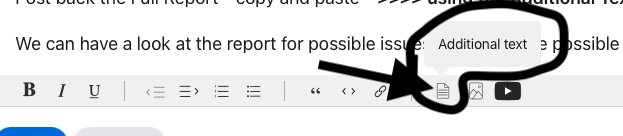
Post back the Full Report - copy and paste - >>>> using the Additional Text Icon ( 3rd Icon to last ) <<<<

Similar questions

41 replies

Jan 30, 2023 8:05 AM in response to Owl-53

P.Phillips, thank you indeed for your strong and useful support.

I already tested (without any success) 1 to 6 points with the Apple technical support by phone (and screen sharing) and sent to Apple a complete log using a special Apple software tool.

Now I am just waiting for an Apple report about that. Currently I do not need the Apple firewall because I always used Little Snitch so I'm in no harry about the fix.

As soon as I get useful information from Apple, I'll post it here.

Feb 12, 2023 8:04 AM in response to RobbiOne

I believe the problem here is that the firewall GUI does not have sudo write privileges to the ApplicationFirewall file since in Ventura you don't need to unlock the firewall to edit it as you do in OS 12.x . I fixed my problem by using the commands for socketfilterfw (located in /usr/libexec/ApplicationFilewall/socketfilterfw , man pages http://www.manpagez.com/man/8/socketfilterfw/ ) using

% /usr/libexc/ApplicationFirewall/socketfilterfw --listapps (to get the apps and paths listed in the firewall file)

% sudo /usr/libexec/ApplicationFirewall/socketfilterfw --unblockapp <path to app>

then rebooting system.

Mar 14, 2023 10:03 AM in response to dog782

It Just WORK !!! Thanks !

I restart the Mac with firewall GUI opened and didn't work. I then close it and did the command lines again with the "sudo" before and it worked ! Don't know which of two did the job.

Note that the directory is wrong, correct "libexc" with "libexEc"

Can also add, for less terminal skilled, to drag an drop the "socketfilterfw" instruction (use CMD+SHIFT+. to see hidden files and directories) in the terminal area to write the path, also do this with apps to block/unblock.

Apr 13, 2023 10:07 AM in response to etresoft

One flag was wrong, that I posted. I meant "--setblockall off" to be set "on" instead of "off".

Anyways, yea, I get what you are saying. My router does have it's own fw to deal with well-known stuff, but my idea is to "be safe" whatever that means anyways. There are a lot of exploits that could deal a bunch of damage anyways and always, like dns hijacking and that can't be dealt with using basic tools from end user perspective when oblivious to that. Since third party tools usually sell data, I don't feel comfortable using those either so what is left is to be as safe as possible and enable basic built in mechanism to mitigate whatever unnecessary traffic there is. So, the basic setup for personal use device for me would be just this. For any other purposes I use my linux device that is "not personalised" and I use a separate network for that.

Apr 15, 2023 10:17 AM in response to etresoft

> Don't bother with the firewall. That's just something Apple provides so that people don't go off looking for their own and download some scam app. But it's pointless.


Oh, thanks, point taken.


FWIW all these years I have always turned macOS internal Firewall and even its stealth mode ON (and wondered why on earth FW is OFF by default).


But after reading all this, I will leave it OFF in the future. Especially after my son told me he could could not connect to the Internet on an AFAIK privatish Wi-Fi before turning macOS 12 Firewall OFF.


So the built-in macOS Firewall is not really needed even if I happen to use some open public Wi-Fi, right?


But might want I turn it ON even if I happen to use some 3rd party network app??


https://www.howtogeek.com/205108/your-mac’s-firewall-is-off-by-default-do-you-need-to-enable-it/

This thread has been closed by the system or the community team. You may vote for any posts you find helpful, or search the Community for additional answers.

Ventura internal Firewall (v13.1)

Welcome to Apple Support Community
A forum where Apple customers help each other with their products. Get started with your Apple Account.

