Apple Watch Ultra Heart Rate During Workout

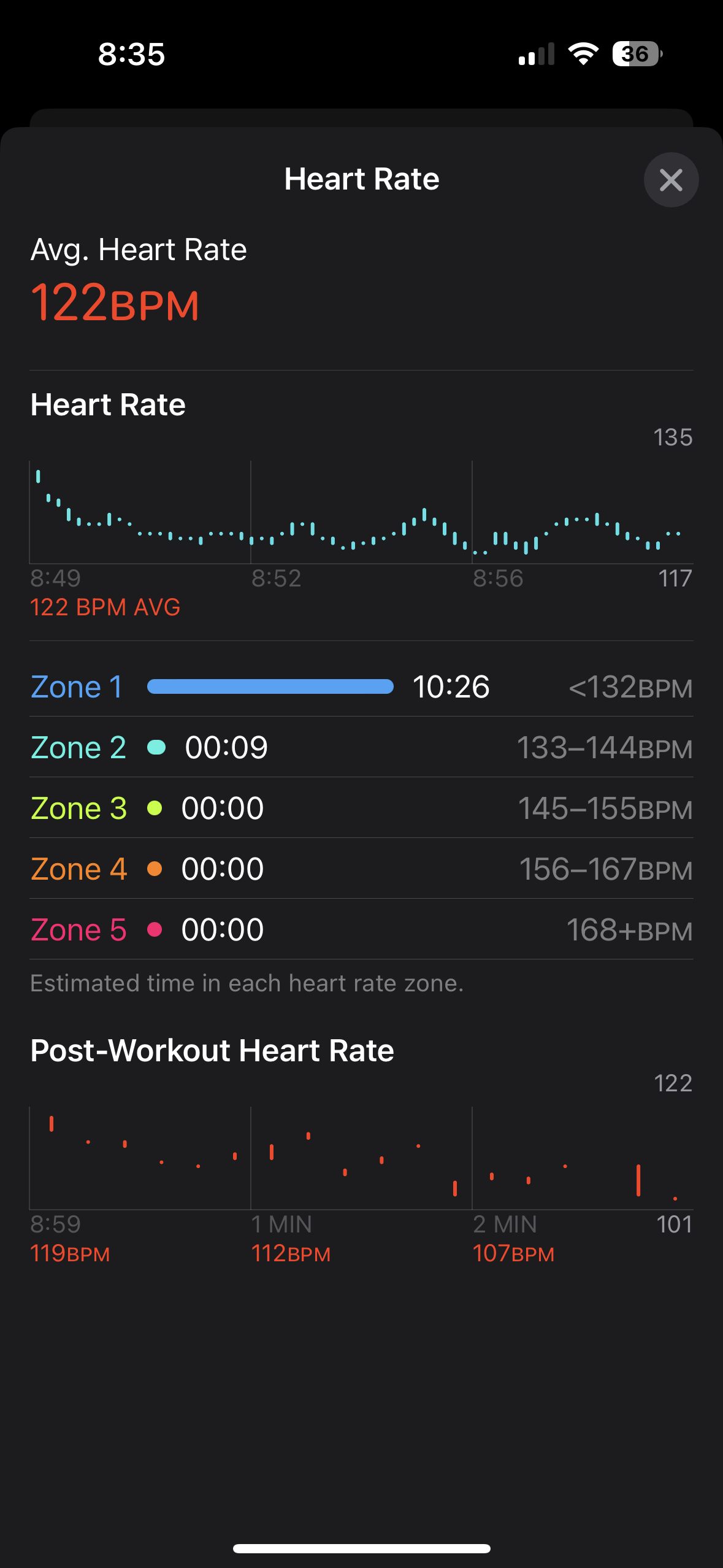
I’ve been having problems with my Apple Watch ultra. basically as seen in the photos I’ve attached, every workout I do starts with the Apple Watch reading my heart rate and then for the next 5-10 minutes it doesn’t read at all. I’ve looked everywhere and read different forums and tried every setting possibility out there but none of it seems to work because it looks like I’m the only one with this problem, I’ve tried loosing and tightening my strap but it doesn’t effect the process. I’ve came to conclusion that this is a bug in the workout app because the heart rate sensors work and as seen they read my heart rate through the other half of my workout.


if anyone else has this problem please let me know.

Apple Watch Ultra, watchOS 9

Posted on Dec 18, 2022 1:35 PM

Reply
Question marked as Top-ranking reply

Posted on Jan 10, 2023 8:03 AM

Hi everybody,

I know all of you are frustrated about the Apple Watch not being able to read your heart rate sometimes while working out, well after about two weeks of talking everyday with Apple support we have a conclusion and it’s a scientific one.


Apple’s heart rate sensors are one of the most advanced sensors in the world for a wrist watch and they read your heart rate using the veins on your wrist.

when you begin a run you’re cold which means your veins aren’t popped out yet which makes it difficult for the every wrist workout watch to indicate what your heart rate is. When being in a lower temperature area such as running outdoors it’s likely that in the couple first minutes of the workout your heart rate won’t be read because your body is still cold therefor your veins didn’t pop yet (this happens mostly in the winter and depends on where you live) I’ve talked with friends who own Garmin’s and Suunto’s and they’re experiencing the same problem too because of cold weather.


Please be advised that every person is different then the other and some people take longer time to warm up either because they’re more in shape and running a couple minutes won’t warm them up or that’s just how your body is.


What I can advise you before you contact Apple about a problem like this is to make a run indoors where it’s hotter then your outside temperature and run on a treadmill and you’ll be able to see that the Watch reads your heart rate easily, just make sure it’s strapped on as Apple advised while working out.

Similar questions

274 replies

Jan 5, 2024 9:03 AM in response to OmriShpigel

I have experienced tha same problem with the Ultra 1. I even had apple send a replacement but it was even worse during my wokout for no particular reason the heart rate monitor "glitches" out and this affects my activity ring and my exercise minutes. Apple know's this is a problem but seem totally unconcerned about correcting it. Typical Apple response. I bought an Ultra 2 hoping that it would be corrected with the newer edition that was a waste of money because the Ultra 2 is just as bad. It is affecting my workouts in significant way. I have tried all the fixes checked all the settings move it up my arm etc. The only way is to stop and wait 20-30 seconds form the hear rate monitor to "catch up" and by that time you heart rate ha s dropped significantly. My last workout I had to workout 65 minutes just to get 30 minutes of exercise time recorded on my watch and complete my activity ring. The heart rate going in and out the whole time. If the heart rate monitor is not recording you are not getting calories burned or exercise minutes. So that's just the way it is. Is it me or is Apple slipping? I could get a replacement but would that do any good? i doubt it.

My last solution before I give up sell my watch and buy a Garmin is I have bought a Coros heart rate monitor it has not been deliver yet. I will bluetooth with my watch but will it affect my activity ring or my exercise minutes on the watch? Does anybody know the answer to this question? If you do please let me know. I'd greatly appreciate it. Thank you

Jan 5, 2024 9:12 AM in response to OmriShpigel

I have experienced tha same problem with the Ultra 1. I even had apple send a replacement but it was even worse during my wokout for no particular reason the heart rate monitor "glitches" out and this affects my activity ring and my exercise minutes. Apple know's this is a problem but seem totally unconcerned about correcting it. Typical Apple response. I bought an Ultra 2 hoping that it would be corrected with the newer edition that was a waste of money because the Ultra 2 is just as bad. It is affecting my workouts in significant way. I have tried all the fixes checked all the settings move it up my arm etc. The only way is to stop and wait 20-30 seconds form the hear rate monitor to "catch up" and by that time you heart rate has dropped significantly. My last workout I had to workout 65 minutes just to get 30 minutes of exercise time recorded on my watch and complete my activity ring. The heart rate going in and out the whole time. If the heart rate monitor is not recording you are not getting calories burned or exercise minutes. So that's just the way it is. Is it me or is Apple slipping? They have to know it's a probelm but they are offreing no solutions. I paid a premium price for their premium watch TWICE and it is not a premium product. I could get a replacement but would that do any good? I doubt it.

My last solution before I give up and sell my watch and buy a Garmin is I have bought a Coros heart rate monitor it has not been delivered yet. I will bluetooth with my watch but will it affect my activity ring or my exercise minutes on the watch? Does anybody know the answer to this question? If you do please let me know. I'd greatly appreciate it. Thank you

Mar 19, 2024 9:20 PM in response to OmriShpigel

This is the exact same problem for me however I am using the first gen of Ulta Watch. Highly frustrating to be on a run and doing hr zone training only to have the heart rate monitor, for lack of better terms, freeze. It does just like yours. I will have it working. Then it will freeze for 4 to 7 min and then start up and for maybe another 10 min. Only to repeat. Usually for the initial freeze, I will switch apps from workout to heart rate app. That sometimes seems to work to wake it up. But not always.


really hope Apple pays attention to this. Unfortunately I am out of warranty but reading these similar issues gives me

confidence it’s not us or our watches. I believe it’s a new bug from a recent update. Why? Cause I never had this issue before until about a month ago. Currently only 10.4. Just updated it hoping it would fix the issue. But nope it’s still happening.

Feb 26, 2023 9:05 AM in response to DazSpruce

You have just described the exact same issues I’m facing with my Apple Watch Ultra. After being extremely persistent with the store I had it replaced for a new unit after using it for 15 days. Well, the new unit is doing exactly the exact same thing. I start running HR goes up to 160, 170, 180 and it gets stuck there for a long time. Probably the entire run if I don’t remove the watch and put it back on again. I have a Garmin Fenix and a Samsung Galaxy and they are sooo much accurate. It is extremely annoying to be in the middle of a race and not being concentrated and your HR ALL OVER THE PLACE.


There is something going on in these watches for sure, I just hope that Apple does something about it. This is ridiculous for the most expensive Watch in the market.

Mar 24, 2023 3:00 AM in response to cristiand9

Hi cristiand9,


cristiand9 wrote:

Having complained about my ultra for about one month after buying it regarding the failure of reading my heart rate during my running exercises I somehow managed to keep the sensor running by doing these two steps: first one I fastened firmly the watch band on my wrist and second , before starting to run, pressed the side button and waited not only for the gps location but also for the heart rate to be steady ( heart picture to be fully red)! I don’t know if this help others but it worked for me! For enabling this feature you have to go to settings -> workout and then enable precision start option!


I have tried it today and I first thought that it solved it. It unfortunately didn't.


Today it was sunny and 10°C. When I started the workout manually, heart rate was at 95 and slowly went up to 125. So far so good.

But then after maybe 200 meters, same thing happened: Heart rate field grayed out and not showing any reading. Another 500 meters further heart rate showed again and continued to show.


However I have now lost trust whether the heart rate is ever recorded correctly.


And as this is the only thing the Apple Watch can do, which an iPhone can't – measure heart rate – the Ultra is just not fit for the job.


I really hope that this is "just" a software bug. I am afraid it is a hardware limitation of the sensor of the Ultra, which would mean Apple can never fix it. And yes, I am disappointed.

Apr 1, 2023 4:01 PM in response to OmriShpigel

Same issues here. I got an Ultra back in mid March. I spent two weeks running totally frustrated with the HR missing more than half of my run. As soon heart beats go above 135 BPM (it seems to be my magic number) the watch gets lost and just recovers readings almost always 10+ minutes later (but still on and off). After looking around and trying tighter, looser, upper arm, inside of wrist, bla bla bla…same problems. For sanity check, I went for a run with the Ultra on my left arm and my wife’s 8 Series on my right arm. For my surprise the Ultra lost more than half as usual, 8 Series didn’t miss a beat.

I went back to Apple Store and replaced my Ultra thinking I had a defective unit. However, new unit and same old problems.

Anyway, I’m more inclined to believe it’s poor hardware/software interface. It’d be weird Apple having a different software running on 8 Series and Ultra. They might share the same software, but the weight/size/shape of the Ultra may requires a different solution (maybe even hardware…not sure if it’s the same as 8 Series).


Below Heart Readings from my last 20 minutes run and a fast pace walk at the end. Difference is abismal. Running it got just a bit more than 4 minutes readings.



I loved the Ultra: concept, design, features; and I was so looking forward to go diving with it. But there’s no point of having an outdoor smartwatch that can’t monitor heart beats.

Now it’s time to return the Ultra again and decide if I move to a 8 Series or other brands, because it’s pretty clear Apple is not concerned at all on fixing this problem. Apple isn’t the same anymore and I’m on the ecosystem since 2009!


May 9, 2023 9:58 AM in response to Kakinou

I have tried all these steps too, for me it didn't make a bit

difference.


Plus wearing the Ultra on the insight I found annoying.


Kakinou wrote:

STEP 1 : Enable AFib History
On your iPhone, open the Health app.
Tap Browse, then tap Heart.
Tap AFib History.
Tap Set Up, then tap Get Started.
Enter your Date of Birth.
Select Yes to indicate that you have been diagnosed with AFib by a doctor, then tap Continue.
Tap Continue to learn more about AFib History, the results you may see, and life factors.
Tap Done.


Careful, I think once you enabled this there is no easy way back in case you want to get rid of AFib again. So you will get notifications that your HR variance hasn't changed the last week (assuming that you don't have HR variance) and you loose the warnings. I had to reset and unpair the watch to get rid of the feature.

May 29, 2023 5:53 PM in response to OmriShpigel

I have tried about 10 different watch bands, Apple and 3rd parties. From lose to extremely tight there is no difference. It is definitely not related to the tightness of the band. I have noticed watchOS 9.5 somewhat improved it, but still totally unreliable (and wrong readings, jumping to 150 right after started running or stays at 120 during sprints).

I ordered a COROS Apex 2 Pro and had none of those issues. I did not particularly like the design, I am going to try a Garmin Fenix 7 and will probably stick with it.

My only hope was waiting for watchOS10, but i do not want to wait until October.


The only thing that really makes me struggle to get rid of my Ultra is the „integration“ in the Apple ecosystem and Siri. Also I have to admit the design really beats all other watches.

But technically and from software point of view, its just not really good and not what I expect from a company such as Apple.


I really do not understand why Apple is not addressing or at least acknowledging this issue!

WatchOS9.5 had some fancy new faces as key features nothing mentioned about any bugfixes. That‘s what apple is putting focus on. Great job.

Aug 26, 2023 9:02 AM in response to Kakinou

I have tried everything I’ve read in a nutshell explain what I can do.? The only way I have been able to keep my heart rate working through an entire workout is to slowly steadily increase the intensity unfortunately not all my workouts are like that typically after my warm up when I try to increase the intensity rapidly is when it glitches out . I have to stop for 10 or 15 + seconds and by then the heart rate has dropped . It can go through all levels but only if I slowly increase the intensity but even then sometimes it glitches out.

Sep 24, 2023 4:56 AM in response to AleksFadini

I have had several Apple Watches. Most recently the series 6. They were all essentially flawless with heart rate recording. I just bought the Ultra 2. I wear it in the exact same position as my 6. On my first workout (rowing), it skipped recording large sections of my workout. Did fine while I was weight lifting afterward. Seems to be an Ultra issue. Very disappointing from an expensive product.

This thread has been closed by the system or the community team. You may vote for any posts you find helpful, or search the Community for additional answers.

Apple Watch Ultra Heart Rate During Workout

Welcome to Apple Support Community
A forum where Apple customers help each other with their products. Get started with your Apple Account.
