Apple watch text message notifications
I can feel and hear notifications for all of my emails but NOT for any of my text messages. How do I increase the vibration and sound for messages?
I can feel and hear notifications for all of my emails but NOT for any of my text messages. How do I increase the vibration and sound for messages?
Thanks for reaching out inforthewinter,
It sounds like you're not receiving notifications for messages on your Apple Watch. We can help.
A great place to start is with this guide on how to Read messages on Apple Watch:
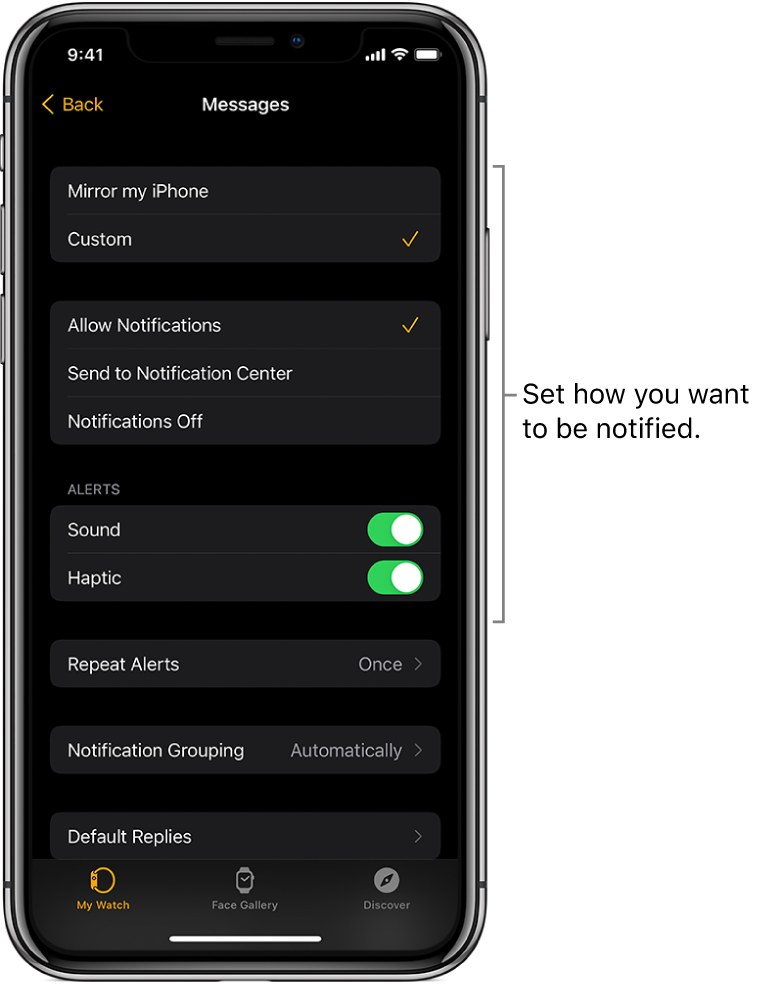
Decide how to be notified
1. Open the Apple Watch app on your iPhone.
2. Tap My Watch, then tap Messages.
3. Tap Custom to set options for how you want to be notified when you receive a message.
You won’t receive a notification if you’re using a Focus that doesn’t allow Messages notifications.
Hope that helps.
Take care.
Apple watch text message notifications