And what about the empty Home in Big Sur after the upgrade to IOS 16.2?

Is there a solution for the users with macOS Big Sur? I can NOT see any of the devices that I can see on iPad Pro and iPhone XS, even after removing 'My home'!

iMac 27″, macOS 11.7

Posted on Dec 23, 2022 5:50 AM

Reply

Similar questions

5 replies

Dec 27, 2022 8:09 AM in response to herrewa

Hi herrewa,


Thanks for clarifying that for us.


Since the Home app is working as expected on your iOS devices, let's make sure that you're signed into the same Apple ID on your Mac as you are on those other devices.


You can check if you're signed into the same account by following these steps:


Find where you're signed in
Follow these steps to find the devices that you're currently signed in to with your Apple ID. 
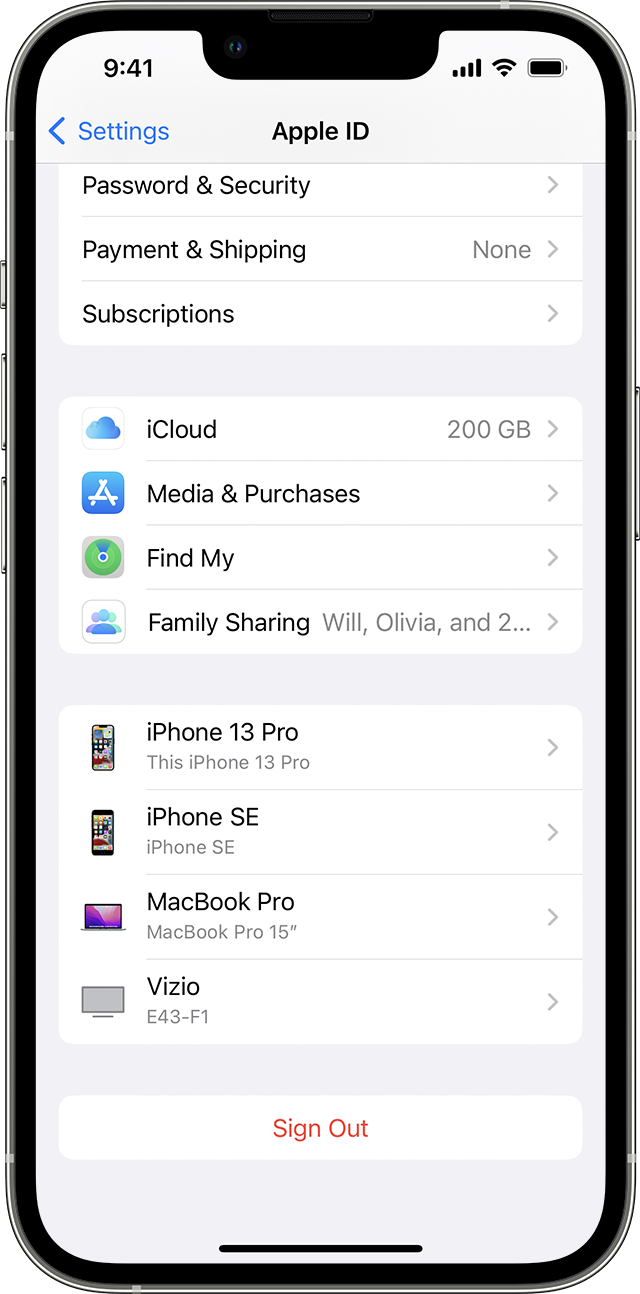
Find what devices you're signed in to with your Apple ID on iPhone 
Use your iPhone, iPad, iPod touch, or Apple Watch to find where you're signed in
1. Tap Settings > [your name], then scroll down. 
2. Tap any device name to view that device's information, such as the device model, serial number, OS version, and whether it's a trusted device that can be used to receive Apple ID verification codes.
The information might vary depending on the device type. You might need to answer your security questions to view device details. 

Use your Mac to find where you're signed in
1. Choose Apple menu  > System Settings. In macOS Monterey or earlier, choose Apple menu  > System Preferences.
2. Click your name. In macOS Montery or earlier, click Apple ID.
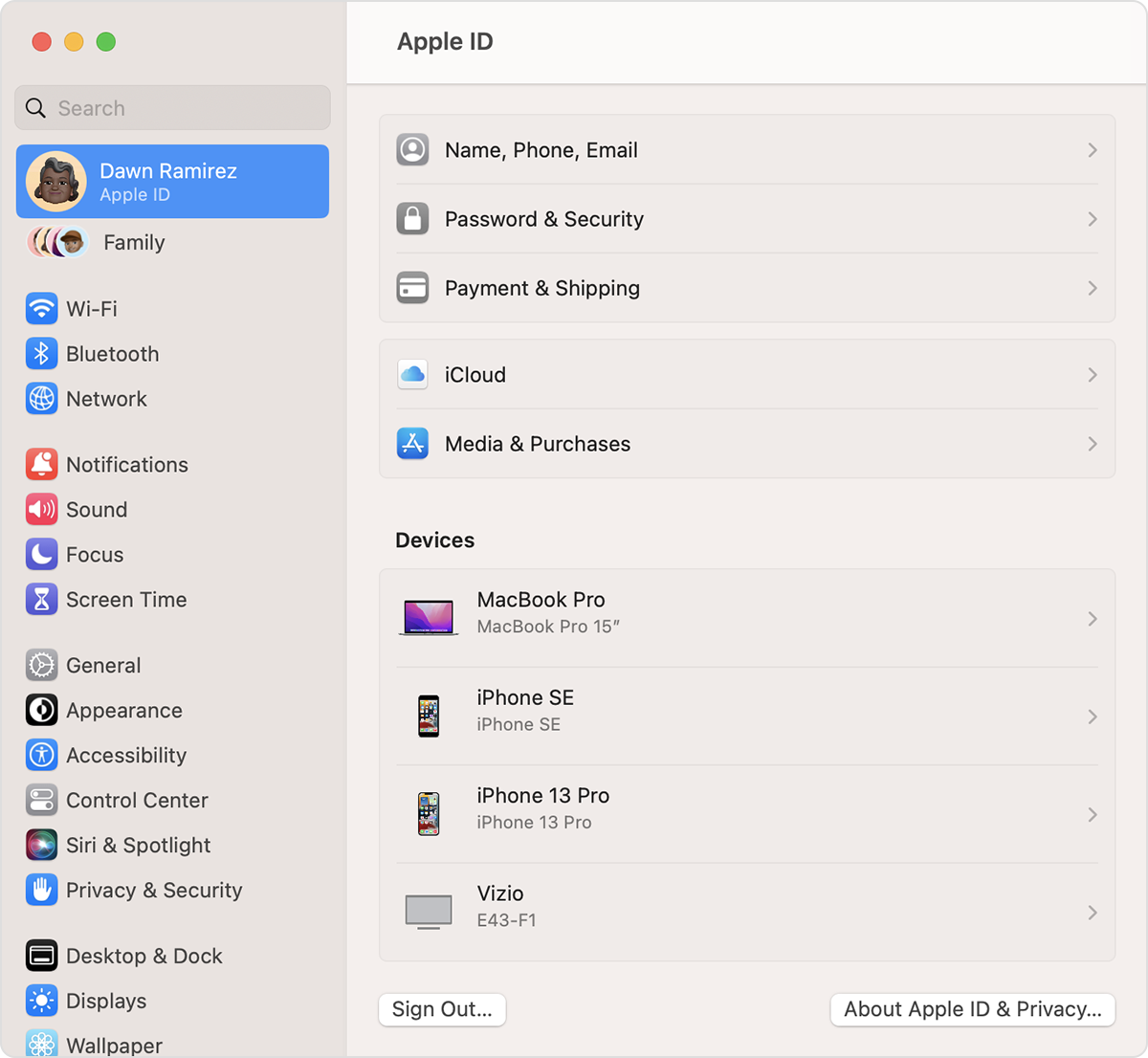
On Mac, find devices that you're signed in to with your Apple ID in System Settings

3. Click any device name to view that device's information, such as the device model, serial number, and OS version. The information might vary depending on the device type. You might need to answer your security questions to view device details. 


Check your Apple ID device list to find where you're signed in


If you're signed into the same Apple ID already, it may be best to contact Apple Support to have them look into this further.


Have a great day!



Dec 27, 2022 6:31 AM in response to herrewa

Got it herrewa,


This may be expected, particularly if you are trying to add new items. Per Add an accessory to the Home app - Apple Support, "To add an accessory to the Home app, use your iPhone or iPad. You can't add accessories to the Home app on Mac."


When opening the Home app on your Mac, what actions were you trying to accomplish? Are you trying to manage and use existing accessories or are you trying to add them?


Cheers

Dec 26, 2022 10:51 AM in response to herrewa

Hey there herrewa,


We want to make sure we understand so we can help! Are you trying to view the accessories within your Home app on your Mac? If so, do you run into any trouble when controlling them?


You might be able to find steps to help with this here: Control Home accessories on Mac


Should you need additional help, please reply with more specific information along with the answers to our questions below:


  • What exactly are you trying to view on your Mac that is seen on your iPad and iPhone? Which app are you using?
  • What steps are you taking and are you receiving any errors along the way? If so, what do you see?
  • When you say you removed "My home", what exact steps did you take?


The most specific info you provide, the better the community can assist.


Take care!

Dec 27, 2022 3:52 AM in response to hc1111

There are no accessories in the Home App on macOS Big Sur; the Home Apps on iHpne Xs and iPad Pro are full operational and without issues!

I deleted 'My home' and then it suggests a new 'My home' and there it stops on my iMac (iMac (Retina 5K, 27-inch, Late 2014).

  • I open 'Woning' (is dutch for 'My home')
  • No errors
  • I removed 'My home' on my iMac

:-)


This thread has been closed by the system or the community team. You may vote for any posts you find helpful, or search the Community for additional answers.

And what about the empty Home in Big Sur after the upgrade to IOS 16.2?

Welcome to Apple Support Community
A forum where Apple customers help each other with their products. Get started with your Apple Account.

